98
2. Camera Overview
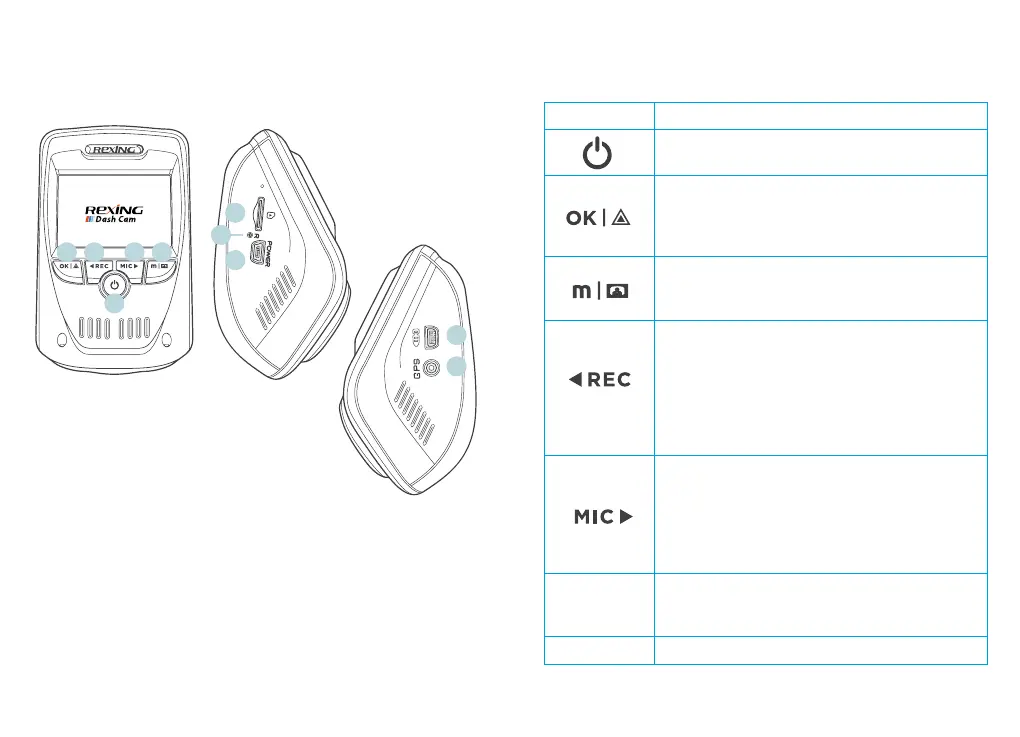
Device Layout
1. OK (Conrm) Button / Emergency Lock Button
2. Up Navigation Button / Record Button
3. Power Button / Screen Toggle Button
4. Down Navigation Button / Mic Button
5. Menu Button / Mode Button
6. Micro SD Card Slot
7. Reset Button
8. USB Charging Port
9. Rear Camera Port
10. GPS Logger Port (not used by V1P Pro)
2. 4. 5.
3.
1.
9.
10.
6.
8.
7.
Buttons
Button Function
Press: Toggle display on or o
Hold: Turn the device on or o manually
Menus: Conrm a selection
Video Mode: Manually lock current recording
Photo Mode: Take photo
Playback Mode: Start / stop playback
Press: Enter menu, cycle through menus or
exit current menu
Hold: Change mode
Menus: Move selection up
Video Mode: Start / stop recording
Hold (Video or Photo Mode): Enable Wi-Fi
mode
Playback Mode: Decrease or reverse
playback speed / Cycle left through
recordings
Menus: Move selection down
Video Mode: Toggle audio recording
Hold (Video or Photo Mode): Change front /
rear camera views
Playback Mode: Increase playback speed /
Cycle right through recordings
RESET
Press and hold for 4 seconds to reset the
device in the event that it operates erratically,
hangs up, or freezes
Indicator Flashing Red – Recording



 To Next Page