1312
Step 1: Attach the Front Camera to the
Window Mount
Make sure that you mount the front camera in a safe,
appropriate location where it won’t obstruct the driver’s view.
Clean your
windshield before applying the mount. Wait at least
20 minutes after applying the mount to the windshield before
attaching the camera.
Step 2: Inserting the Memory Card
The V1P Pro accepts Micro SD memory cards (class 10 or higher)
with a maximum capacity of 256GB.
Depending on the memory card manufacturer and type,
some cards may not be compatible with your device.
Using an incompatible card may damage the device or
the memory card or corrupt the data stored on it.
We highly recommend using Micro SD cards that are
specifically designated for use with dash cams. You can find
our recommendations on our website:
www.rexingusa.com/memory-card/.
Note: Before inserting or removing a memory card, first ensure
you’ve powered down the device.
3. Getting Started
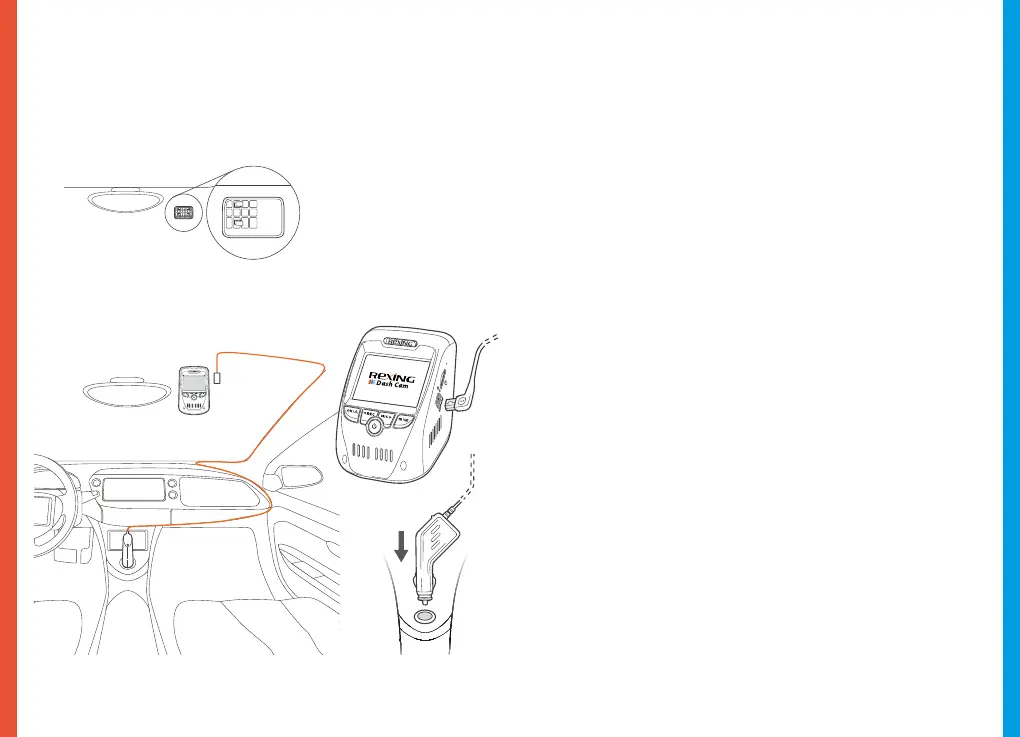
Installation
Video guide can be found at video.rexingusa.com.
Orient the
mount as shown
Route power cable
to the Dash Cam
Plug Mini USB
Connector to the
Dash Cam
Plug charger into
power outlet or
cigarette lighter



 To Next Page