Hardware Installation and Reference Guide Installation
11 techsupport@ireyee.com
Do not place the router in a place where it will be exposed to moisture or excessive heat.
Keep the router away from devices with strong electromagnetic interference, such as Bluetooth devices,
microwave ovens, or cordless phones.
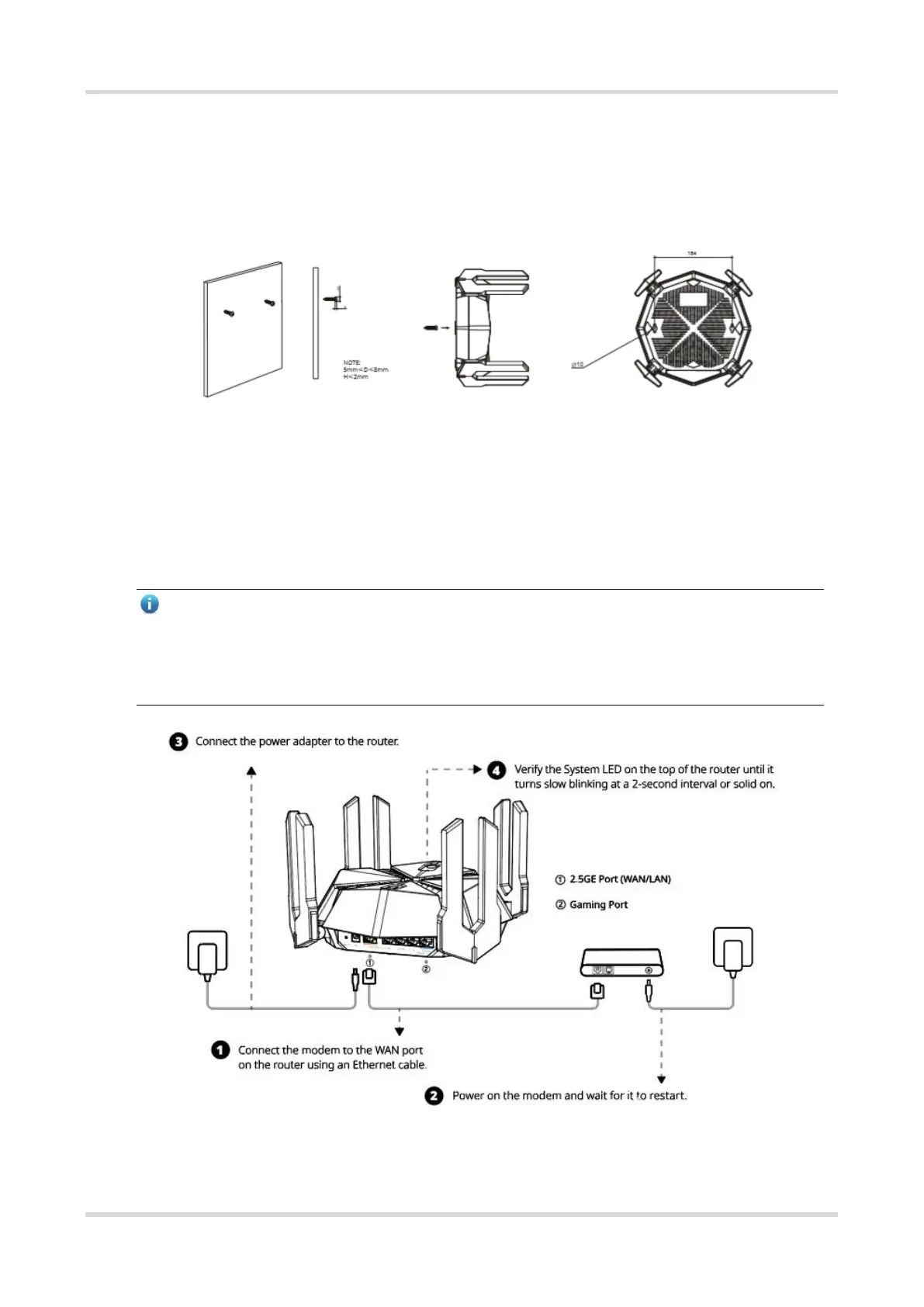
Generally, the router is placed on a horizontal surface, such as on a shelf or desktop. The router also can
be mounted on the wall as shown in the following figure.
The screw head should have a diameter ranging from 5mm to 8 mm (5 mm ≤ D ≤ 8 mm), with a maximum height
of 3 mm. The distance between two screws should measure precisely 111.64 mm. The screw should have a
minimum length of 20 mm, with a visible portion above the wall measuring at least 4.5 mm in order to withstand
the weight of the router.
3.3.2 Connecting Cables
Note
If you use a modem for Internet access, power off your modem and remove the backup battery if it has one.
If you do not have a modem, you can connect the Ethernet port in the wall directly to the WAN port of your
router. Once connected, proceed to follow steps 3 and 4.



 To Next Page