Form CP-MAPSIII-D21, Doc No 303070, Page 20
5.2 Setting the Unit for Operation via the Digital Input
Closure or Time Schedule - Option D21
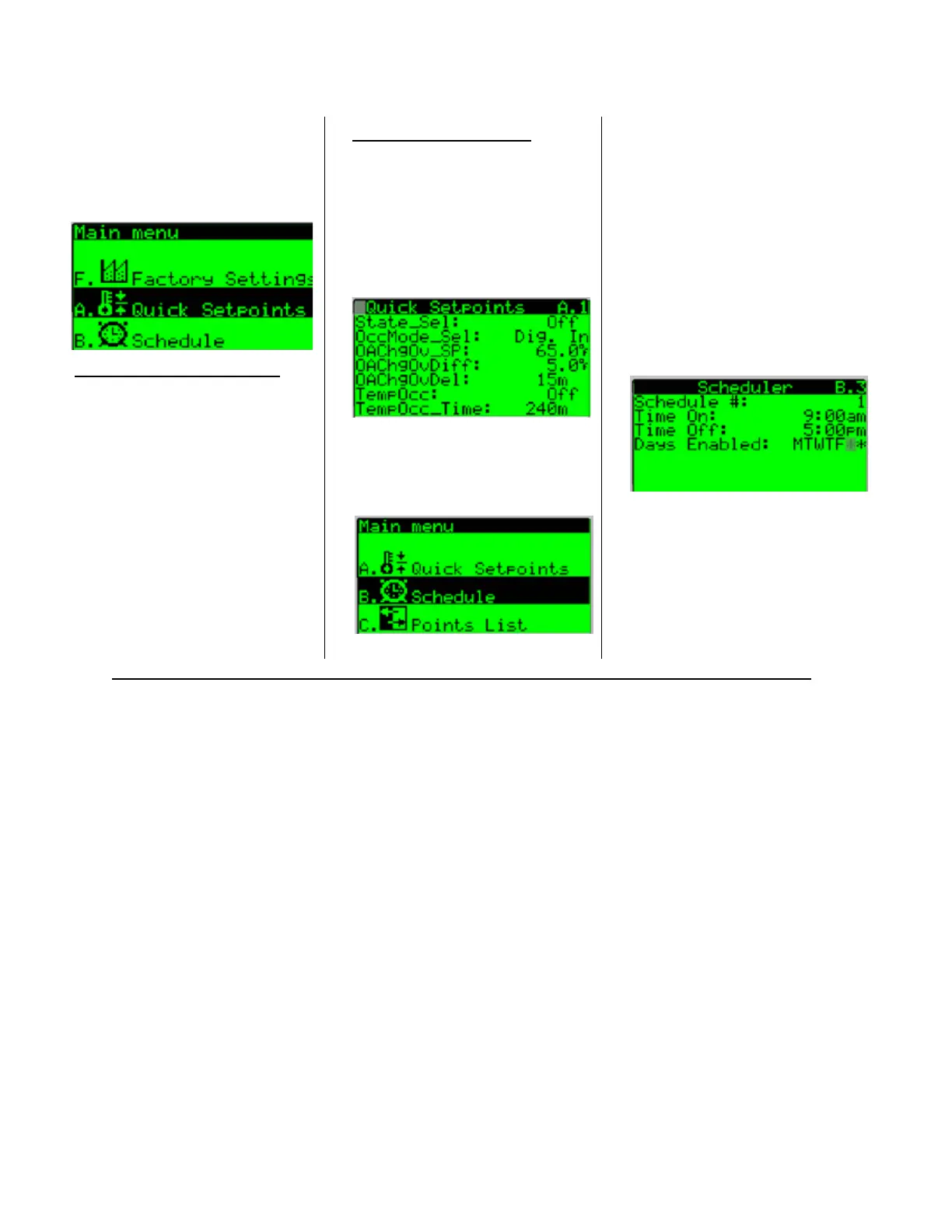
From the Main Menu, press the
up or down arrow keys to navigate
to the A. Quick Setpoints
submenu and press the enter key
to select.
DIGITAL INPUT SELECTION -
From Screen A.1, press the enter
key to access the State_Sel:
eldandsetthevaluetoeither
the Heat, Cool, or Auto state.
Press the enter key to select the
OccMode_Sel:eldandusethe
up or down arrow key to set the
value to Dig. In.
The unit ships with a jumper wired
on the occupied digital input.
The unit will remain on until the
occupied jumper is removed and
replacedwithanexternaleld
supplied contact.
Press the escape to return to
the main menu and select the B.
Schedule sub menu. Press the
enter key to enter the B. Schedule
sub menu.
SCHEDULE SELECTION - From
Screen A.1, press the enter key
to access the State_Sel:eldand
set the value to either the Heat,
Cool, or Auto state. Press the
enter key to select the OccMode_
Sel:eldandusetheupordown
arrow key to set the value to
Schedule.
Press the down arrow to advance
to screen B.3
From Screen B.3 press the enter
Keytoaccessthemodiable
Scheduleeldsandsetthe
desired Time
From Screen B.3 press the enter
Keytoaccessthemodiable
Scheduleeldsandsetthe
desired Time ON, Time OFF, and
Days Enabled values. Press the
program Key to return to the main
menu.
5.3 Unit Test Mode
The test mode is accessed via the service menu (from the unit mounted display) and
can only be entered when the unit is in the off state. Once the test mode is enabled,
it remains active for a 2 hour time period adjustable from 0-4 hours. When the timer
expires or test mode is disabled, the unit will return to the off state.
In the test mode, all sequences of operation stop. Upon the test mode being enabled
the following devices shall be automatically commanded:
1. The Unit Damper Position Y1 shall be automatically be commanded to = 100%.
2. The Unit Supply Fan NO1 will be automatically commanded ON.
3. The Unit Supply Fan Speed Y2 will be automatically commanded to the supply fan
maximum Speed% setpoint value.
OncesupplyairowisprovenviaSupplyFanStatusID1,theusercanmanually
select all of the remaining controller outputs to be commanded ON and OFF or
modulated between 0-100%.
5.0 Start Up
(Cont’d)
NOTE: Any reference to
supply fan speed control
only applies if the unit is
conguredwithOption
VFD1, VFD2 or VFD3.


 To Next Page