Form CP-MAPSIII-D21, Doc No 303070, Page 38
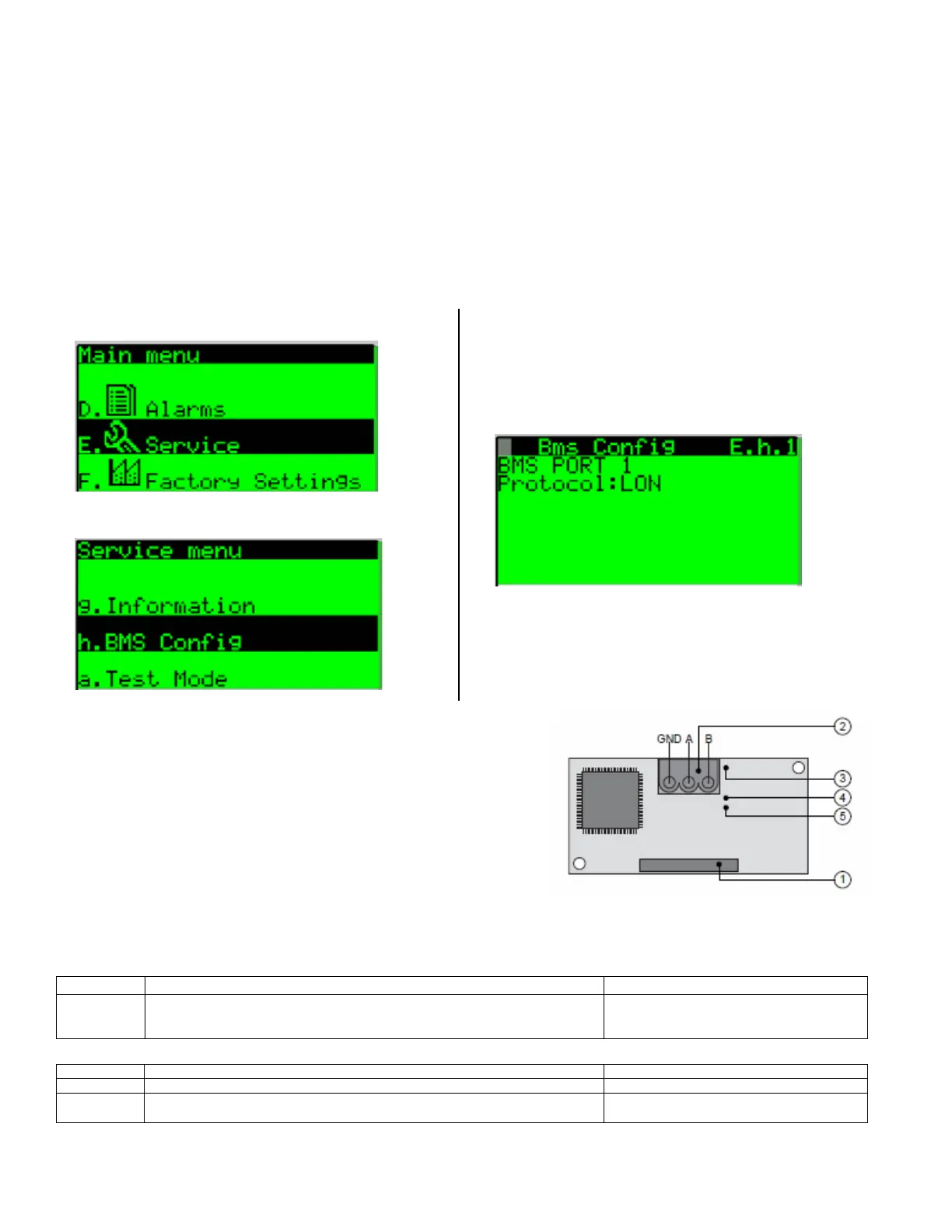
1. From the main menu navigate to E. Service and
press the enter key to access the service menu.
2. Fromtheservicemenunavigatetotheh.BMSCong
submenu and press the enter key to select.
3. FromtheBMSCongscreenE.h.1verifythatthe
Protocol:eldissettoLon.OnaBAScardretrot
theProtocol:eldmayneedtobeset.Tochangethe
protocolpresstheenterkeyuntilthecursorisashing
ontheProtocol:eldandusetheupordownkeyto
scroll through the available choices and select Lon
thenpressentertoconrmtheprotocolchange.
When complete press the escape key to return to the
main menu.
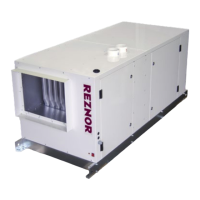
The Lonworks communication card
has the following components.
1. Serial port connection
2. Terminal block for LonWorks
®
network (GND, A, B)
3. Service pin
4. Service green LED
5. Anomaly red LED
To activate the service pin, simply short-circuit the two pins for an instant using the tip of a screwdriver or similar tool.
TheactivationisconrmedbythelightingoftheserviceLED.
The service LED has several function listed below.
LED Light Description Troubleshooting
Green
1. Signals the status of the mode, as per the LonWorks protocol;
2. Remains ON during the activation of the service pin;
3. Remains ON for a second when receiving a WINK command from the network
The anomaly LED indicates the status of communication between the card and the controller.
LED Light Description Troubleshooting
Off Communication with controller is established and working.
Red Communication is not established and no data is passing to the card.
1.Conrmcardisrmlypluggedin.
2.ConrmBMSProtocolissettoLON.
8.2 LonWorks
®
(Option BHB7)
Communication
LonWorks
®
is an open protocol that was originally developed by Echelon Corpora-
tion. It is now maintained by Echelon in collaboration with members of the LonMark
®
Interoperability Association. It requires the use of Echelon’s Neuron microprocessor to
encode and decode the LonWorks
®
packets.
The LonWorks
®
protocol is based on the concept of using standardized functional pro-
lestocontrolsimilarpiecesofequipment.TheLonWorks
®
(Option BHB7) communi-
cation allows access to selected unit function parameters. The network is considered
open communication, whereas any device on the network has the capability to receive
input from any other controller on the network. In all MAPS Series units included on
a LonWorks
®
network,theunitprotocolcongurationparametersmustbesetbefore
communication can be established with other devices.
Follow the procedure below to set the BMS protocol to LonWorks
®
.


 To Next Page