RF Explorer User Manual page 16
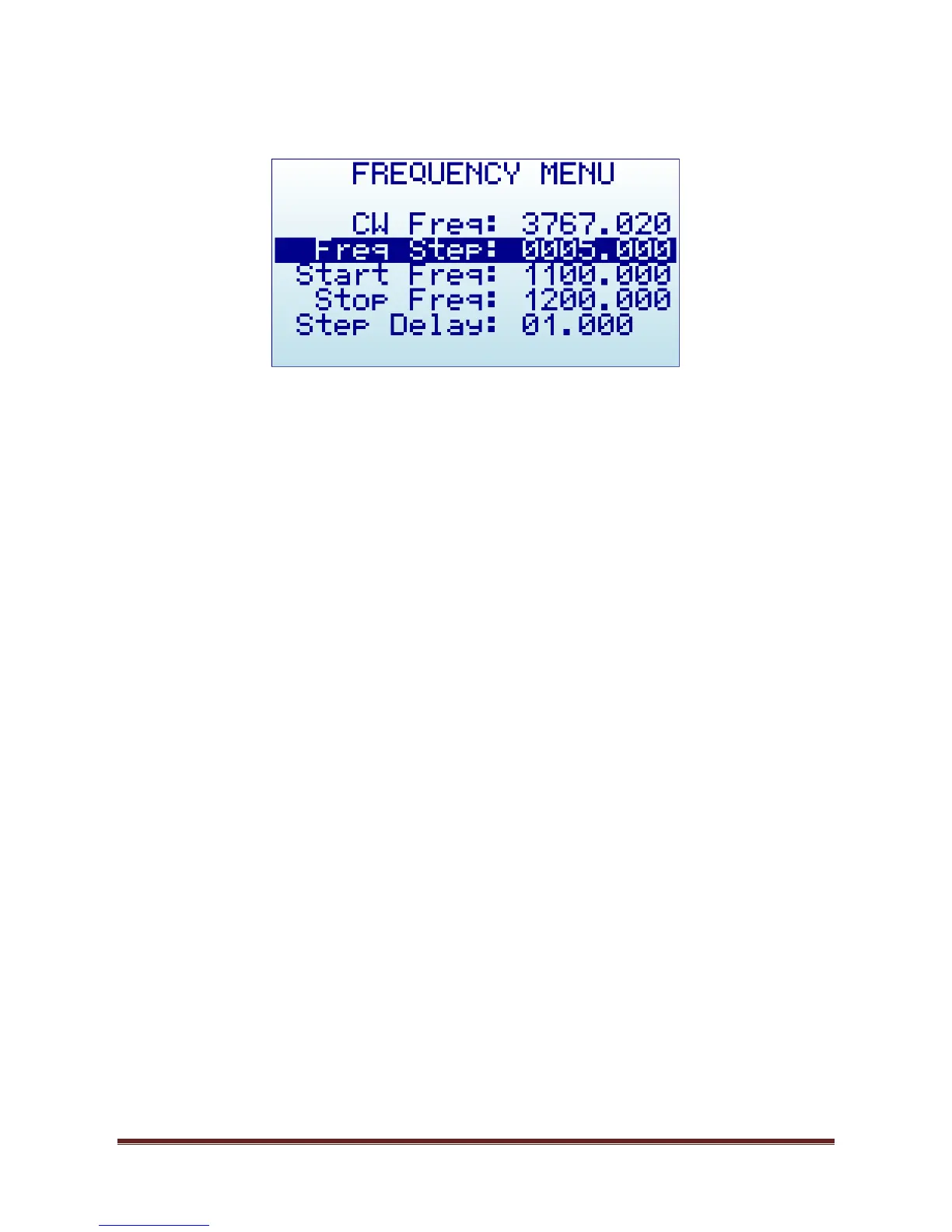
Frequency Menu
CW Freq: CW frequency selected for transmission in MHZ
Freq Step: Frequency step in MHZ used in Frequency Sweep mode and when using LEFT-RIGHT
button increments in CW mode.
Start Freq: Lower frequency in MHZ used in Frequency Sweep mode
Stop Freq: Higher frequency in MHZ used in Frequency Sweep mode
Step Delay: Selected step delay for Amplitude / Frequency Sweep in seconds (with millisecond
resolution)
To navigate through the menu, just use [Up] and [Down] keys to go to the option you want, then click on
[Enter] to edit that option, [Left] or [Right] to go to the digit you want to change, and [Enter] to confirm or
[Return] to cancel.
In above example screen:
CW frequency is 3,767.020 MHz
Frequency sweep will run from 1,100.000 MHz to 1,200.000 MHz with a 5 MHz step and 1 second
delay


 To Next Page