13
Operating and installation instructions RF-KIT Power Amplifier RF2K-S
5.2.4 LAN/WiFi/VNC
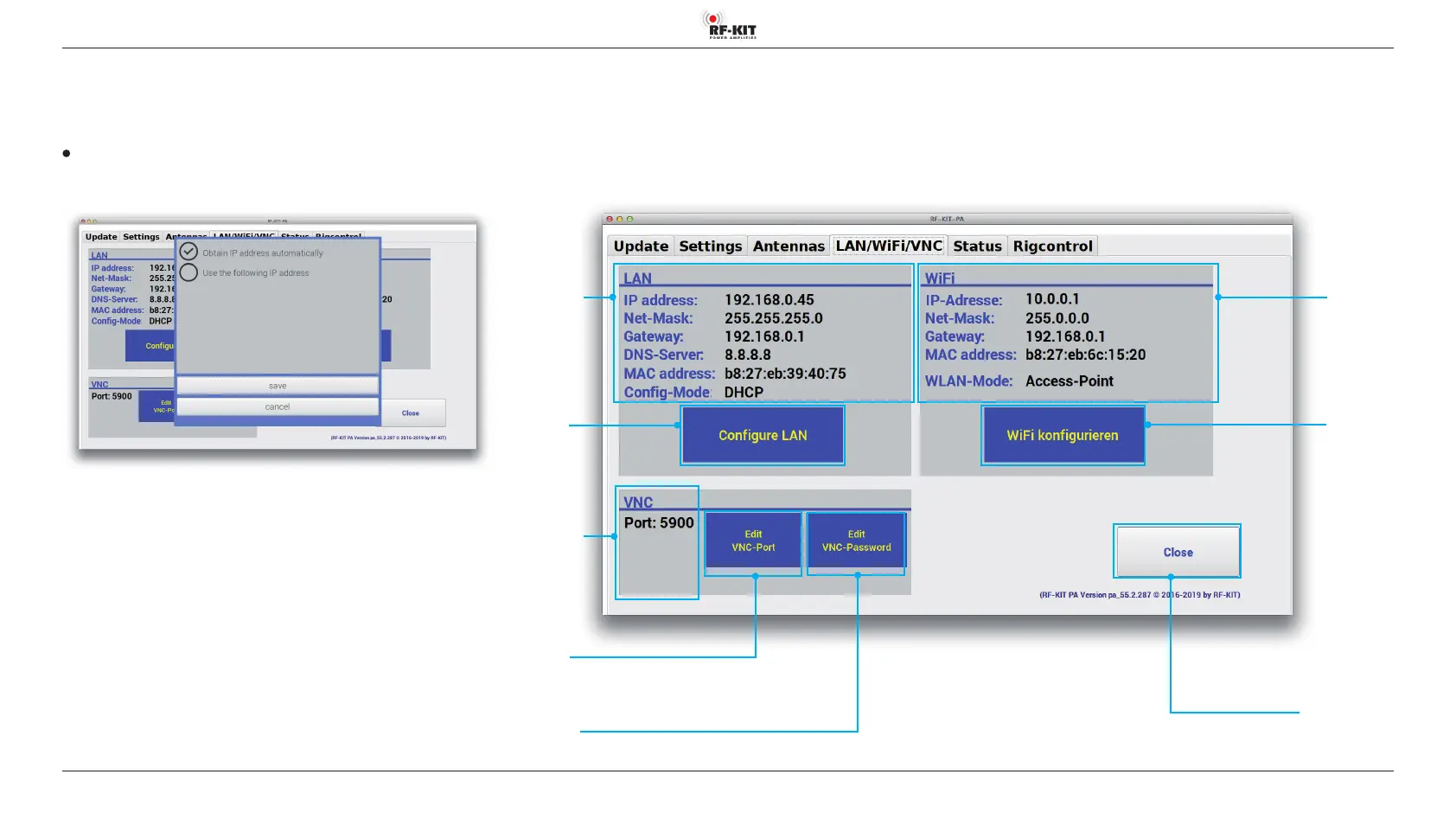
All of the necessary settings for remote operation of the PA are made here.
A network connection is possible via LAN / WiFi / VNC.
Connection by wire (LAN)
To congure LAN connection:
► Touch switching area Congure LAN. The following screen appears:
If you want the PA to be assigned automatically with an IP address:
► Place a check mark by touching the circle next to „Obtain IP address
automatically“
► Touch save to store and cancel to cancel.
If the device is to be assigned a fixed IP address:
► Place a check mark by touching the circle next to „Use the following IP
address“.
The input mask for a fixed IP address will be displayed:
Switching
area
Congure LAN
Switching area Close
Touching this switching area closes the user menu;
subsequently the main screen will be displayed
Switching
area
Edit VNC-Port
Indication area
LAN
Indication area
VNC
Indication area
WiFi
Switching area
WiFi kongurieren
Switching area
Edit VNC-Password
►



 To Next Page