mini-pro Quick Start
When setting PTZ, use the signal key ①②③④ to select the corresponding PTZ camera
signal to preview.
On the PTZ menu interface , when the PTZ function is enabled, the rotation angle of the PTZ
can be adjusted by the joystick, and the focal length adjusted by the Up/Down keys. Pushing signal
keys can switch the signal source between different PTZ cameras.
Record
The mini-pro supports recording streaming media content to an external SSD or U disk through
the USB2.0 interface. The SSD storage can reach up to 2T, and the U-disk can support up to 64G. The
supported formats include exFAT and FAT32. The supported SSD can reach up to 2T and U-disk 64G
and recording format is in exFAT or FAT32.
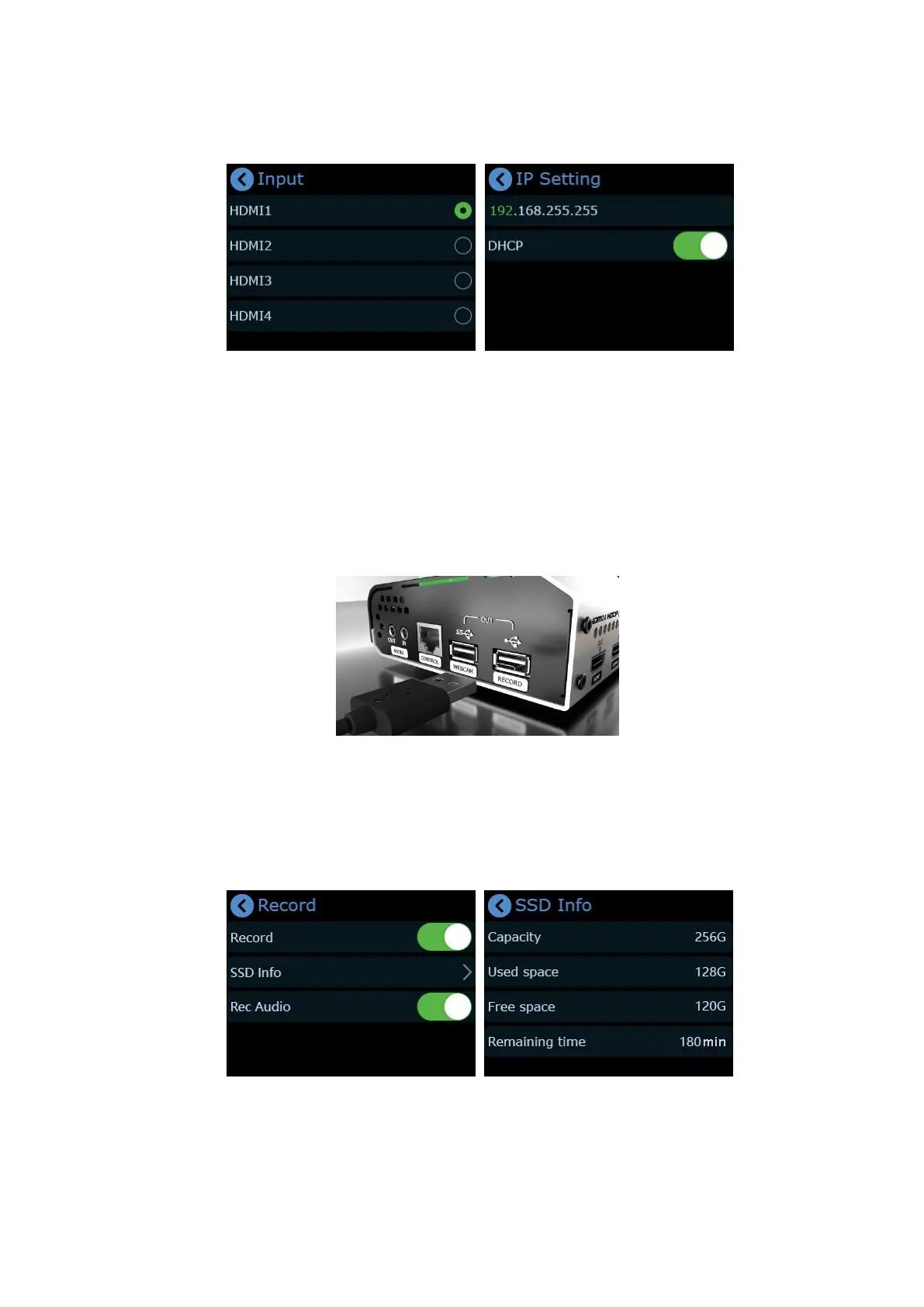
Before recording format the SSD or U-disk and then insert it into the USB2.0 interface RECORD.
mini-pro will automatically recognize the hard disk or U disk and display the relevant information on
the recording window of multi-screen PVW .
After inserting the hard disk or U disk, push button【M】to return to the main menu, and then
tap [Record] to enter the interface to switch on Record and view the status of the hard disk.
After setting, you can tap【S】to find the record button, and tap the【Record】button to pause
record or continue.
.


 To Next Page