User manual: Installation and Operation of Direction Finder System RHOTHETA RT-600 / SAR-DF 517
- 16 -
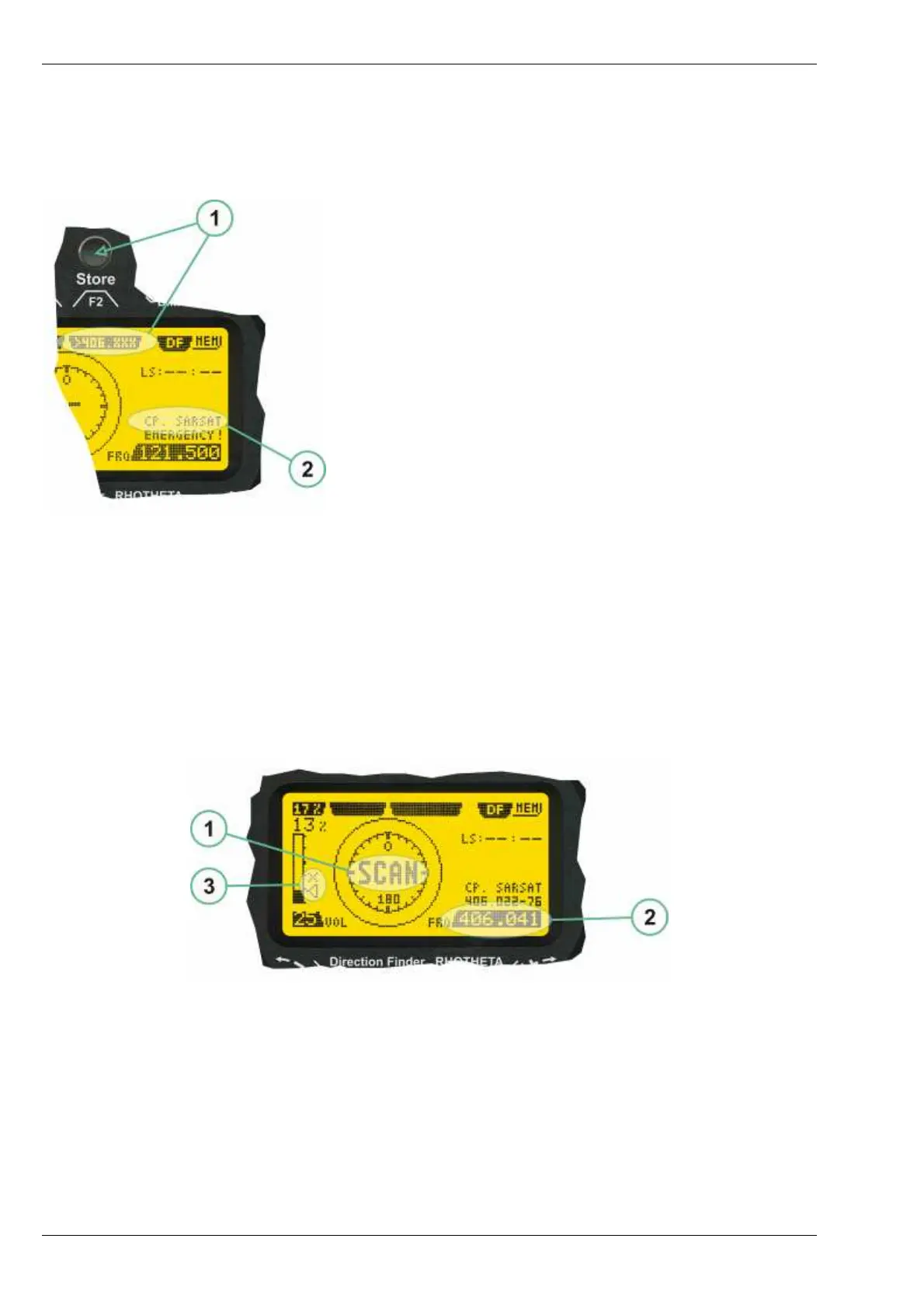
2.2.5 121.500 MHz bearing Window in COSPAS-SARSAT mode
While being in the 121.500 MHz bearing window activated through the COSPAS-SARSAT Bearing Mode sub-
page, the bearing window is slightly different to the normal bearing window:
121.500 MHz Bearing Window in COSPAS-SARSAT Mode
Differences are:
(
1) >406.xxx< push button (F2 button) allows to switch
back to the last used 406 MHz frequency. This
allows to quickly check on 121.500 MHz if a beacon
can already be received on VHF and, in the case
that this is not possible, to cycle back to 406 MHz
quickly.
(2) >CP-SAR-SAT< indication shows that the actual
page belongs to the COSPAS-SARSAT page
section.
2.2.6 COSPAS-SARSAT Scan Mode
If the COSPAS-SARSAT scan mode has been selected, the COSPAS-SARSAT channels, as selectable
m
anually from the Frequency Selection Page, are scanned. After reception of a valid COSPAS-SARSAT Signal,
the COSPAS-SARSAT bearing mode is activated. Due to the fast scanning – the complete COSPAS-SARSAT
sub-band is scanned within less than 400 ms – detection of a receivable COSPAS-SARSAT signal is possible
within one COSPAS-SARSAT repetition cycle.
Display in COSPAS-SARSAT Scan Mode
(1) >SCAN< flashing indication notifying the user that the equipment is operating in scan mode.
(2) Frequency display indicating the COSPAS-SARSAT scanning frequency range.
(3) >X< sign showing that squelch settings are controlled autonomously by the receiver.
Scan mode can be left by entering a new frequency through the frequency or memory setup.



 To Next Page