User manual: Installation and Operation of Direction Finder System RHOTHETA RT-600 / SAR-DF 517
- 19 -
ID Editing Sub-Page
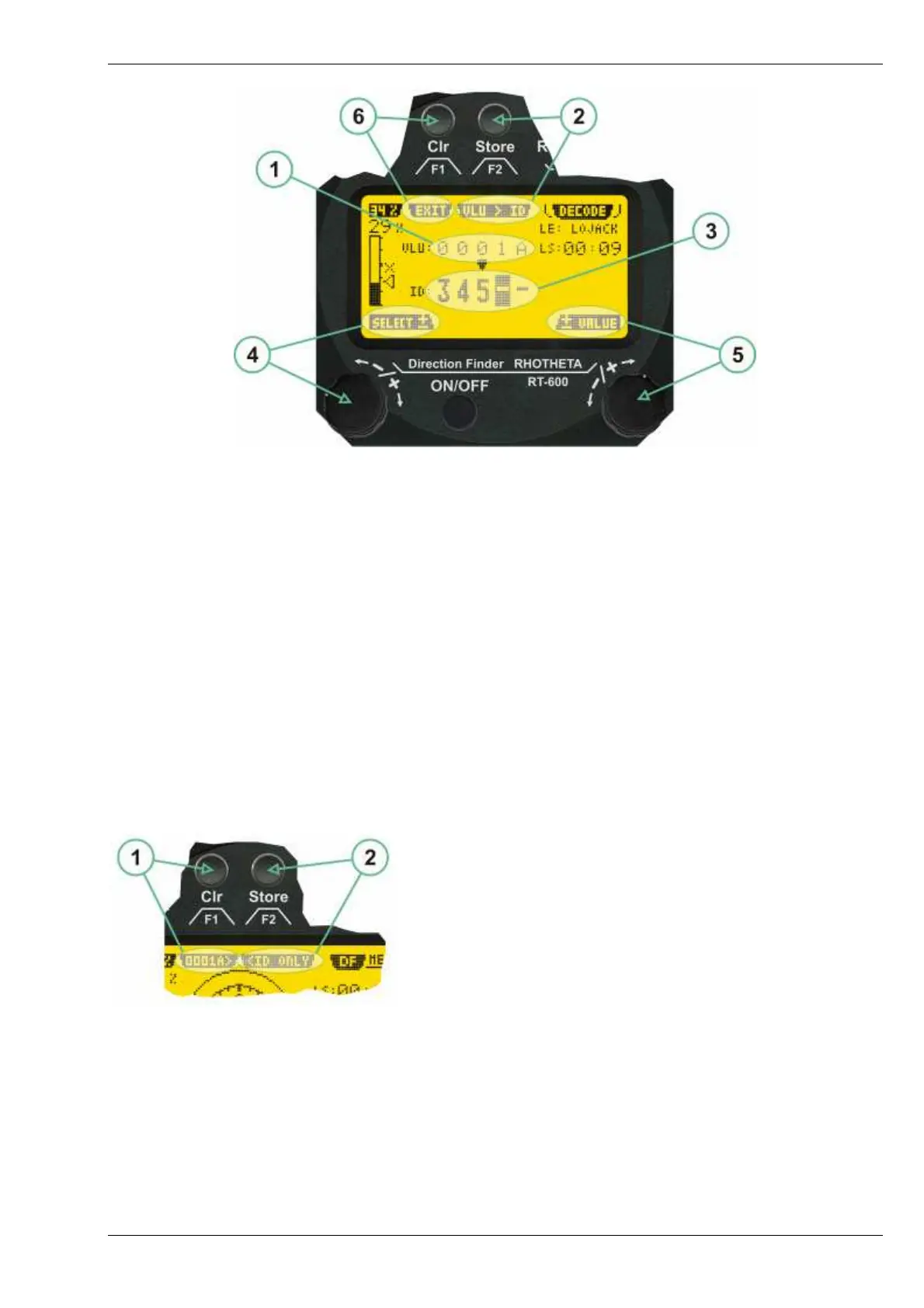
(1) >VALUE< Data field showing the last received LoJack ID of any active VLU within receive range. In case
that no LoJack ID has been received, the value field is filled with dashes (“ - - - - - “).
(2) >Value to ID< hotkey (F2 push-button) allows to copy the received LoJack ID in the ID field.
(3) >ID< field showing the LoJack ID which shall be selected. If no LoJack ID has been selected, the ID field
is filled with dashes (“ - - - - - “). Manual entry of data is possible. The position of the ID field which can be
modified manually is high-lighted by dark background and bright values.
(4) >Select< rotary switch, allowing to select which position of the ID field shall be modified manually.
(5) >Value< rotary switch, allowing to modify the currently selected position within the ID field.
(6) >Exit< hotkey (F1 push-button), allowing to switch back to the LoJack bearing window.
If an ID has been selected successfully, the LoJack bearing window indicates the selected Lojack ID and the ID-
only mode. In this case, the squelch is controlled by the antenna unit without possibility of user influence,
indicated by an “X” ahead the squelch level marker. The direction finder will calculate bearing information only
while he receives a transmission with the selected ID, thus the squelch is not necessary and only would reduce
system sensitivity.
ID Only Mode Menu with defined ID
(1) >ID< menu option showing the currently selected ID and
allowing, by pressing the F1 push-button, to re-enter the ID
editing sub-page.
(2) >ID only< menu option showing that currently the ID only
mode is active. By pressing the F2 push-button, the ID-
only mode may be deactivated.



 To Next Page