User manual: Installation and Operation of Direction Finder System RHOTHETA RT-600 / SAR-DF 517
- 21 -
2.4 Frequency Selection Page
If the frequency selection page has been activated by using the frequency selection rotary switch, the frequency
selection page opens. The frequencies which can be selected consist of several frequency blocks: Memory
Channels, Special Application Frequencies, COSPAS-SARSAT frequencies, and scan modes.
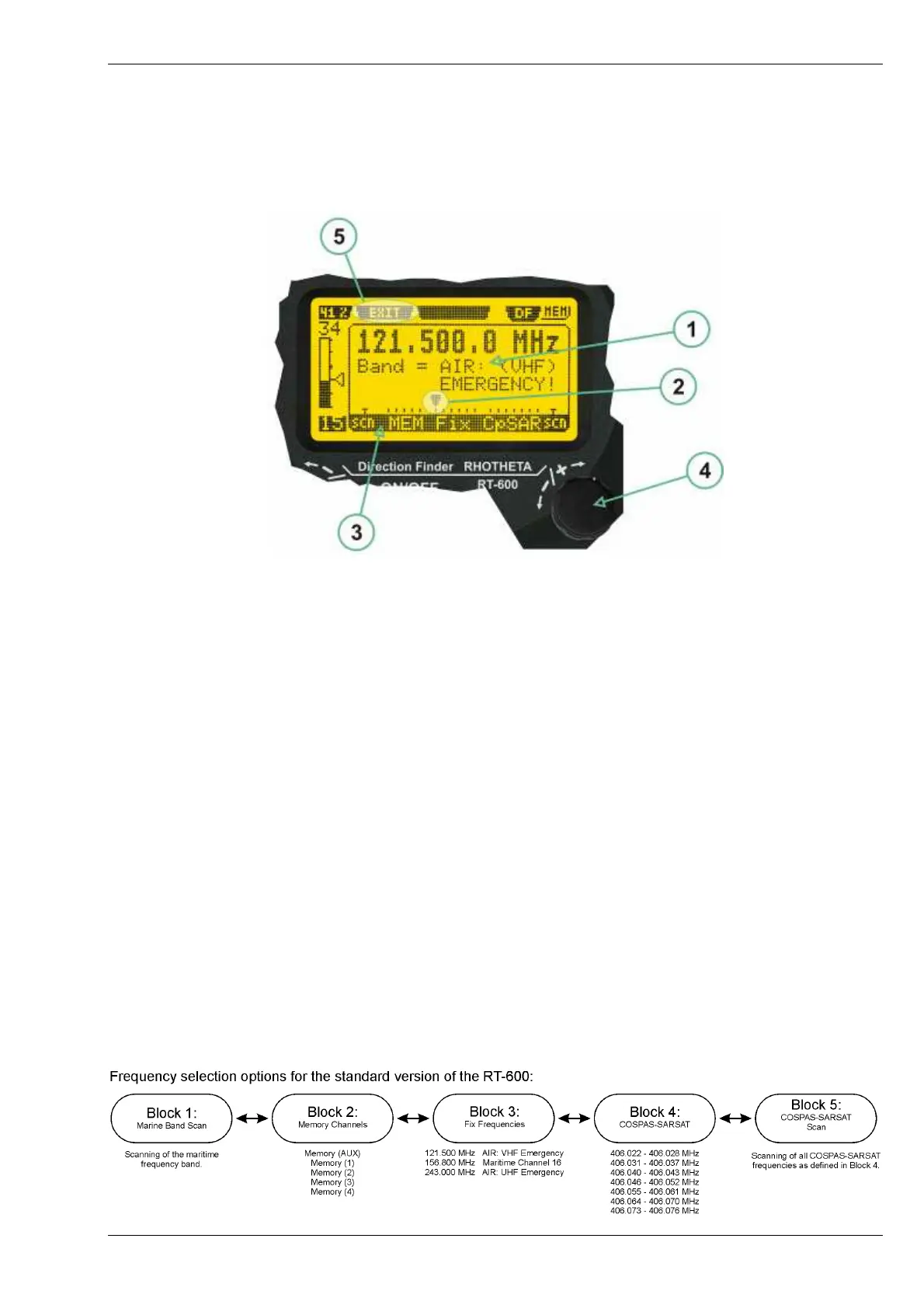
Frequency Selection Page and Operating Elements
(1) >Frequency< information field, showing all necessary information on the selected frequency such as
frequency in MHz, memory channel (in case of memory frequencies), purpose of the selected frequency.
(2) >Marker< showing the currently chosen frequency on the frequency scale
(3) >Frequency scale< on which a frequency can be chosen. The frequency scale is organized in frequency
blocks. The name of the frequency block is indicated below the frequency scale. They are:
- Law Enforcement scanning frequencies (Law Enforcement version only)
- Memory Channels
- Fix pre-programmed frequencies
- COSPAS-SARSAT frequencies
- COSPAS-SARSAT scanning frequencies.
(4) >Frequency selection< rotary switch allowing to select a frequency by moving the marker along the
frequency scale.
(5) >Exit< hotkey (F2 push-button) allowing to directly switch back to the normal operating mode on the
currently selected frequency. If the exit hotkey is not pressed, the direction finder will fall back into the
operating mode automatically after ca. 5 seconds of user inactivity.
2.4.1 Frequency Selection Page, Standard Version
In the standard version of the equipment, the frequency selection page offers a set of 17 different choices,
o
rganized in 4 blocks, which can be selected by the user.



 To Next Page