Installation 5
Decimal Rotation Configuration
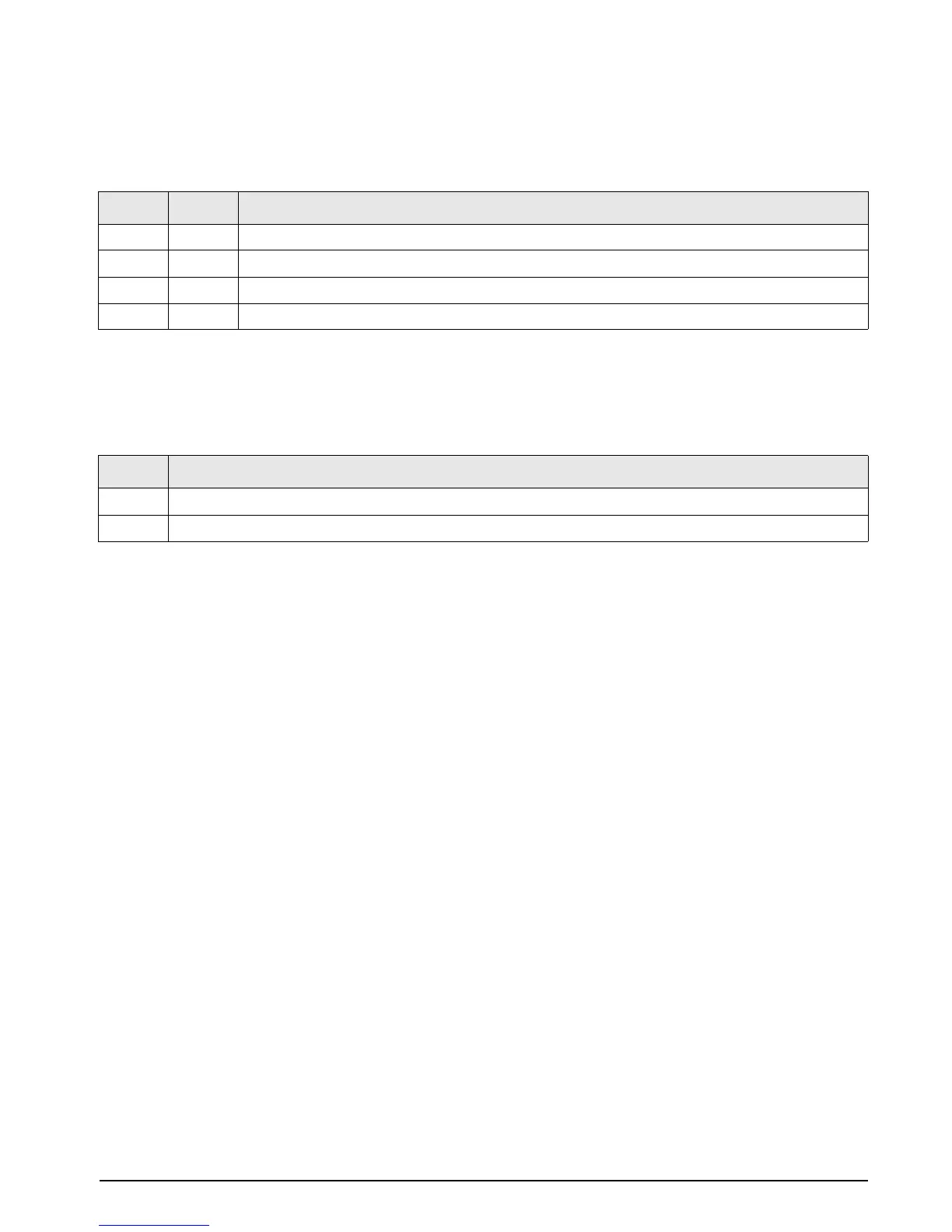
See Table 2-5 below for information on configuring dip switch for decimal rotation. See Section 3.2 on page 11
for more information on decimal rotation.
Polarity Bit Select
See Table 2-6 below, for information on configuring polarity bit select mode. See Section 3.3 on page 11 for
more information on polarity switch.
SW1-1 SW1-2 Parallel Output Format
0 0 No rotation
0 1 Rotate left enable
1 0 Rotate right enable (primary only)
1 1 Reserved
Table 2-5. Decimal Rotation Configuration
SW1-3 State
1 + Polarity (logic 1 = +5V) ; – Polarity (logic 0 = common)
0 + Polarity (logic 0 = common); – Polarity (logic 1 = +5V)
Table 2-6. Polarity Bit Select Configuration



 To Next Page