4 BCD Interface Installation and Configuration Manual
2.2 Dip Switch Configuration
The BCD option card contains dip switches (see Figure 2-3 on page 3). Move the switches to configure BCD
interface parameters (see Table 2-1).
Unit Status Bit/Communications Output Selection
See Table 2-2 for unit status bit/communications output select configuration.
By connecting J3 on the BCD board to J8 on the 520 board, communications mode allows the throughput of
connector J3 to be used as a wiring path for communications from the 520 indicator to an external device through
the DB-37 connector. It is not a communications port, rather an alternative route for wiring a 520 communication
port to an external device.
Do not connect communications to J3 if switch SW1-4 is in Units mode.
Units/Tri-State Input
See Table 2-4 below, for information on configuring units or tri-state input modes.
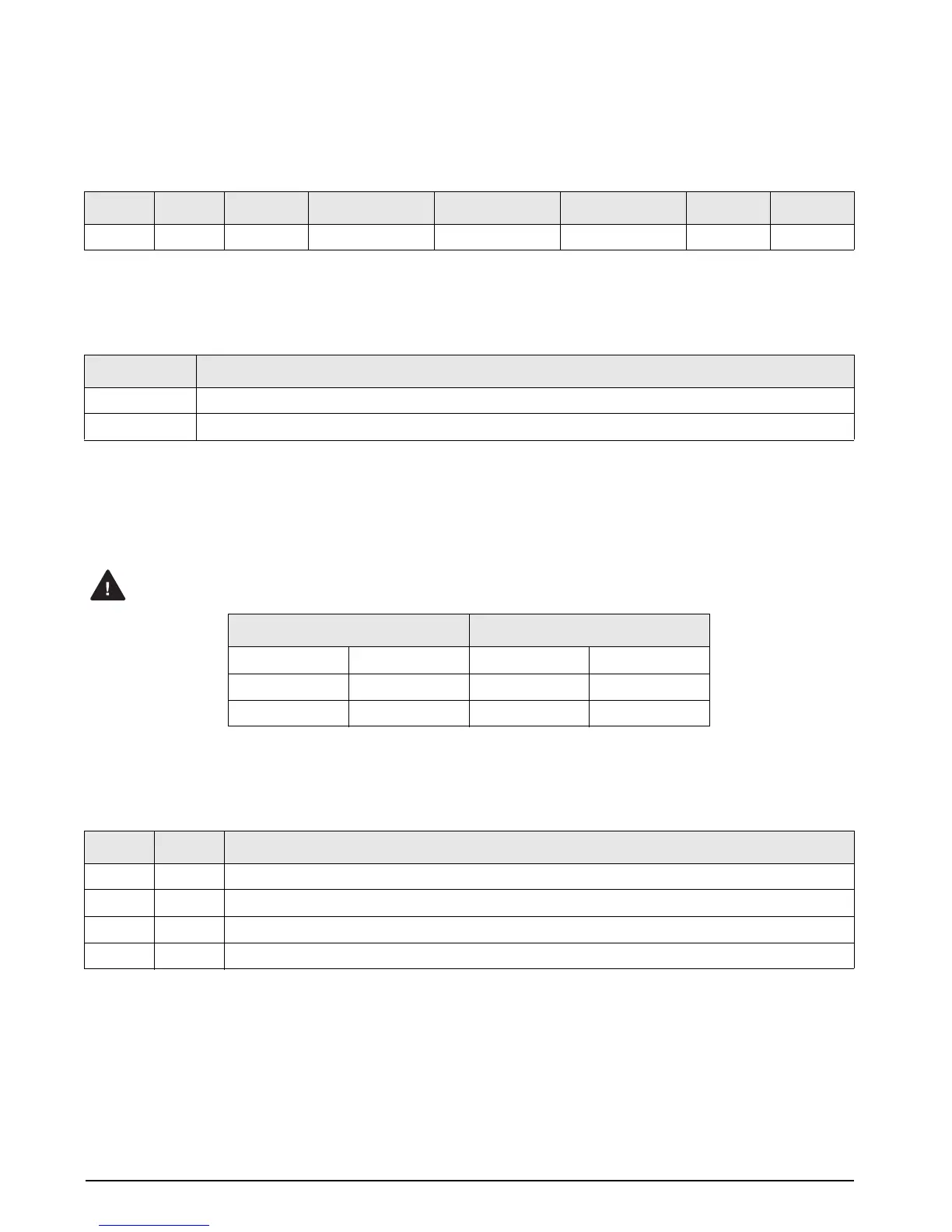
SW1-1 SW1-2 SW1-3 SW1-4 SW1-5 SW1-6 SW1-7 SW1-8
DEC_1 DEC_2 POL_SEL Units/Com Select Units Input Select Tri-State Select Reserved Reserved
Table 2-1. Dip Switch Configuration Modes
SW1-4 Mode
0 Unit Status Bit mode – Indicates primary or secondary
1 Communications Select mode – RS-232
Table 2-2. Units Status Bit/Communications Select Mode Configuration
BCD Option Card 520 Indicator
J3-1 TX J8-1 TX
J3-2 Gnd J8-2 Gnd
J3-3 RX J8-3 RX
Table 2-3. J3/J8 Connections
SW1-5 SW1-6 Mode
0 0 Not valid
0 1 Units enable
1 0 Tri-State enable
1 1 Off
Table 2-4. Units/Tri-State Input Configuration



 To Next Page