Registering Folders
89
4
H
HH
H
Press [Connection Test] to check the
path is set correctly.
I
II
I
Press [Exit].
Note
❒ If the connection test fails, check
the settings, and then try again.
J
JJ
J
Press [OK].
Note
❒ To change the user (destination)
name, see p.72 “Changing a
User Code”.
Deleting a registered SMB folder
A
AA
A
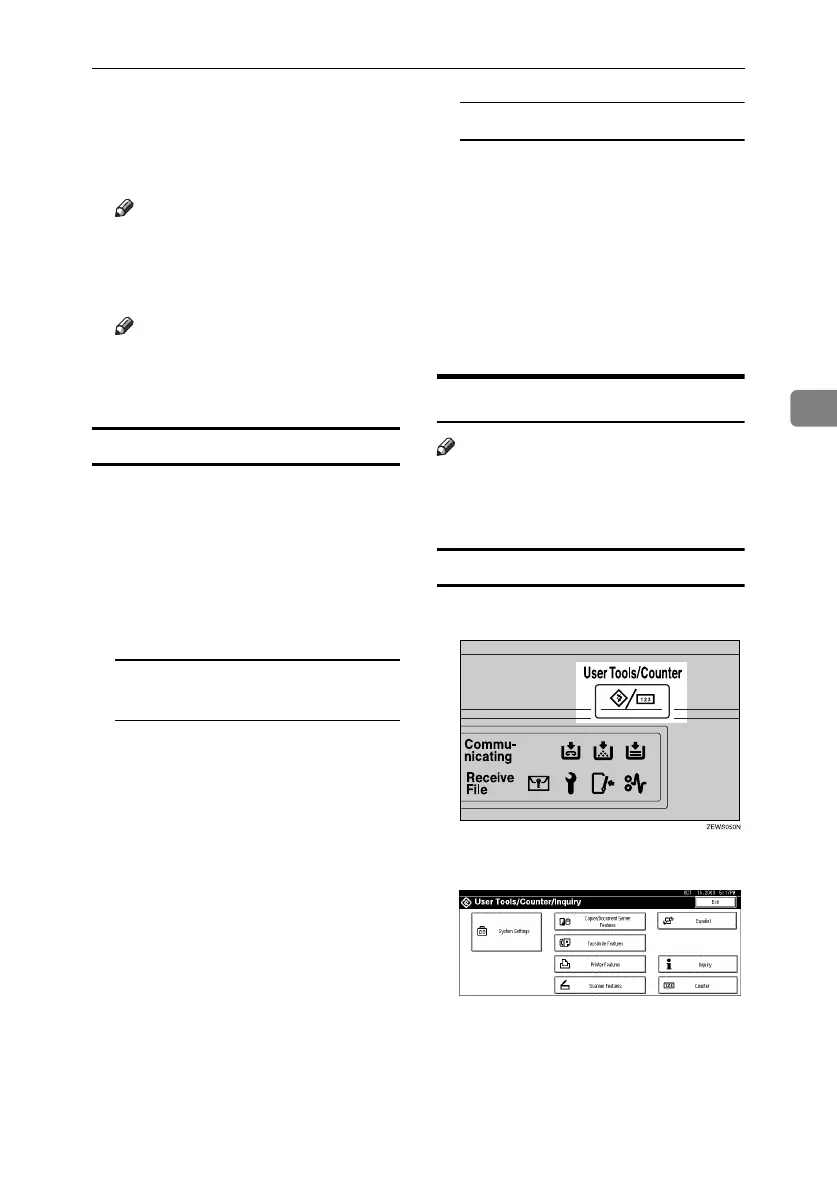
Press the {
{{
{User Tools/Counter}
}}
} key.
B
BB
B
Press [System Settings].
C
CC
C
Press [Key Operator Tools], and then
press [T
TT
TNext].
D
DD
D
Press [Address Book Management].
To delete only the registered
folder
A Select a user of the folder you
want to delete.
Press the user (destination) key,
or enter the registered number
using the number keys.
B Press [Folder].
C Press [FTP].
A confirmation message ap-
pears.
D Press [
Yes
].
E Press [OK].
Settings under SMB are all
cleared.
To delete all user information
A Press [Delete].
B Select a user you want to de-
lete.
Press the user (destination) key,
or enter the registered number
using the number keys.
C Press [Yes].
E
EE
E
Press [Exit].
Using FTP to Connect
Note
❒ To register a shared folder config-
ured in Windows, see p.85 “Using
SMB to Connect”.
To register an FTP folder
A
AA
A
Press the {
{{
{User Tools/Counter}
}}
} key.
B
BB
B
Press [
System Settings
].
C
CC
C
Press [
Key Operator Tools
], and then
press [T
TT
TNext
].
D
DD
D
Press [Address Book Management].
RussianC3_ENgsg-F_FM.book Page 89 Monday, June 16, 2003 6:48 PM




 To Next Page