Settings for the Document Server
45
3
Settings for the Document Server
❖
❖❖
❖ Copier/Document Server Features (See "General Features 4/4", Copy Refer-
ence.)
❖
❖❖
❖ System Settings (See p.51 “General Features”, p.55 “Tray Paper Settings”, p.58
“Timer Settings”, and p.59 “Key Operator Tools”.)
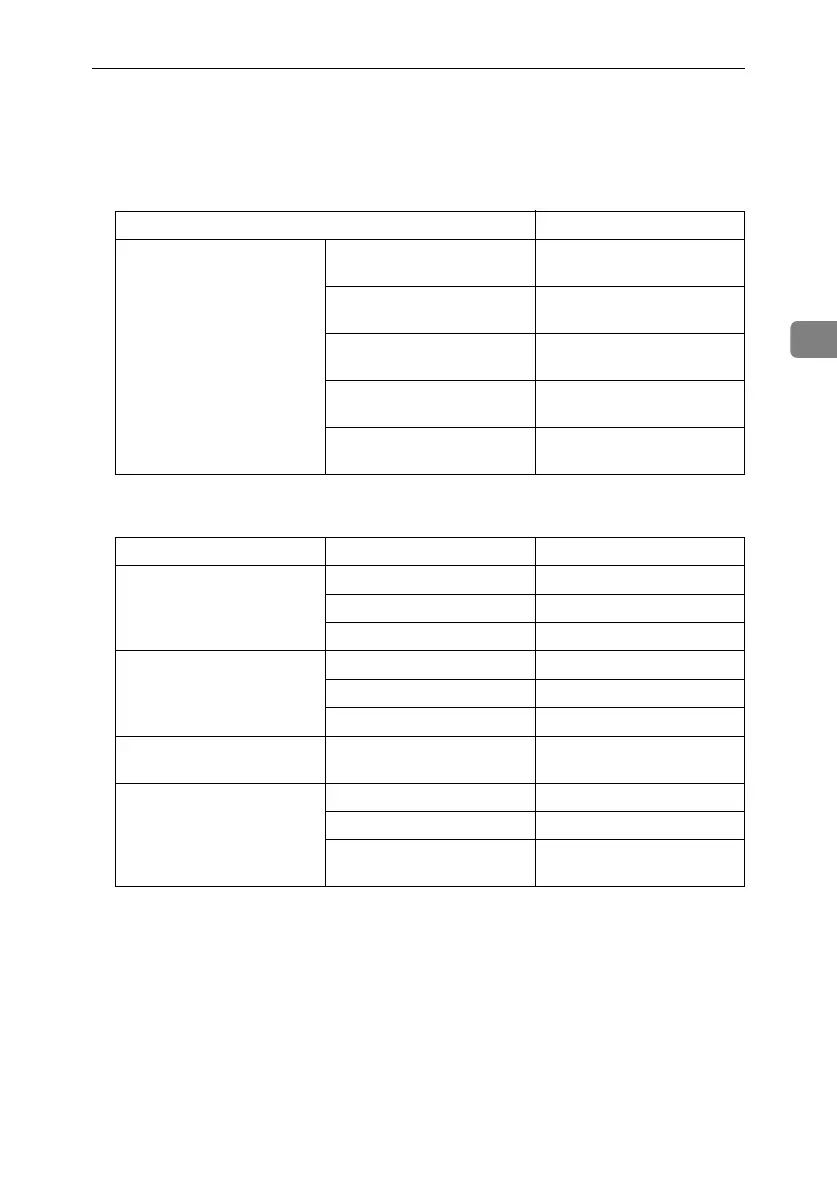
Items Default
General Features Document Server Storage
Key: F1
2 Sided Original Top to top
Document Server Storage
Key: F2
1 Sided
→
1 Sided Combine
Document Server Storage
Key: F3
1 Sided
→
1 Sided Combine:
4 originals
Document Server Storage
Key: F4
1 Sided
→
1 Sided Combine:
8 originals
Document Server Storage
Key: F5
Create Margin
Items Default
General Features Warm Up Notice ON
Copy Count Display Up
Output: Document Server Internal tray 1
Tray Paper Settings Paper Tray Priority: Copier Tray 1
Cover Sheet Tray Off
Slip Sheet Tray Off
Timer Settings Copier/Document Server
Auto Reset Timer
60 seconds
Key Operator Tools Auto Delete File Yes After 3 day(s)
Delete All Files --
Password Management for
Stored Files
Do not Unlock
RussianC3_ENgsg-F_FM.book Page 45 Monday, June 16, 2003 6:48 PM




 To Next Page