User Codes
75
4
Clearing the Number of Prints
A
AA
A
Press the {
{{
{User Tools/Counter}
}}
} key.
B
BB
B
Press [System Settings].
C
CC
C
Press [
Key Operator Tools
].
D
DD
D
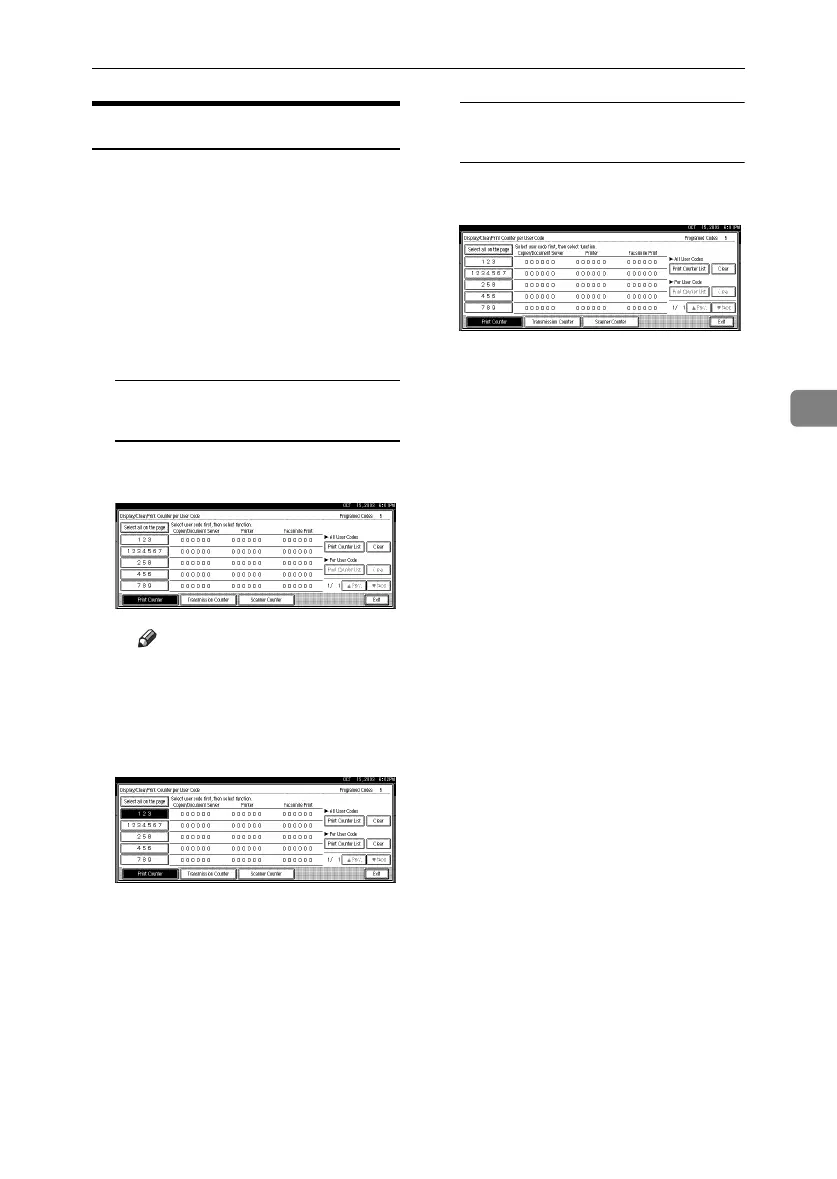
Press [Display/Clear/Print Counter per
User Code].
E
EE
E
Select the user code to clear.
To clear the number of prints
made under a user code
A Select the user code from the
left side of the display.
Note
❒ Press [Select all on the page] to
select all user codes on the
page.
B Press [Clear] under Per User
Codes.
C Select the function usage you
want to clear from [Print
Counter], [Transmission Counter],
and [Scanner Counter].
D Press [OK].
To clear the number of prints for
all user codes
A Press [Clear] under All User
Codes.
B Select the function usage you
want to clear from [Print
Counter], [Transmission Counter],
and [Scanner Counter].
C Press [OK].
RussianC3_ENgsg-F_FM.book Page 75 Monday, June 16, 2003 6:48 PM






 To Next Page