User Tools (System Settings)
104
4
To enter a port number
A Press [Change] under Port No..
B Enter the port number using
the number keys, and then
press [#].
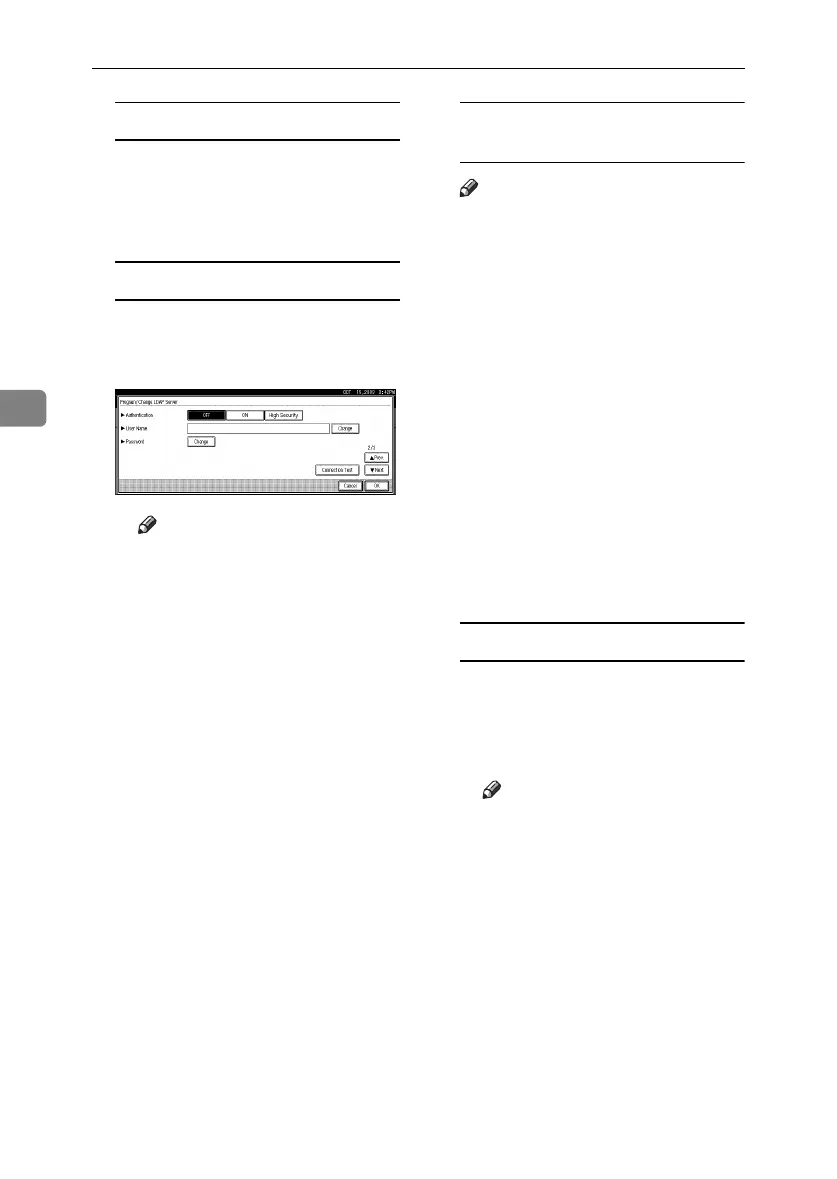
To set authentication
A Press [Next].
B Press [ON] or [High Security] un-
der Authentication.
Note
❒ [High Security] is not available
with LDAP Version 2.
❒ When [
ON
] or [
High Security
]
is selected, the administrator
account name and password
is required to access the
LDAP server.
❒ When [High Security] is select-
ed, you can use a generic
password unique to the net-
work. If you do this, the serv-
er also requires the same
setting. For details, ask your
network administrator.
To enter the user name and
password
Note
❒ To use the administrator ac-
count for authentication, enter
the account name and password
here.
❒ If you leave the user name and
password blank, users will be
prompted for the password ev-
ery time they attempt to connect
to the LDAP server.
A Press [
Next
].
B Press [Change] under User
Name.
C Enter the user name, and then
press [OK].
D Press [
Change
] under Password.
E Enter the password, and then
press [OK].
To test the connection
A Press [Connection Test].
A connection test is carried
out.
B Press [Exit].
Note
❒ If the connection test fails,
check your settings, and
then try again.
RussianC3_ENgsg-F_FM.book Page 104 Monday, June 16, 2003 6:48 PM






 To Next Page