Using the Document Server
37
3
When using an unregistered user
name in the Address Book
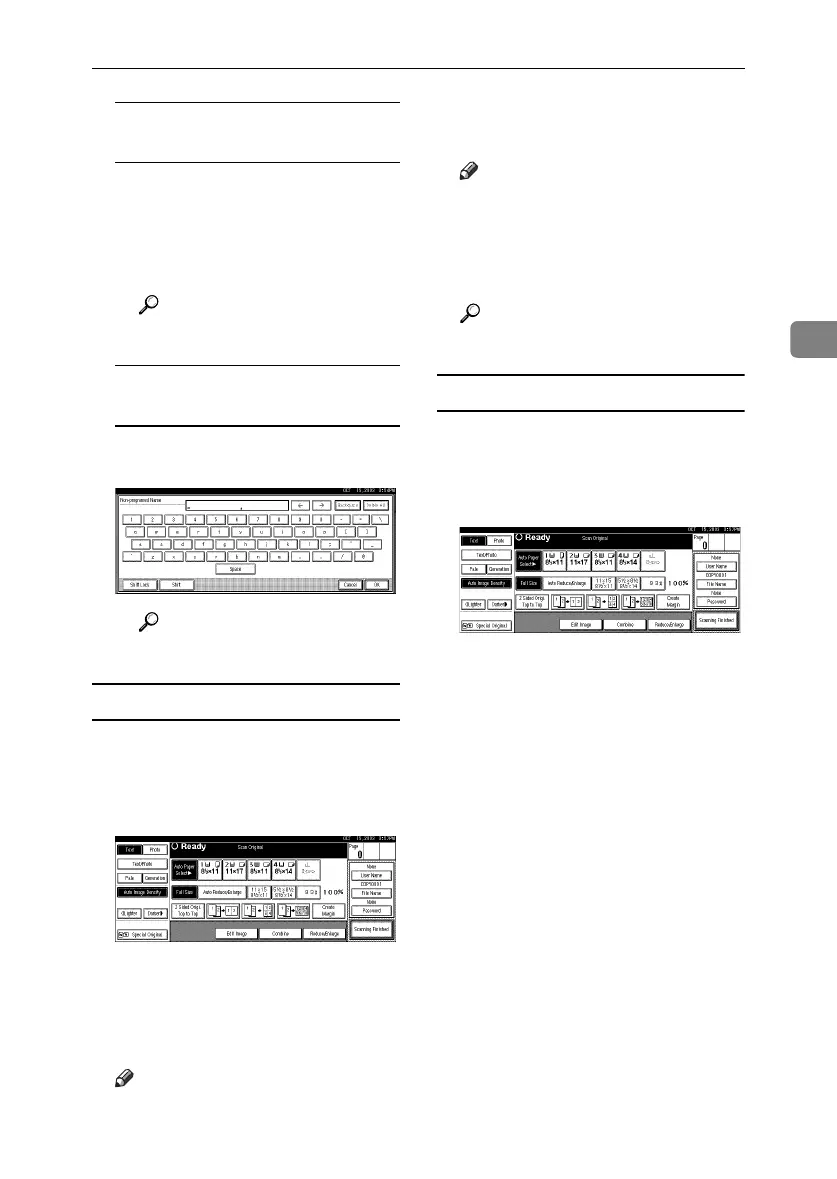
A To enter an unregistered user
name, press [Non-programed
Name].
B Enter a new user name, and
then press [OK].
Reference
p.143 “Entering Text”
When no user name has been
registered in the Address Book
A Enter a new user name, and
then press [OK].
Reference
p.143 “Entering Text”
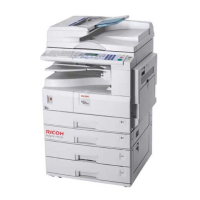
To change a file name
A
AA
A
Press [
Scan Original
].
The Scan Original display appears.
B
BB
B
Press [
File Name
].
The Change File Name display ap-
pears.
C
CC
C
Press [Delete All] to delete the old
file name.
Note
❒ You can also use [Backspace] to
delete unnecessary characters.
D
DD
D
Enter a new file name, and then
press [
OK
].
Note
❒ Up to 20 characters can be en-
tered as a file name. Note that
only 16 characters of each file
name appear in the document
list.
Reference
p.143 “Entering Text”
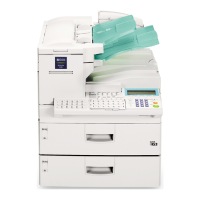
To set or change a password
A
AA
A
Press [
Scan Original
].
The Scan Original display appears.
B
BB
B
Press [
Password
].
C
CC
C
Enter a password using the num-
ber keys (four digits), and then
press the {
{{
{#}
}}
} key.
D
DD
D
Reenter the password (four dig-
its) for verification, and then
press the {
{{
{#}
}}
} key.
E
EE
E
Press [OK].
RussianC3_ENgsg-F_FM.book Page 37 Monday, June 16, 2003 6:48 PM






 To Next Page