E-mail Destination
83
4
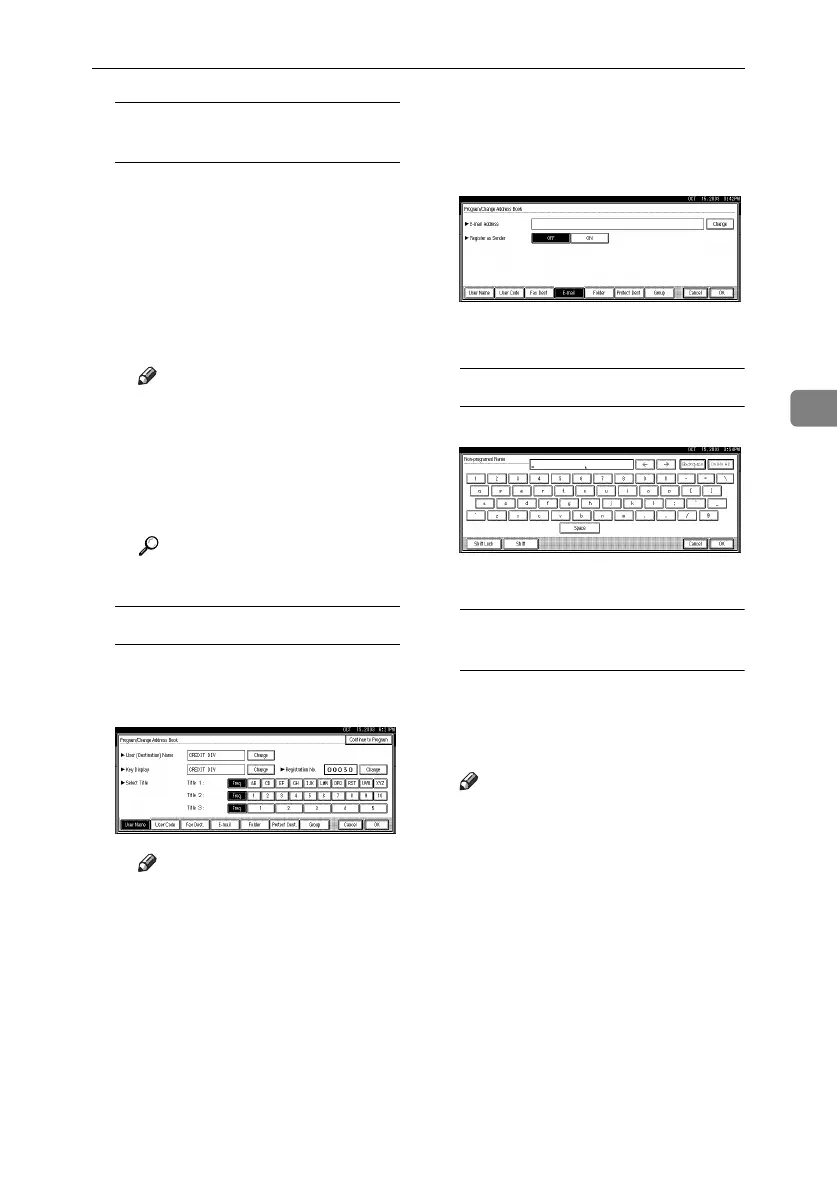
To register the user (destination)
name and key display
A
Press
[Change]
under User (Des-
tination) Name or Key Display.
The user (destination) name or
key display entry display ap-
pears.
B Enter the user (destination)
name or key display, and then
press [OK].
Note
❒ You can use the user name
when selecting an address to
send an e-mail to.
❒
You can register the user code
after the user name. For de-
tails, see
p.70 “User Codes”
.
Reference
p.143 “Entering Text”
To select the title
A To associate a user with a title,
press the title key under Select
Title.
Note
❒ The keys you can select are as
follows:
• [Freq.]
… Added to the
page that is displayed first.
•
[AB], [CD], [EF], [GH],
[IJK], [LMN], [OPQ],
[RST], [UVW], [XYZ], [1] to
[10]… Added to the list of
items in the selected title.
❒ You can select [Freq.] and one
more page for each title.
G
GG
G
Press [E-mail].
H
HH
H
Press [Change] under E-mail Ad-
dress.
I
II
I
Enter the e-mail address.
Entering the e-mail address
A Enter the e-mail address.
B Press [OK].
Using the e-mail address as the
sender
A Press [ON] under Register as
Sender.
J
JJ
J
Press [OK].
Note
❒ When a group is registered, oth-
er e-mail destinations can be
added to the group. See p.95
“Registering Destinations to a
Group”.
RussianC3_ENgsg-F_FM.book Page 83 Monday, June 16, 2003 6:48 PM






 To Next Page