Sample Print/Locked Print
14
3
C
CC
C
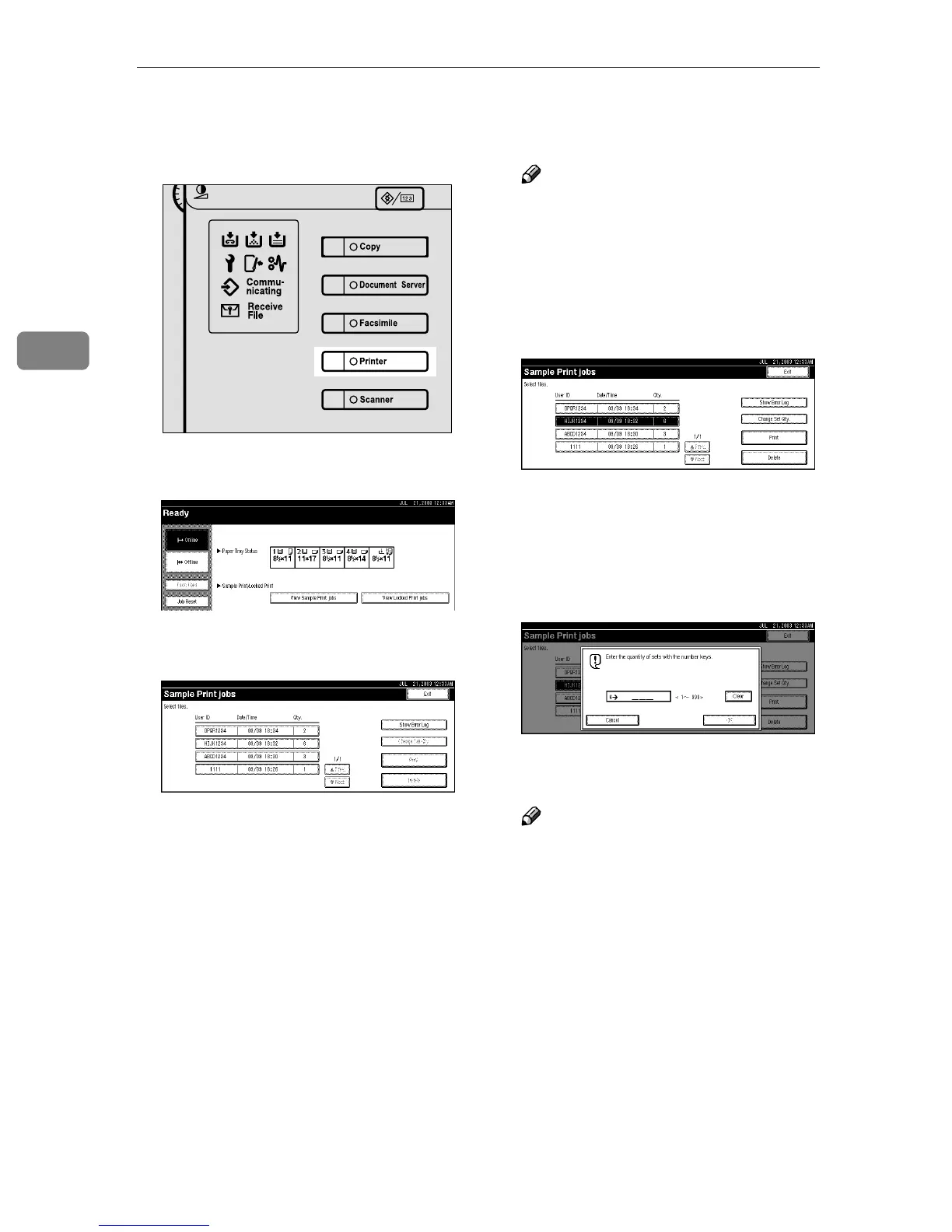
On the machine's control panel,
press the {
{{
{Printer}
}}
} key to display
the Printer screen.
D
DD
D
Press [View Sample Print jobs].
A list of the sample print files
stored in the machine is displayed.
The following will also be dis-
played:
• User ID: The user ID set up by
the printer driver.
• Date/Time : The date and time
when the job was sent from the
computer.
• Qty. : The number of remaining
sets.
E
EE
E
Select the file you want to print
by pressing on it.
Note
❒ Press [U
UU
UPrev.] or [T
TT
TNext] to
scroll through the list.
❒ Only one file can be selected at a
time.
F
FF
F
Press [Change Set Qty.] to change
the number of sets to be printed.
If you do not want to change the
set quantity, proceed to step
H
.
G
GG
G
Enter the new number of sets us-
ing the number keys, and then
press [OK].
The screen returns to the file list
screen.
Note
❒ You can enter up to 999 sets.
❒ Press [Clear] to correct any entry
mistakes.
❒ If you want to cancel changing
the set quantity, press [Cancel].
H
HH
H
Press [Print].
The print confirmation screen is
displayed.
ZHZS040N



 To Next Page