EasyManua.ls Logo

Ricoh MLP150DN - Page 43

Ricoh MLP150DN
228 pages
Print Icon
To Next Page IconTo Next Page
To Previous Page IconTo Previous Page
Loading...
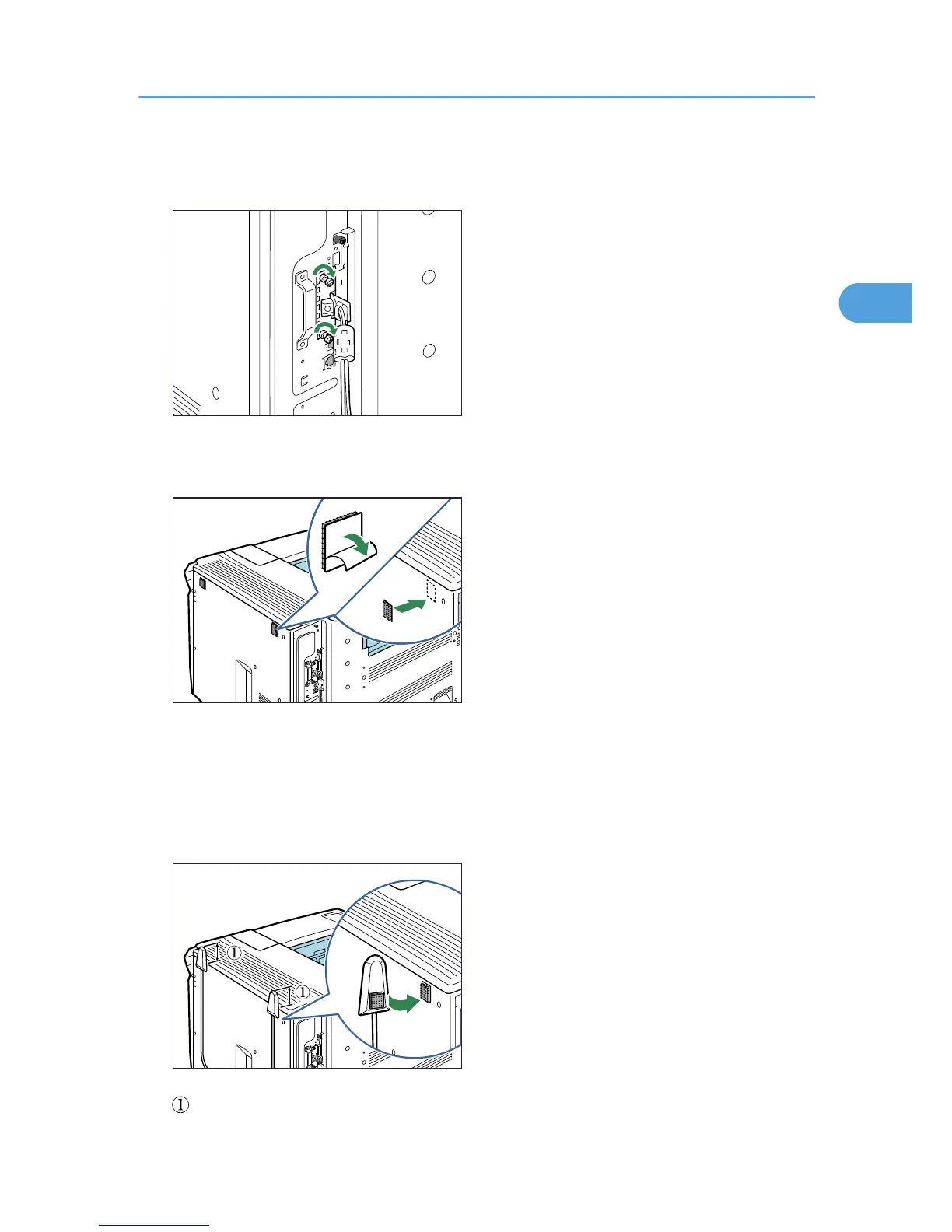
Confirm that the interface board is firmly connected to the controller board.
5. Tighten the two screws to secure the interface board.
BEK168S
6. Remove protective paper from the hook-and-loop fasteners, and then place them as far
away from each other as possible on the upper side of the printer rear.
BEK169S
Make sure that the hook-and-loop fasteners are not placed over any screw holes or seams on the
printer body.
7. Remove protective paper from antennas, and then attach the antennas upright to the hook-
and-loop fasteners. Attach the antenna coming from a black ferrite core on the right side of
the printer rear.
BEK170S
: The antenna tops must project at least 4 cm (1.6inches) above the printer body.
Installing the Interface Units
41
2

Table of Contents

Other manuals for Ricoh MLP150DN

Related product manuals