Home
Ricoh
Printer
Pro 8210
Page 47
Ricoh Pro 8210 - Page 47
132 pages
Manual
Save Page as PDF
To Next Page
To Next Page
To Previous Page
To Previous Page
Loading...
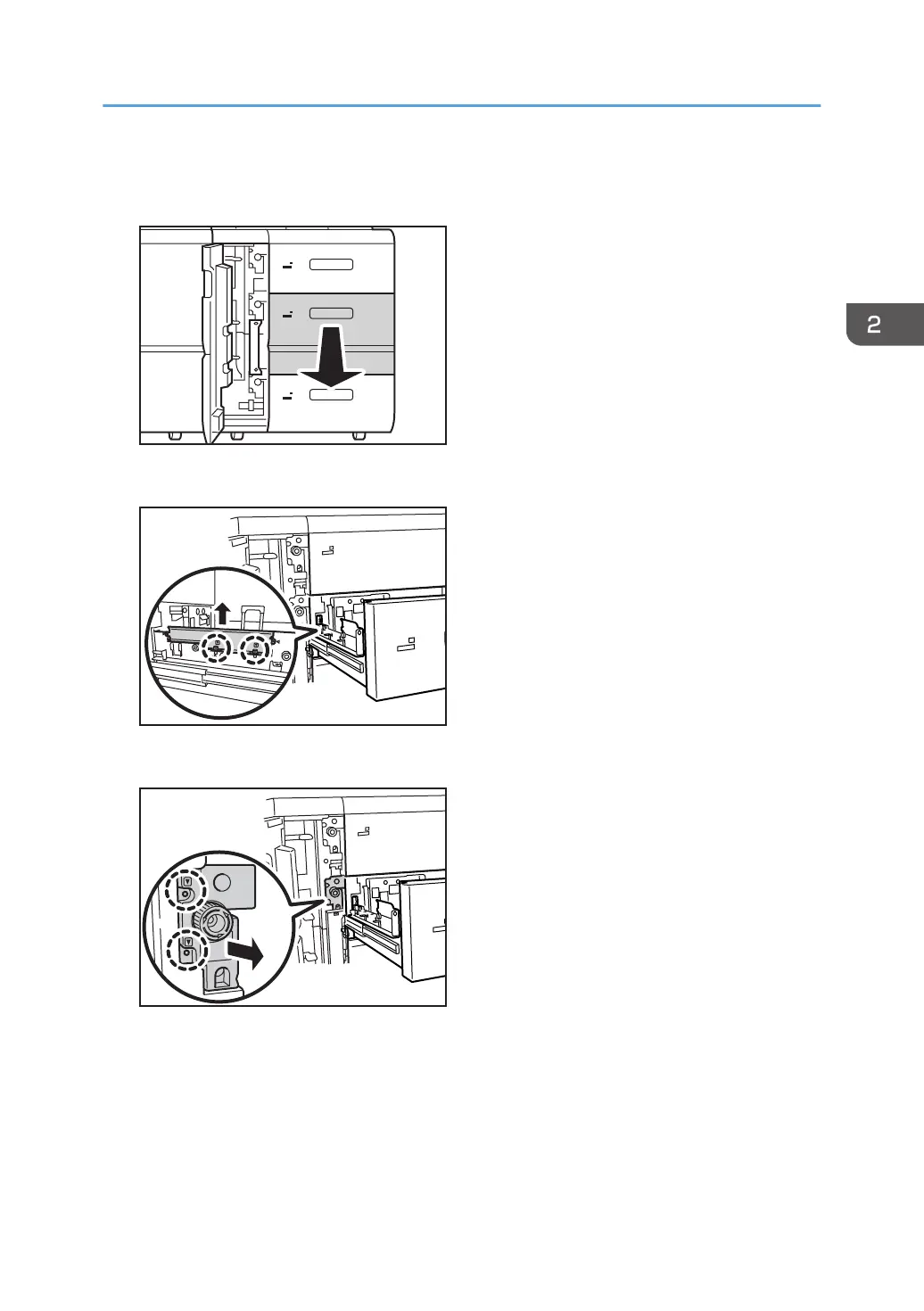
3.
Pull open the tray until it stops.
Remove any paper in the tray.
4
5
6
CZC026
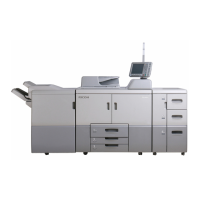
4.
Remove the 2 screws, and then remove the side plate.
4
5
CZC151
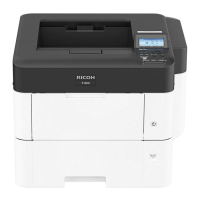
5.
Remove the 2 screws, and then pull out the paper feed unit until it stops.
4
5
CZC152
Replacing the Rollers in the Wide LCT
45
46
48
Table of Contents
Main Page
Default Chapter
1
Operating Instructions
1
Table of Contents
3
Introduction
5
How to Read this Manual
6
Symbols
6
Disclaimer
6
Power Switch Symbols
6
Safety During Operation
7
Safety Precautions to be Followed
8
Environments Where the Machine Can be Used
8
Handling Power Cords and Power Plugs
8
Handling the Main Machine
10
Handling the Machine's Interior
11
Handling the Machine's Supplies
12
1 Before You Begin
15
What You Need
15
General Cautions
16
Names of Components
17
Control Panel
18
Turning Off/On the Power
19
Turning off the Main Power
19
Turning on the Main Power
20
Specifying System Auto-Reset Timer
22
Preparation
23
Resetting the Replaceable Parts Counter
24
2 Replacing the Paper Feed Rollers
27
Before You Begin
27
Tray Names
28
Position of the Paper Feed Rollers
29
Replaceable Parts
30
Replacing the Rollers in Tray 1
32
If A3 Tray Unit Is Attached
36
Replacing the Rollers in Tray 2/3
40
Replacing the Rollers in the Wide LCT
42
Replacing the Rollers in the Wide LCT 4
42
Replacing the Rollers in the Wide LCT 5/6
46
Replacing the Rollers in the LCT
52
Replacing the Rollers in the LCT 4
52
Replacing the Rollers in the LCT 5
52
Replacing the Rollers in the LCT 6
59
Replacing the Rollers in the Bypass Tray
64
Replacing the Rollers in the ADF
68
3 Development Unit
77
Before You Begin
77
Replaceable Parts
77
Replacing the Charge Unit/Cleaning Unit for Photoconductor Unit/Photoconductor Unit
79
4 Cleaning Unit for Intermediate Transfer Belt
93
Before You Begin
93
Replaceable Parts
93
Replacing the Cleaning Unit for Intermediate Transfer Belt
94
5 Transfer Unit
103
Before You Begin
103
Replaceable Parts
103
Replacing the Transfer Unit
104
6 Fusing Unit
109
Before You Begin
109
Replaceable Parts
109
Replacing the Cleaning Unit for the Fusing Unit/Fusing Assembly
111
7 Developer
117
Before You Begin
117
Replaceable Parts
117
Replacing the Developer
118
8 Waste Toner Bottle
127
Before You Begin
127
Replaceable Parts
128
Replacing the Waste Toner Bottle
129
Other manuals for Ricoh Pro 8210
Technical Bulletin
82 pages
Related product manuals
Ricoh Pro 8200s
132 pages
Ricoh Aficio SP 8200DN
16 pages
Ricoh P 800
12 pages
Ricoh IM 8000
148 pages
Ricoh SP 8400DN
108 pages
Ricoh Pro 8300 Series
84 pages
Ricoh Aficio SP 8300DN
132 pages
Ricoh LANIER SP 8300DN
840 pages
Ricoh Printer
164 pages
Ricoh Provence-P2W
561 pages
GX7000 - Color Inkjet Printer
25 pages
AP610N - Aficio B/W Laser Printer
96 pages



 To Next Page