声明:本说明书著作权归杭州睿登科技有限公司所有,未经允许任何单位或个人不得用于商业用途。
63
4.2 Software Operation
4.2.1 Software Connection
Double click RidenPowerSupply.exe to run the PC software.
Only RD6012P-W supports WiFi function, WiFi connection is a test function, due
to poor compatibility with some computers, if you cannot connect PC software via
WiFi, please ignore this function. For this function, we do not provide any guarantee
and technical support, and we will decide whether to keep this function based on
customer feedback.
WiFi connection video link:
https://drive.google.com/drive/folders/1BZslMRSntMj9Se6hnsYANsv8XAVhIZZi?usp=sharing
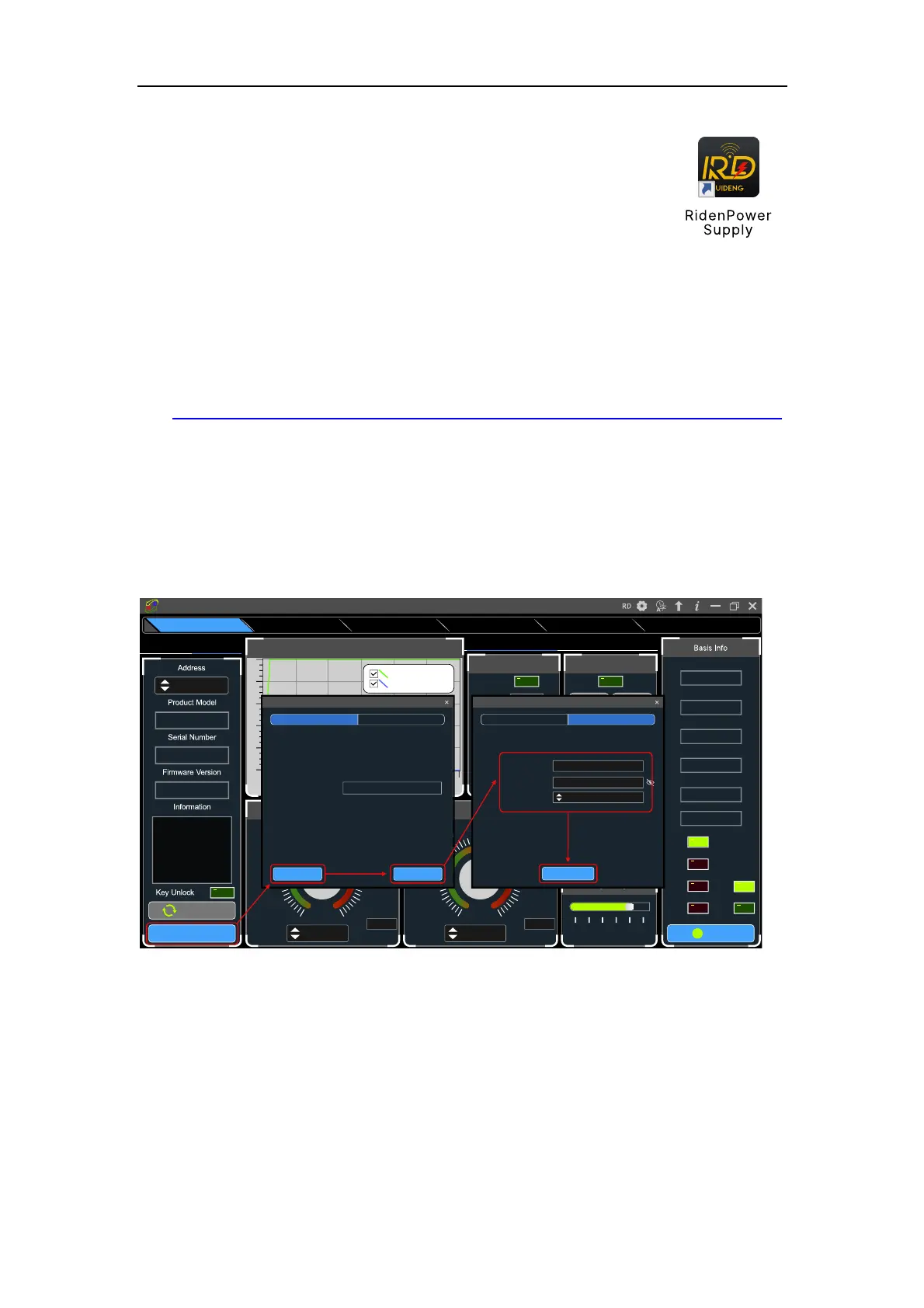
Set the RD6012P communication interface to WiFi, and restart, RD6012P
displays like figure 27, click "WiFi Network" on the PC software to pop up the WIFI
configuration interface (figure 29), click "Initialize" and wait for about 5 -10 seconds,
after the RD6012P displays the local IP address (as shown in figure 28), click "Next"
and enter the WiFi name and password, then click "Network distribution", wait for
about 20 seconds, the PC software prompts that the connection is successful, and
then Click "Connect".
USB connection: Set RD6012P communication interface to USB and connect
RD60012 and PC, the PC software prompts the serial port has been updated and licks
“Connect”.
On
No rm al
O VP
OCP
O TP
CV
CC
5 4 .9 7 V
Inp ut Vo ltag e
4 9 .9 9 8 V
O utp ut Vo ltag e
0 .0 0 0 0 A
O utp ut C uren t
0 0 .0 0 0 W
O utp ut Po w er
25 °C
Sy stem T em p ertu re
077
°F
B acklight A djust
0 1 2 3 4 5
T im e S ynchronization
S ynchronize
3 .0 5 0 0
3 .6 6 0 02 .4 4 0 0
4 .2 70 01.8 3 0 0
4 .8 8 0 01.2 2 0 0
5.4 9 0 00 .6 10 0
6 .10 0 00 .0 0 0 0
5.0 0 00
A
6.10 00
M ax
V - S et
3 0 .5 0 0
3 6 .6 0 02 4 .4 0 0
4 2 .70 018 .3 0 0
4 8 .8 0 012 .2 0 0
5 4 .9 0 06 .10 0
6 1.0 0 0
V
0 .0 0 0
5 0.0 00
V
61.0 00
M ax
C all O ut
D ata 9
D ata 8D ata 7
D ata 6D ata 5
D ata 4D ata 3
D ata 2D ata 1
Battery C harging
Wh00 0.0 00
O utp ut W h
Ah00 0.0 00O utp ut Ah
°F---
°C--
Te m pe rature
V00 .00Vo ltag e
U nc on ne cte d
B attery C harging/Q uick C all O ut C a lib ra tio n
Re ad N um b er(N u m )
0 5 10 15 20 25 3 0
50
40
30
20
10
0
O utput V oltage A nd C urrent G raph
D o u b le d ic k to in itia liz e
O utp ut Vo ltag e(V )
O utp ut C urre nt(A )
W iF i N e tw o rk
C o n ne ct
W iFi fun ctio n is
cu rren tly tria l versio n,
ple as e rea d th e
m an ua l carefully
be fore us e!
----
----
----
001
WiFiUSB
Sta rtup Lo go U pd ateFirm w a re U p da teRS 48 5 M u lti C orres po ndAdvanced FunctionsBa sic F u n c tio ns
Riden Pow er Supply Softw are
N extInitialization
46s
T o b e in itia liz e d ... (c lic k th e [in itia lize ] b u tto n to in itia liz e )
192.168.50.104Local lp:
If th e lo c a l IP is b la n k , p le a s e re o p e n th is p a g e to re fre s h . A n y of th e re fre s h tim e s is
e m p ty . Plea s e c h e c k th e c o m p u te r c o n fig u ra tio n .
Step 2Step 1
W iFi Ne tw ork
D istrib ution
W a iting fo r d is trib u tio n ne tw o rk ... (a fte r co n firm in g tha t th e p ro d u c t d is p la y s the IP
a d d re s s o f th e m a c h in e , c lic k th e [d is trib u tio n n e two rk ] b u tto n for d is trib u tio n
n e tw o rk )
1Equipm ent C ount:
·················
Passw ord:
A SU S_2.4GW iFi N am e:
F ill in th e c o rre s p o n d in g W iFi n a m e , W iF i p a s s w o rd a n d th e nu m b e r o f d e v ic e s to b e
c o n n e c te d , a n d c lic k th e [d is trib u tio n n e two rk ] b u tto n for W iF i d is trib u tio n ne tw o rk
Step 2Step 1
W iFi Ne tw ork



 To Next Page