MerCruiser / Mercury Racing PCM-09
Page 49
Enhanced Diagnostics via Mercury’s 10-pin CAN port
All MerCruiser engines (including export models) and Mercury Racing engines
equipped with PCM-09 modules have enhanced diagnostic capabilities available
via the engine’s 10-pin CAN port. is includes ECT and non-ECT engines.
Connection to Mercury’s CAN port requires CAN network adapter #94029 and a
6-pin to 10-pin conversion adapter #94032 as shown on page 47.
Connecting to PCM-09 Systems via Mercury CAN
e TechMate Pro scan tool provides an extensive set of diagnostic and support
functions for troubleshooting engines equipped with the PCM-09 engine control
system. Connection of the tool to the engine is detailed in the steps below.
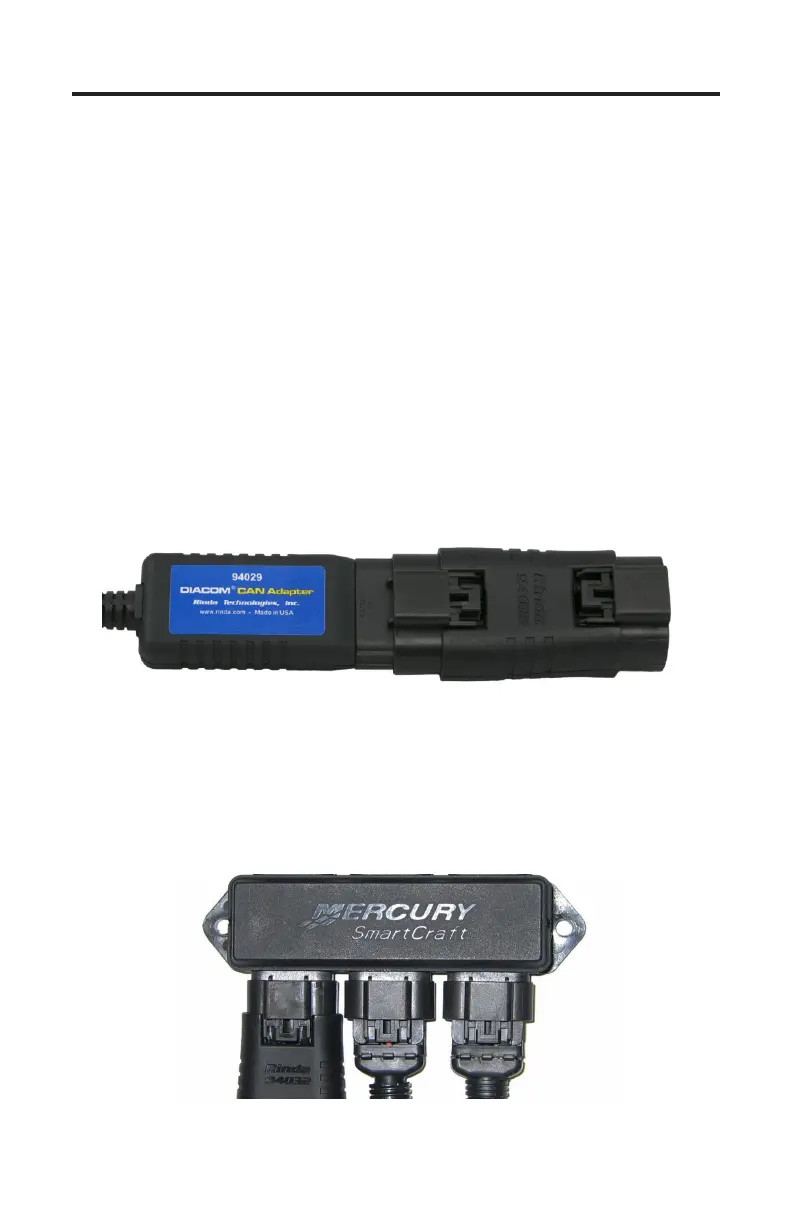
1) Adapters #94029 and #94032 are required for this application. Attach the
#94029 CAN network adapter to the scan tool communication cable. Once
attached proceed to attach adapter #94032 to the 6-pin connector on the
#94029 adapter as shown in Figure 23 below.
Figure 23 Adapter #94029 attached to #94032
2) With the engine’s ignition switch turned OFF, locate the Mercury 10-pin
CAN port on the engine / vessel. Depending upon the application two styles
of CAN ports may be available. Some engines / vessels are equipped with a
CAN junction box. You may connect the scan tool to any available port on
the junction box as shown in Figure 24.
Figure 24 Adapter #94032 attached to junction box


 To Next Page