MerCruiser Thunderbolt V Ignition
Page 57
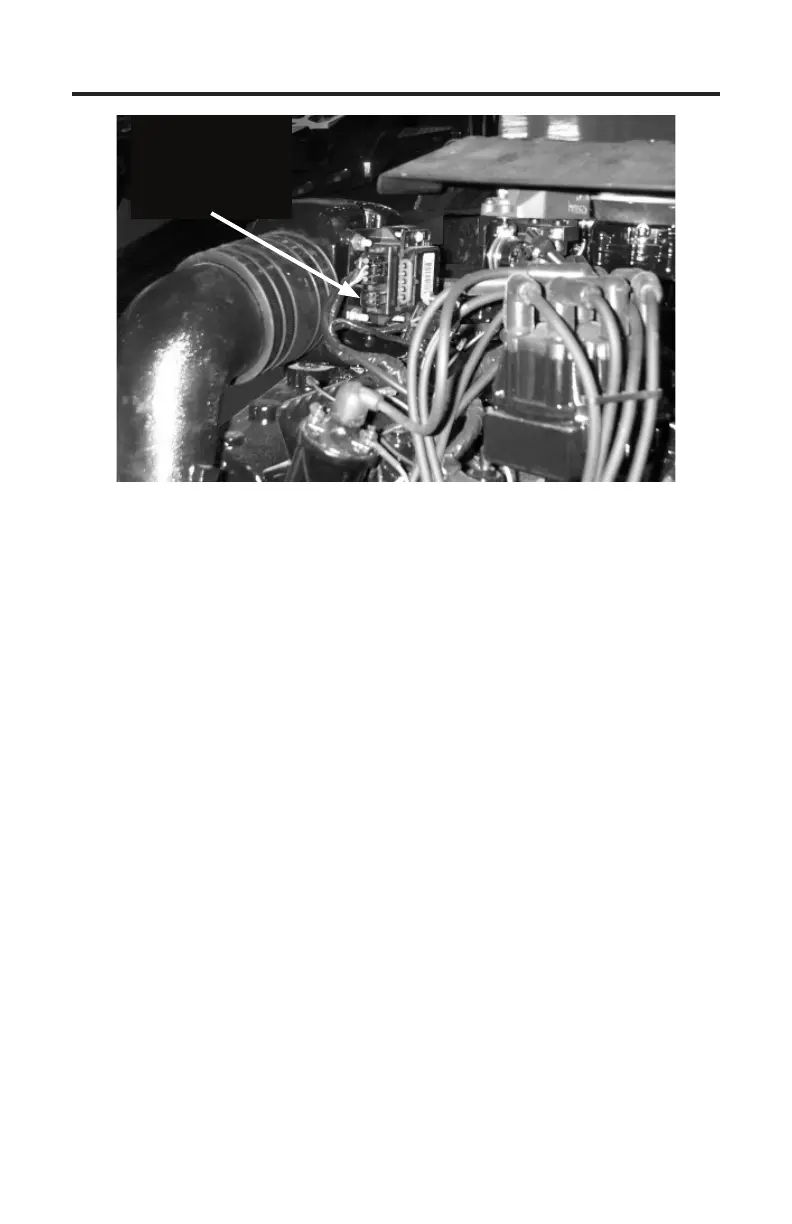
Figure 33
Location of 3rd Generation Thunderbolt V Module
Unplug 4 pin engine
harness connector
and plug adapter in
here
Obtaining Data
e underbolt V module is capable of providing engine operating history
information to the TechMate Pro scan tool. In order for the module to commu-
nicate this information to the scan tool the Engine must be OFF. Aer checking
that you have properly connected the scan tool to the module proceed though
the following steps to extract the module’s data.
1) Aer observing standard safety precautions and ensuring that the scan tool
is correctly connected to the module, place the engine’s ignition switch in the
ON position. DO NOT START THE ENGINE.
2) Choose the ”underbolt V” option from the scan tool’s main menu.
3) e scan tool will now automatically attempt to retrieve data from the un-
derbolt V module. If data is not received within 10 seconds the scan tool will
report that a communication error has occurred. In this situation turn the
engine’s ignition switch to the OFF position and recheck the scan tool con-
nections to the underbolt V module. Also, be sure you have correctly iden-
tied the module as described in “Identifying the underbolt V Version”.
4) Aer the scan tool has successfully retrieved the underbolt V’s data the
information will be displayed for your review.
Please note the scan tool does not continually retrieve information from the
module. Unlike the “live” monitoring functions the scan tool performs on EFI
systems, the underbolt V’s information is not continuously updated while you
are viewing it.


 To Next Page