6 7
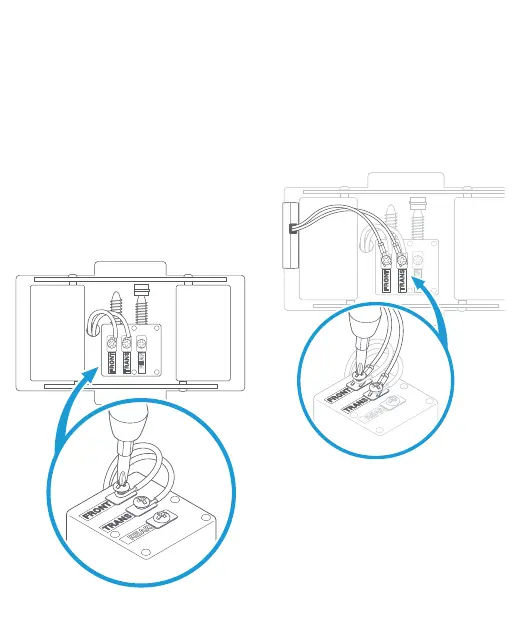
Remove the cover from your
doorbell chime.
After you’ve turned o power at
the breaker, remove the cover from
your chime and set it aside for now.
Loosen the “Front” and “Trans”
terminal screws.
Make sure to keep the existing
doorbell wires in place.
Connect the Pro Power Kit wires.
Connect one wire from the Pro
Power Kit to the “Front” terminal,
and the other to the “Trans”
terminal. It doesn’t matter which
wire you connect to which terminal.
Then re-tighten the terminal screws.
Position the Pro Power Kit
and replace the cover.
Place it within your internal
doorbell, away from any
moving parts.





 To Next Page