- 22 -
OPERATION WITH DELUXE TEMPERATURE CONTROLLERS
Setting the Sound Volume
The sound volume for all Temperature Controllers can be set individually. Note that this can be done
with the Temperature Controllers switched off.
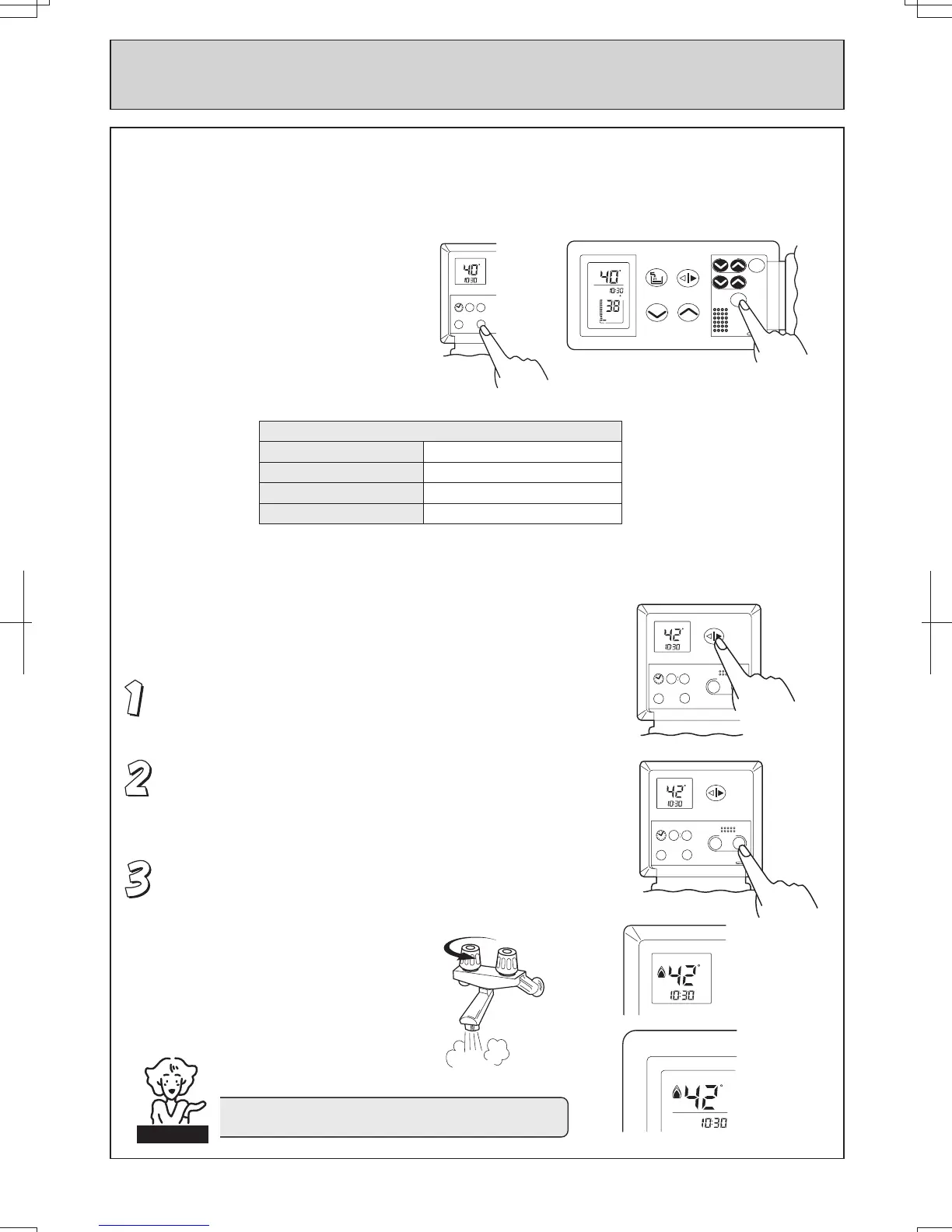
Press the ÔSound Vol.Õ Button located
behind the flip panel.
The volume will change as follows:
Voice Volume
Initial Setting Medium
Press Once High
Press Again Off
Press Again Low
Using Hot Water
The hot water delivery temperature can be controlled from either the Kitchen Controller
(MC-70-1A) or the Bathroom Controller (BC-70-1A).
Deluxe Kitchen Controller
Ensure the system is switched on. When the system is
ON, the monitors will be lit. Ensure the ÔTransferÕ button
is lit. If not, press the ÔTransferÕ button once.
Select the desired temperature using the ÔHot water temp.Õ
buttons. The selected temperature will be displayed on
both the Kitchen and Bathroom Controllers at the top of
each monitor.
Open the hot water tap. The hot water unit will activate
and the red combustion symbol will light on both the
kitchen and bathroom monitors.
CHECK WATER TEMPERATURE BEFORE USE.
CAUTION
Sound
ON/OFF
Transfer
Bath temp.
Water Vol.
C
C
Bath Fill
Hot water temp.
Vol.
BC - 70 - 1A
Clock Hour
Min.
Vo
l.
C
AM
00 00
ON/OFF
Sound
Clock Hour
Min.
Vol.
C
AM
Hot water
temp.
00 00
ON/OFF
MC -70 -1A
Transfer
Sound
Cooler Hotter
Clock Hour
Min.
Vol.
C
AM
Hot water
temp.
00 00
ON/OFF
MC -70 -1A
Transfer
Sound
Cooler Hotter
C
AM
C
HOT
COLD





 To Next Page