Rinnai 27 HW_CF OIM
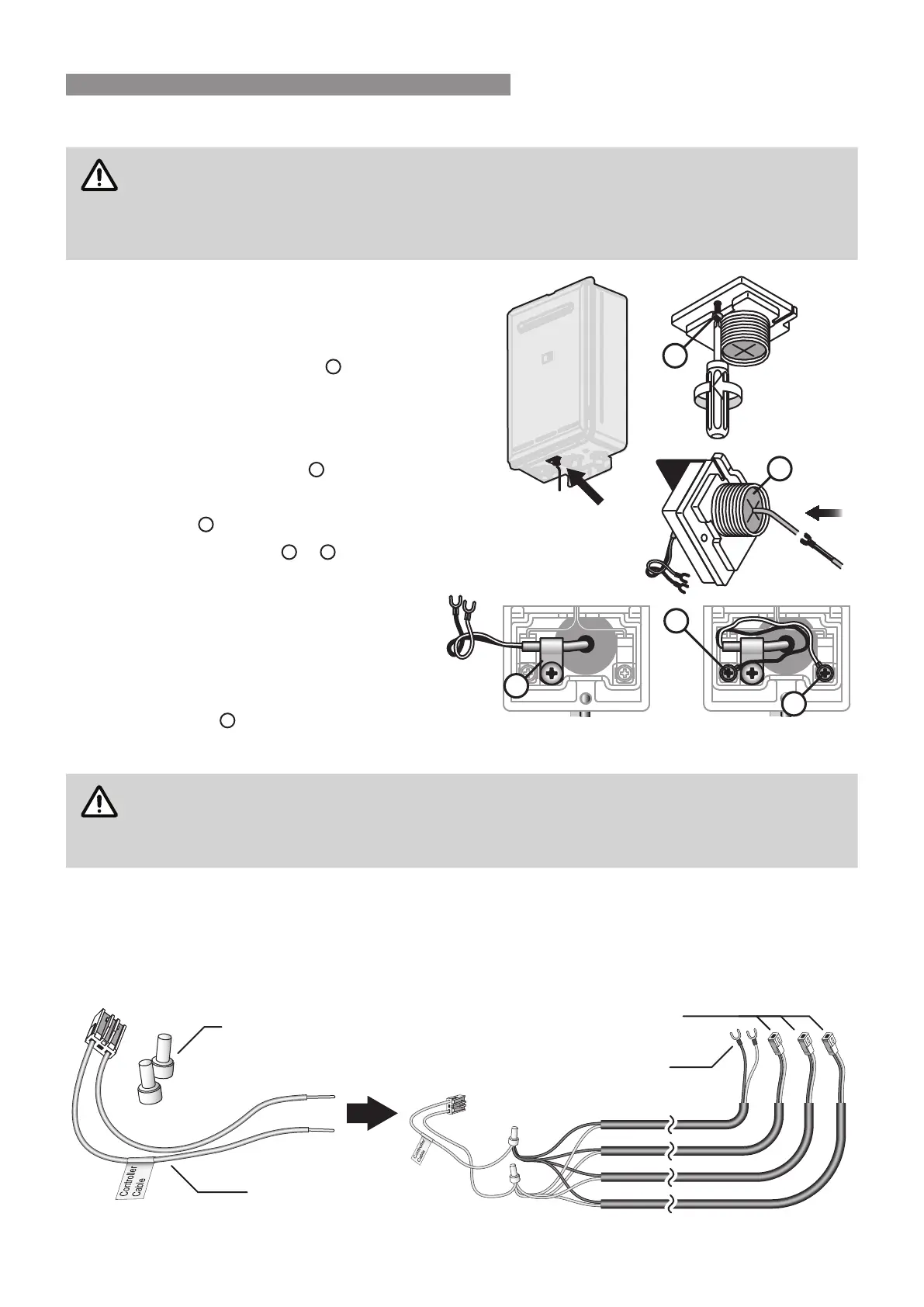
Connecting Communication Cable(s) With 'Ezi connect' (REU-A / REU-AM)
DO NOT attempt to connect cables to the 'Ezi connect' cable connector at the water heater
XQOHVV WKH HOHFWULF SRZHU WR WKH ZDWHU KHDWHU LV VZLWFKHG µRႇ¶ RWKHUZLVH GDPDJH WR HOHFWULFDO
components may occur.
,I \RXU ZDWHU KHDWHU LV QRW ¿WWHG ZLWK DQ (]L FRQQHFW FDEOH FRQQHFWRU LQVWDOODWLRQ PXVW EH
FRPSOHWHGE\DTXDOL¿HGDQGOLFHQVHGWUDGHVSHUVRQ
1. Isolate the electric power supply by switching
WKH SRZHU SRLQW Rႇ DQG UHPRYLQJ WKH SRZHU
plug of the water heater from the electric power
socket.
2. Remove the retaining screw
A
of the 'Ezi
connect' cable connector at the base of the
appliance.
3. Swing the 'Ezi connect' cable connector door
open and thread the cable through the weather
seal of the cable access hole
B
in the direction
VKRZQDOORZLQJVXႈFLHQWFDEOHOHQJWKVRWKDW
the sheath of the cable can be secured with
cable clamp
C
.
Loosen screw terminals
D
&
E
and connect
the cable spade connectors to these terminals
and re-tighten.
Polarity is not important, either wire colour can
be connected to either terminal.
5. Return the 'Ezi connect' cable connector to
the original position taking care not to damage
cable wires in the process and replace the
retaining screw
A
.
Connecting Communication Cables to Mini-Plug (REU-E & REU-VCM)
Installation MUSTEHFRPSOHWHGE\DTXDOL¿HGDQGOLFHQVHGWUDGHVSHUVRQ
DO NOT attempt to connect water controller cables to the mini-plug when it is plugged into the
3&%XQOHVVWKHHOHFWULFSRZHUWRWKHZDWHUKHDWHULVVZLWFKHGµRႇ¶RWKHUZLVHGDPDJHWRHOHFWULFDO
components may occur.
Water controllers are connected to the PCB via a dedicated pre-wired mini-plug (supplied).
Use the supplied electrical cable connectors to terminate the water controller wires to those of the mini-plug. The
existing spade connectors of the communication cables will need to be removed prior to termination. Controllers
are not polarity sensitive, however to avoid confusion it is recommended that like coloured wires be terminated
together.
A
C
E
D
B
Electrical Connectors
(Supplied with Water Controllers)
Communications Cable
MC-100V, MC-503RC-M
Pre-wired Mini-Plug
(Supplied)
Communications Cable
MC-91Q, MC-601Q, BC-100V
WATER CONTROLLER INSTALLATION




 To Next Page