ARBOTOM
®
- Manual 51
Software:
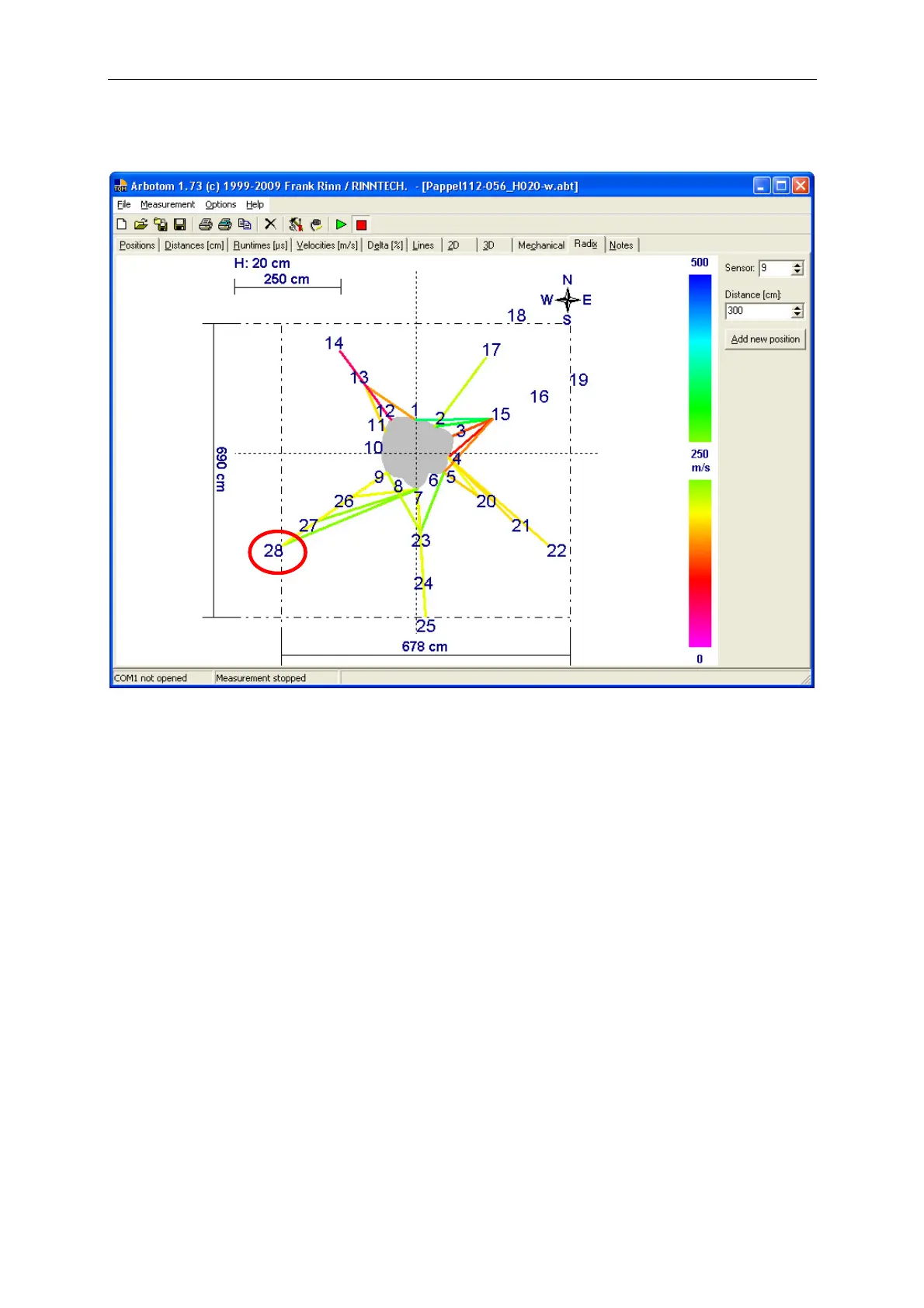
Sensor: Insert in front of which sensor you want to measure. The sensor you want to choose
is always the sensor, which is in a straight line between the measuring point and
center of the tree.
Distance: Distance between the measuring point and the chosen sensor on the tree.
Example: The measuring point 28 is in 300cm distance to sensor 9
.
How the measurement is done:
Step 1: Safe the data of the stem base tomography. Now safe this file again under a new
name (e.g. oak_root) and delete all measured values from this new file.
Step 2: Connect the cable of the root sensor to the last sensor of the sensor chain and switch
on the Battery Pack. The LED of the root sensor should now show a yellow light, the
other sensors should show a green light.
Step 3: Make sure that the sensor positing is on “absolute” and “cm” (compare page 16).
Click on the “Radix” table and open the options. Change the minimum velocity to 0
m/s and the maximum velocity to 500 m/s
.
Close the options-window


 To Next Page