EasyManua.ls Logo

Robe ROBIN MegaPointe Wireless DMX - 2 Fixture Exterior View

Robe ROBIN MegaPointe Wireless DMX
59 pages
Print Icon
To Next Page IconTo Next Page
To Previous Page IconTo Previous Page
Loading...
5
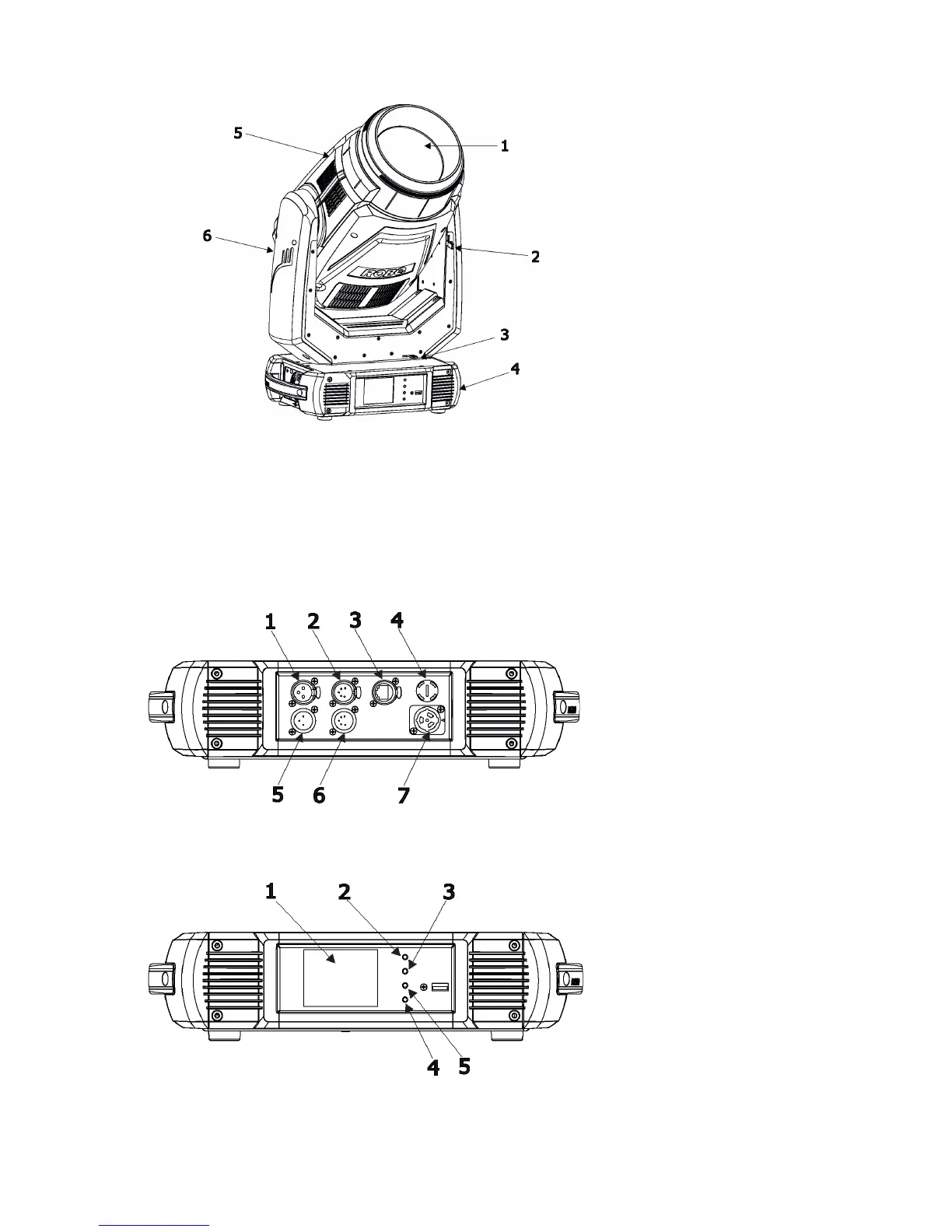
2. Fixture exterior view
Rear panel of the base:
1 - 3-pin DMX Out
2 - 5-pin DMX Out
3 - Ethernet
4 - Fuse holder
5 - 3-pin DMX In
6 - 5-pin DMX In
7 - Power
Front panel of the base:
1 - QVGA touch screen
2 - ESCAPE button
3 - NEXT button
4 - ENTER/DISPLAY ON button
5 - PREV button
The head should be locked for transportation - both tilt lock latch (2) and pan lock latch (3) have to be in locked
positions. Move these latches to unlock positions before operating the xture.
1 - Front lens
2 - Tilt lock
3 - Pan lock
4 - Base
5 - Moving head
6 - Arm
The ENTER/DISPLAY ON button also serves for switching the display on when the xture is disconnected
from the mains.

Related product manuals