9
Note:If when setting up your speaker your Android device complains that it cannot
connect to the internet this is because it is temporarily connected directly to your
VSHDNHU<RXVKRXOGLJQRUHWKLVZDUQLQJPHVVDJH
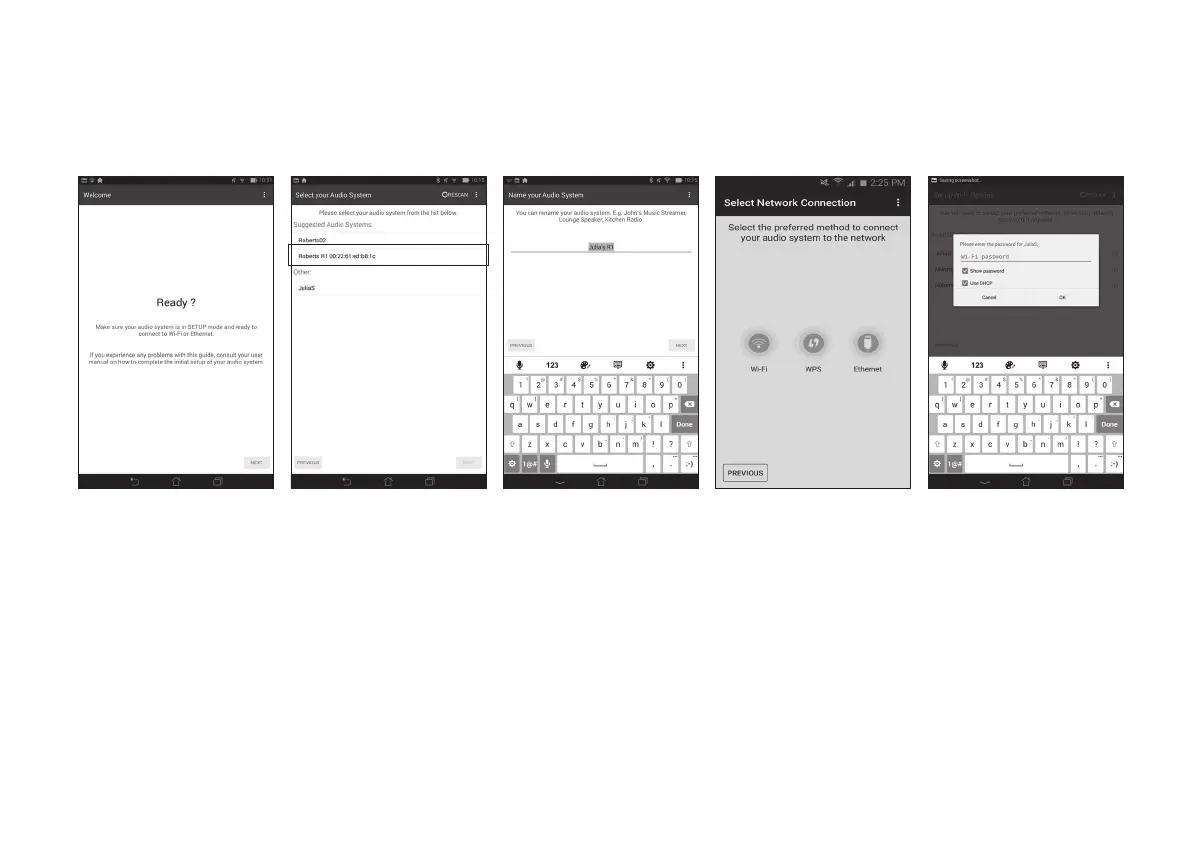
1. Open the UNDOK
app.
2. Setup a New Audio
system.
3. The app will show a
list of suggested audio
systems to setup.
Step 3 - Setup new audio system - Android device
If your device is an iPhone or iPad (i.e. uses iOS) please see page 8.
The UNDOK appKDVDVHWXSZL]DUGWRKHOSFRQ¿JXUHVXLWDEOHDXGLRGHYLFHVWRFRQQHFWWR\RXUKRPH:L)LQHWZRUN
4 <RXU VSHDNHU ZLOO
normally appear in
this list as R1. It may
appear in the list below
called Other. Select the
speaker to be setup.
6. Choose whether it is
connected via WiFi or
Ethernet. If you wish
to connect using an
Ethernet cable please
(see page 39).
7. For a WiFi connection
the app will ask you to
choose a WiFi network
and enter the appropriate
password.
8. The Network Status
indicator on your
VSHDNHUZLOOVWRSÀDVKLQJ
and will go off when it has
successfully connected
to your network.
5. Use the app to complete
the speaker setup,
including giving the
speaker a name (living
room, etc).



 To Next Page