30
Multi-room
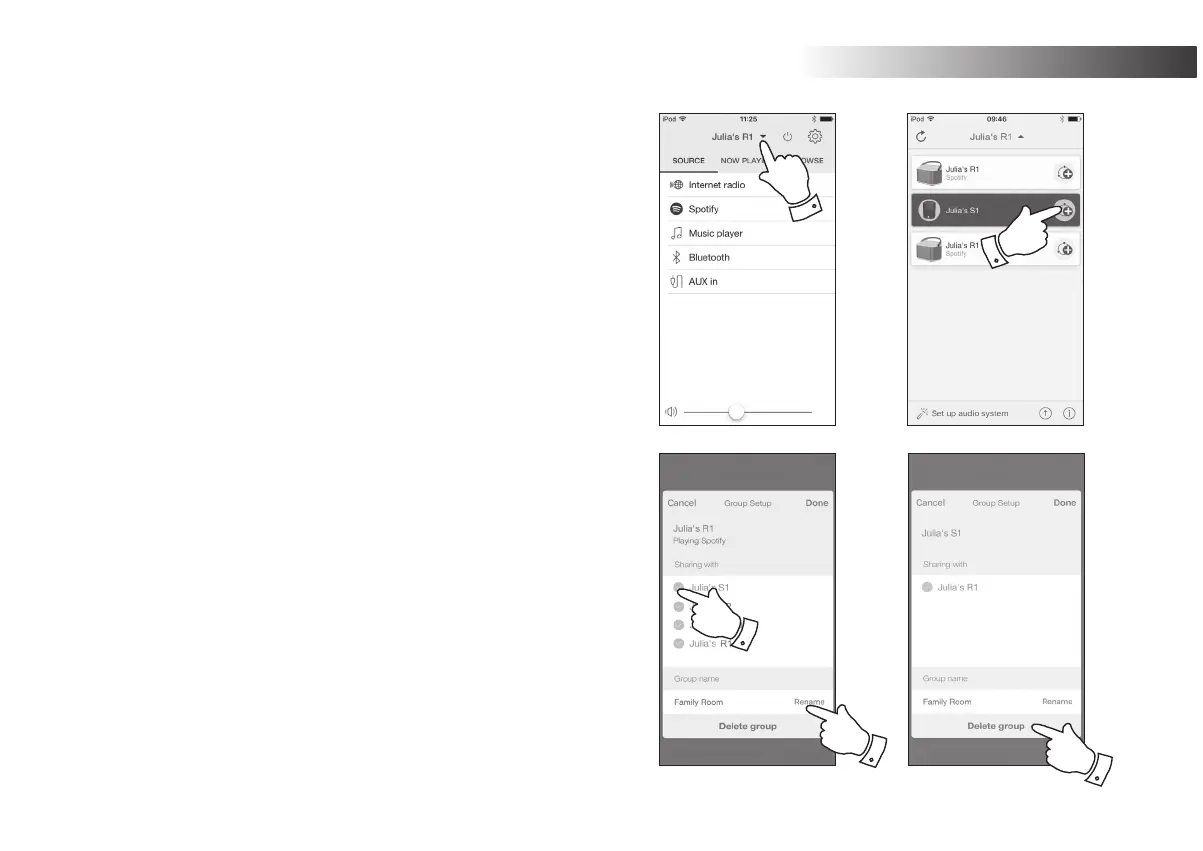
Creating and editing a multi-room group with UNDOK
<RXFDQXVHWKH81'2.DSSWRFRPELQH\RXU5VSHDNHULQWRDJURXS
with the other multi-room products.
Note: <RXPD\DGGXSWR¿YHFRQQHFWHGDXGLRSURGXFWVLQWRDQ\RQHJURXS
1. Access your list of connected audio products within UNDOK.
2. A list of audio products connected to your network will be shown.
3. Select the edit group icon.
4. UNDOK will show the group setup screen and a list of the products
available for grouping.
5. Select the audio products that you wish to add into your group
D PD[LPXP RI IRXU DGGLWLRQDO SURGXFWV <RX PD\ DGG RU UHPRYH
products as needed.
<RXPD\UHQDPH\RXUJURXS IRU H[DPSOH 'Family Room' or 'Down
Stairs' etc.
&RQ¿UP\RXUVHOHFWLRQ
<RXPD\FKRRVHWRGHOHWHDJURXS7KHSURGXFWVWKDWZHUHSUHYLRXVO\
in the group will then be listed as individual products.
1
3
5
6
8



 To Next Page