17
/RFDWLQJDQGSOD\LQJPHGLD¿OHVXVLQJ83Q3
2QFH WKH 83Q3 VHUYHU KDV EHHQ FRQ¿JXUHG WR VKDUH PHGLD ¿OHV ZLWK
\RXUVSHDNHU\RXPD\VHOHFWWKH¿OHVWKDW\RXZLVKWRSOD\DVIROORZV
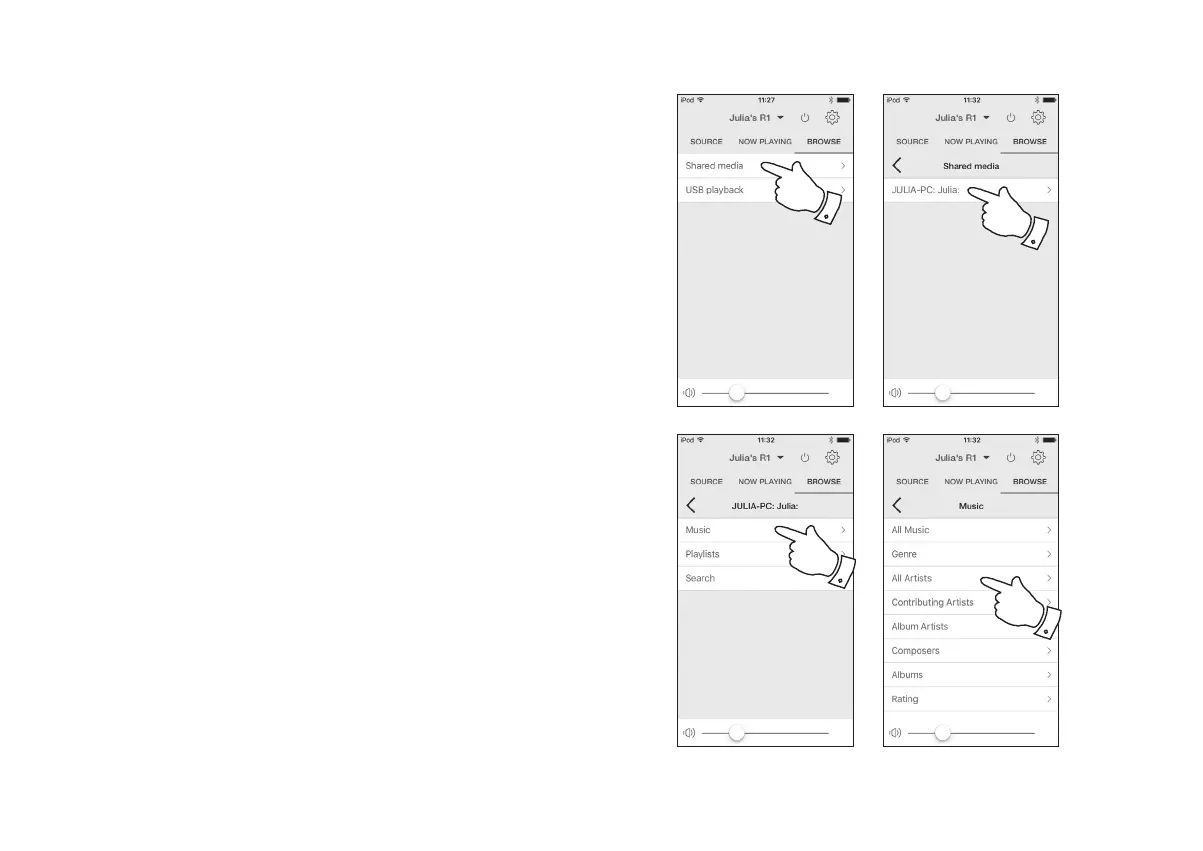
1. Ensure your speaker is switched on. Select Music Player as the music
source. Select 'Browse' and the main Music Player menu will then be
displayed.
2. Select 'Shared media' to cause the speaker to scan for UPnP servers.
Note that it may take a few seconds for the speaker to complete its
scan.
3. After a successful scan select your UPnP server. If the display shows
multiple media types, select 'Music'. (Some UPnP servers can serve
pictures and video content to suitable devices.)
4. UNDOK will now list the media categories which are made available
by the UPnP server - for example, 'Album', 'Artist' and 'Genre'. Select
which category you wish to browse.
If you wish to use the search function select 'Search'<RXPD\VHOHFW
characters to build a keyword for searching for content to play.
:KHQ\RX¿UVWVHWXSVKDULQJZLWKD83Q3VHUYHUQRWDOORI\RXU¿OHVZLOO
EHDYDLODEOHLPPHGLDWHO\7KH83Q3VHUYHUPXVWORRNLQVLGHHDFK¿OHWR
identify the artist and album information from 'tags' embedded in them.
The server may also need time to access the Internet to obtain additional
information such as 'album art' which it can display when you examine
\RXUPXVLFOLEUDU\RQ\RXU3&RUGHYLFH)RUDOLEUDU\RIPDQ\¿OHVWKLV
can take some time.
2
3
3
4



 To Next Page