20
3OD\LQJ¿OHVIURP86%PHPRU\GHYLFHV
1. Carefully insert the USB memory device into the USB socket at the
back of the speaker.
2. Ensure your speaker is switched on.
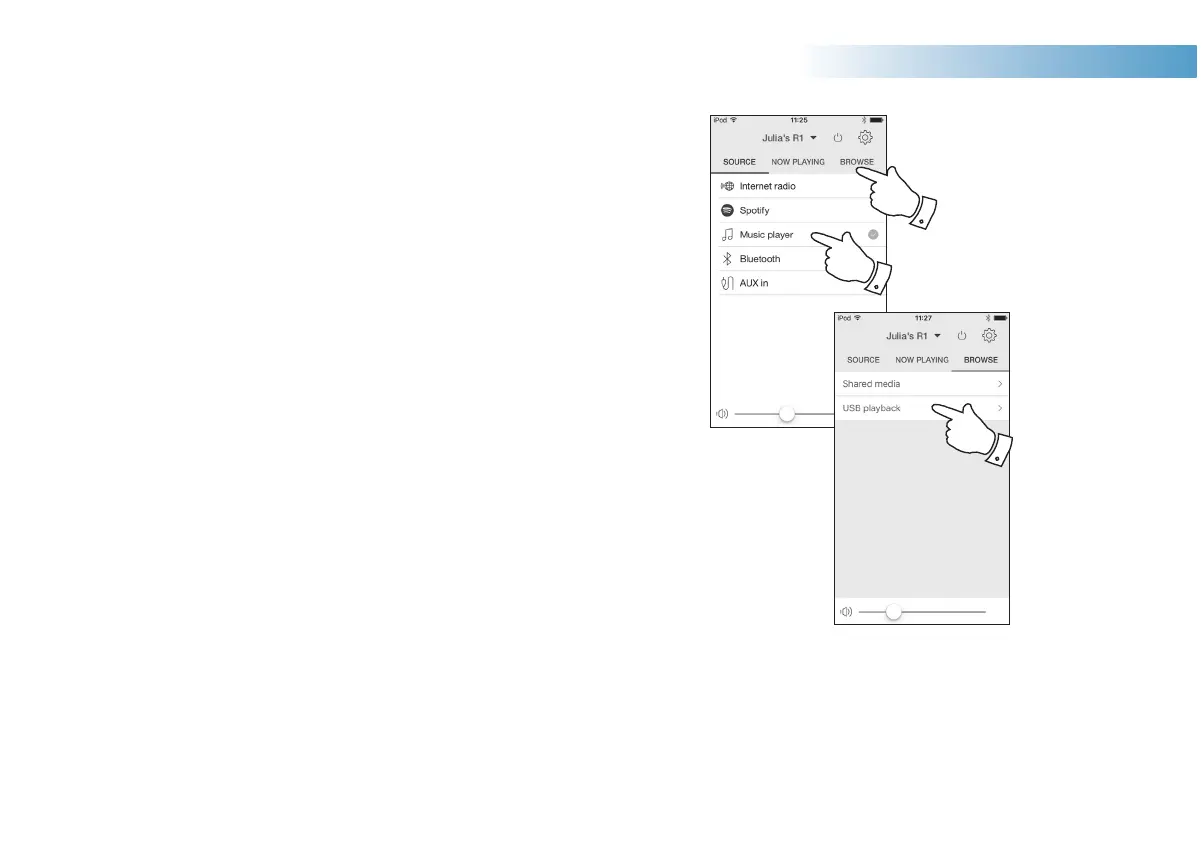
3. Select Music Player as the music source. Select 'Browse' and the
main Music Player menu will then be displayed.
4. Select the 'USB playback' option. UNDOK will now list the content
VWRUHGRQWKH86%PHPRU\GHYLFH,IWKHUHDUHPDQ\¿OHVRUIROGHUV
this may take a few seconds.
5. Select the required folder. The list of current tracks will then be displayed.
Alternatively if you have nested folders (such as album folders within
an artist folder) then you simply step to the next folder level.
6HOHFWWKHKLJKOLJKWHGWUDFN$OO¿OHVLQWKHFXUUHQWIROGHUZLOOWKHQEH
played in turn.
)LOHVDUHVRUWHGE\¿OHQDPHLQQXPHULFDOSKDRUGHU$=EHIRUH
EHLQJSOD\HG$OEXPVZLOOSOD\LQWKHFRUUHFWRUGHULIWKH¿OHQDPHEHJLQV
with the track number (use leading zeroes if more than 9 tracks).
&RQWUROOLQJSOD\EDFNIURPWKH86%PHPRU\GHYLFHLQFOXGLQJ6KXIÀH
and Repeat functions is explained on page 18.
3
3
4
Music Player



 To Next Page