LiPo[0] Balance
2.0A 11.1V(3S)
6.2 Charging Lithium battery at balance mode
This is for balancing the voltages of Lithium batteries of the battery park to be
charged. The battery pack to be charged should be connected to the suitable
balance port at the right side of the charger. And also, you need to connect the
battery out put plug to the output of charger.
In this mode, the charging process will be different from ordinary charging mode.
The internal processor of the charger will monitor the voltages of each cell of the
battery pack and controls charging current that is feeding to each cell to
normalise the voltage.
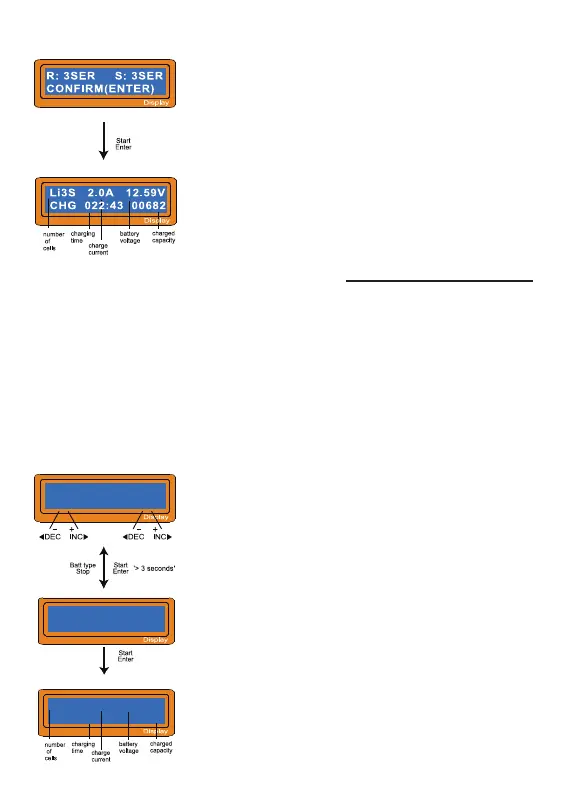
This shows the number of cells you set up and the
process or detects. ‘R’: shows the number of cells
found by the charger and ‘S:’is the number of cells
selected by you at the previous screen. If both
numbers are identical you can start charging by
press Start/Enter button. If not, press Batt Type/
Stop button to go back to previous screen. Then
carefully check the number of cells of the battery
pack to charge again. The screen shows the
present situation during charge process. To stop
charging press Batt Type/Stop key once.
The value on the left side of second line sets a charge
current and the value on the right side of second line
sets the voltage of the battery pack. After setting the
current and voltage press Start/Enter key for more
than 3 seconds to start the process. (Charge current:
0.1~6.0A LD60, 10.0A LD100, Voltage: 2~4S)
This shows the number of cells you set up and the
processor detects. 'R': shows the number of cells
found by the charger and 'S': is the number of cells
selected by you at the previous screen. If both
numbers are identical you can start charging by press
Start/Enter button. If not, press Batt type/Stop button
to go back to previous screen. Then carefully check
the number of cells of the battery pack to charge
again. The screen shows the present situation during
charge process. To stop charging press Batt type/Stop
key once.
-10-
R:3SER S:3SER
CONFIRM(ENTER)
R:Li3S 1.2A 12.59V
BAL 022:43 00682


 To Next Page