14
Routine Maintenance
Robot Sensors
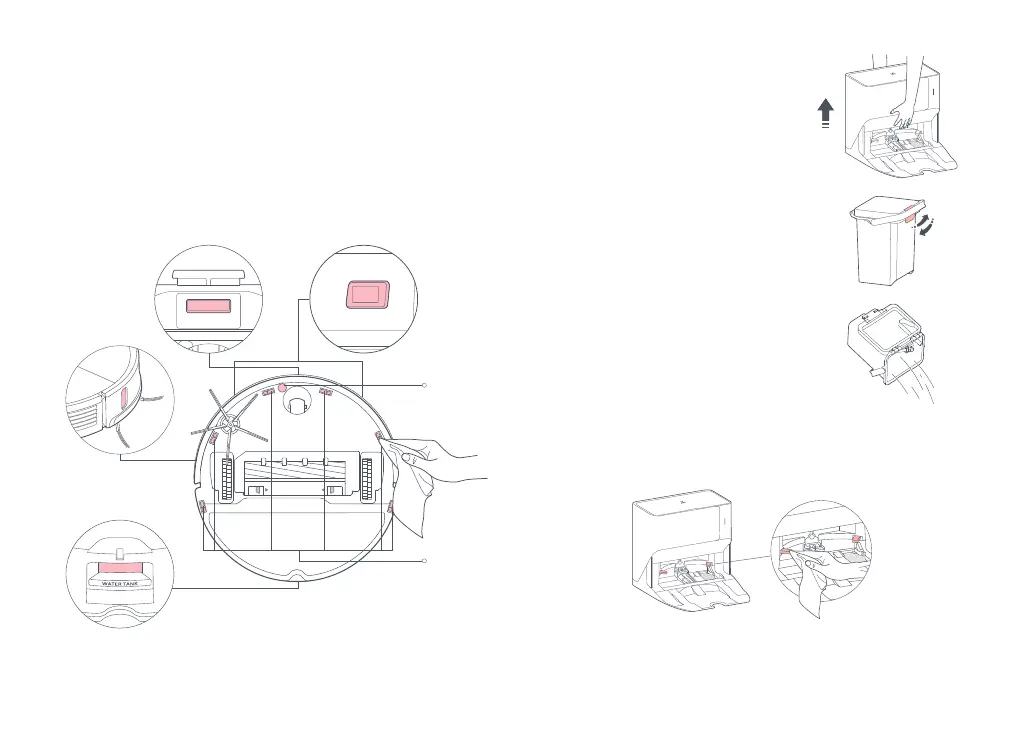
Use a soft, dry cloth to wipe and clean all sensors, including:
1. The dock locator and charging contacts in the front.
2. The wall sensor on the right.
3. The carpet sensor and six cliff sensors on the bottom.
4. The mop wash sensor in the rear.
Carpet
Sensor
Six Cliff
Sensors
Dock Locator
Wall Sensor
Mop Wash Sensor
Charging
Contacts
Moving the Dock
To move the dock, grip the handle on the
back with one hand and the inner side of
the front board with the other hand, as
shown below. Do not grip the base as it is
not designed for lifting.
Notes:
• To prevent corrosion or damage, only use the Roborock
branded floor cleaner in the water tank.
• To avoid deformation, only use cold water.
• If any water stains remain on the outside of the water tank, wipe
them with a soft dry cloth before reinstalling the tank.
Dirty Water Tank
Clean the dirty water tank as needed.
Open the dirty water tank lid and pour
out the dirty water. Fill the tank with clean
water, close the lid, lock it, and shake.
Pour out the dirty water. Close the lid and
then re-install.
Charging Contact Areas
Use a soft, dry cloth to wipe the charging contacts on the dock.



 To Next Page