15
Routine Maintenance
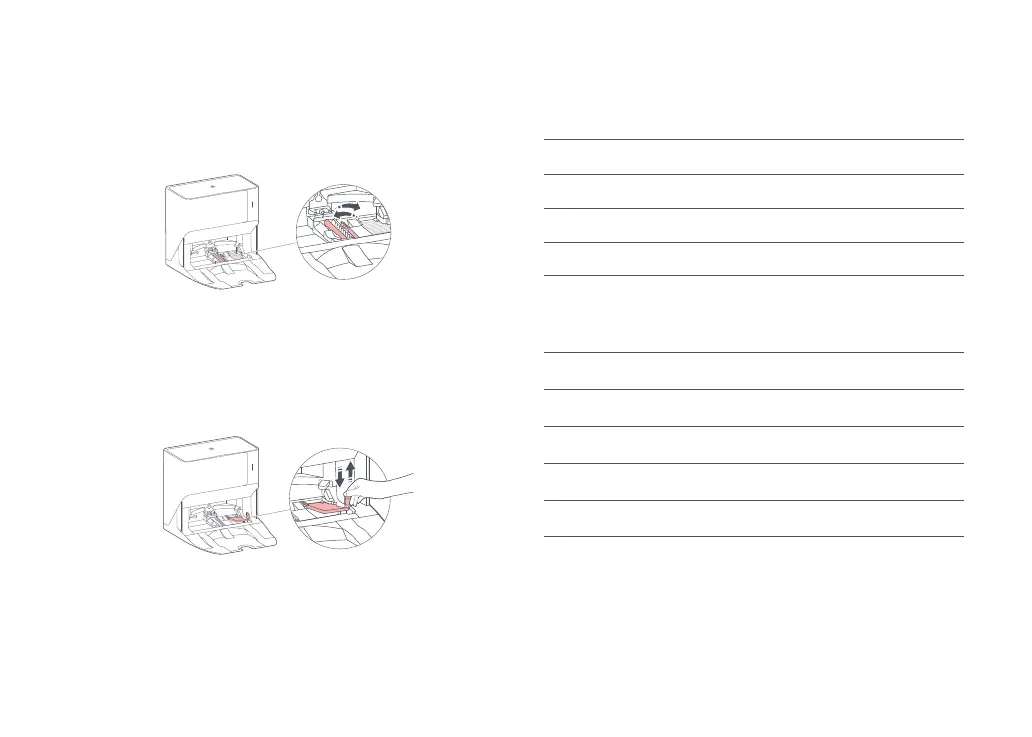
High-Speed Maintenance Brush
1. Lift the high-speed maintenance brush latch and remove the
brush, as shown below.
2. Remove any entangled objects in the high-speed maintenance
brush and rinse it clean. Reinstall the brush and latch it in place.
Water Filter
Unlock the water filter and remove it for washing. Use a soft, dry
cloth to wipe the cleaning tank, and then reinstall the filter. Press
down the filter until you hear it lock with a click.
Battery
The robot is equipped with a built-in high-performance lithium-ion
rechargeable battery pack. To maintain battery performance, keep
the robot charged during normal use.
Note: If the robot will be left unused for a long period, turn it off and charge it at least every
three months to avoid battery damage caused by over-discharge.
Basic parameters
Note: The serial number is on a sticker on the underside of the robot.
Model S300RR
Battery 14.4 V/5200 mAh lithium-ion battery
Rated Input 20VDC 1.8A
Charging Time < 6 hours
Name Wash and Fill Dock
Model WFD01HRR
Rated Input 100-240VAC 50-60Hz 0.8A
Rated Output 20VDC 1.8A
Charging Battery 14.4 V/5200mAh lithium-ion battery
Dock
Robot



 To Next Page