page16
Get your model ready to fly
2. Make sure all servo arms are fully vertical. If not, adjust the servo arm by using the trim
function on your radio. Note: For computerized transmitters, use the servo/channel
sub-trim feature to make each servo arm fully vertical.
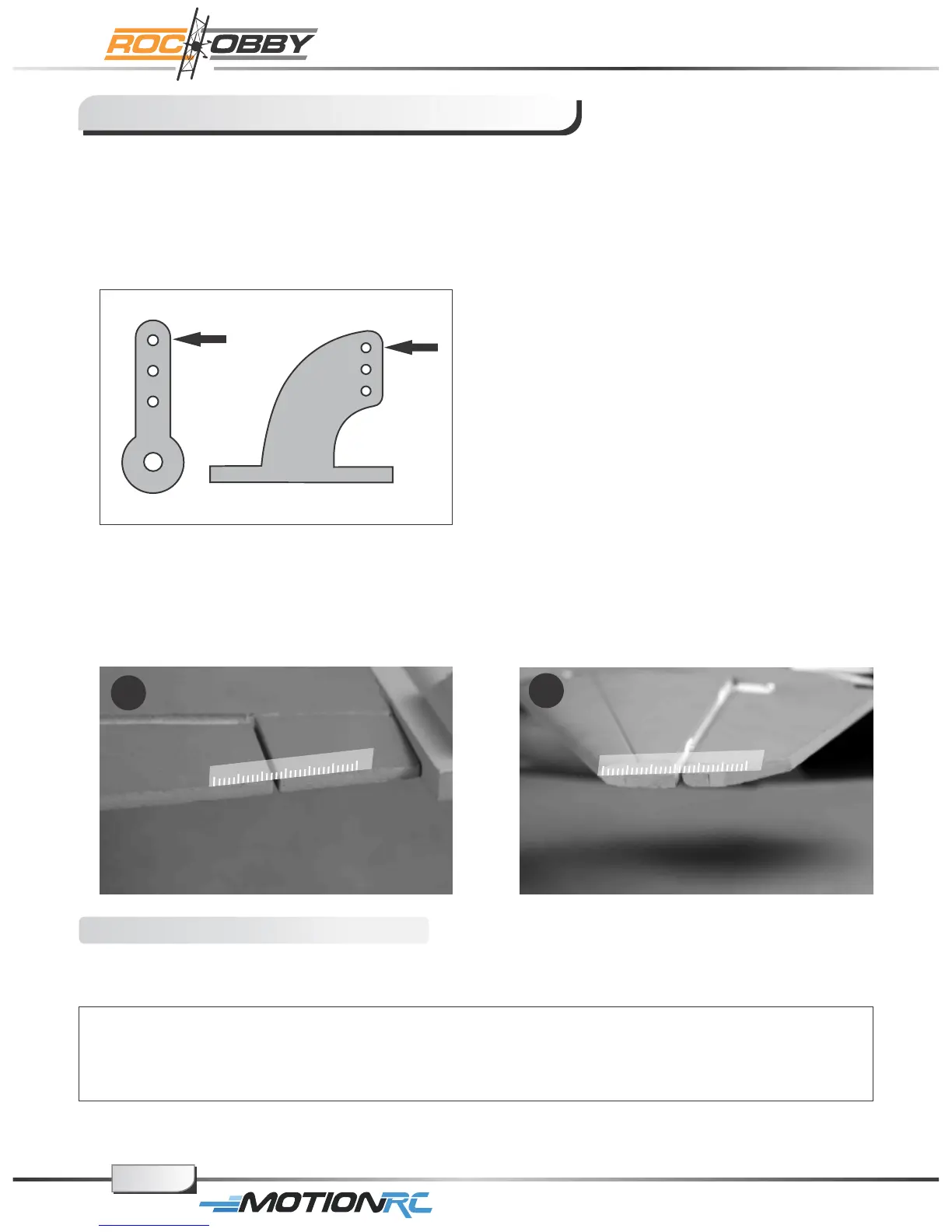
3. The standard hole settings for linkage connections are shown by the black arrows in the
the diagram below. You can move the linkage to different hole positions to increase
control surface travel and increase the aerobatics of the airplane.
4. Align the control surface with the wing root by turning the clevis clockwise and
counterclockwise on the linkage, carefully open the clevis fork and put the clevis pin in
the desired hole of the control horn.
Note: Please secure the clevis with provided piece of tube after the alignment of the
surface is completed.
Check the control throws
The suggested control throw settings for ROC HOBBY are as follows (Dual rate setting):
High Rate Low Rate
Elevator 15mm up/down 10mm up/down
Aileron 17mm up/down 11mm up/down
Front landing gear steering: left/right 30 degree
Tips: At first flight, fly the model in low rate. The first time you use high rates, be sure to fly
at low to medium speeds. High rates, as listed, are only for EXTREME maneuvering.
4.1
4.2
For More Info Vist: www.motionrc.com



 To Next Page