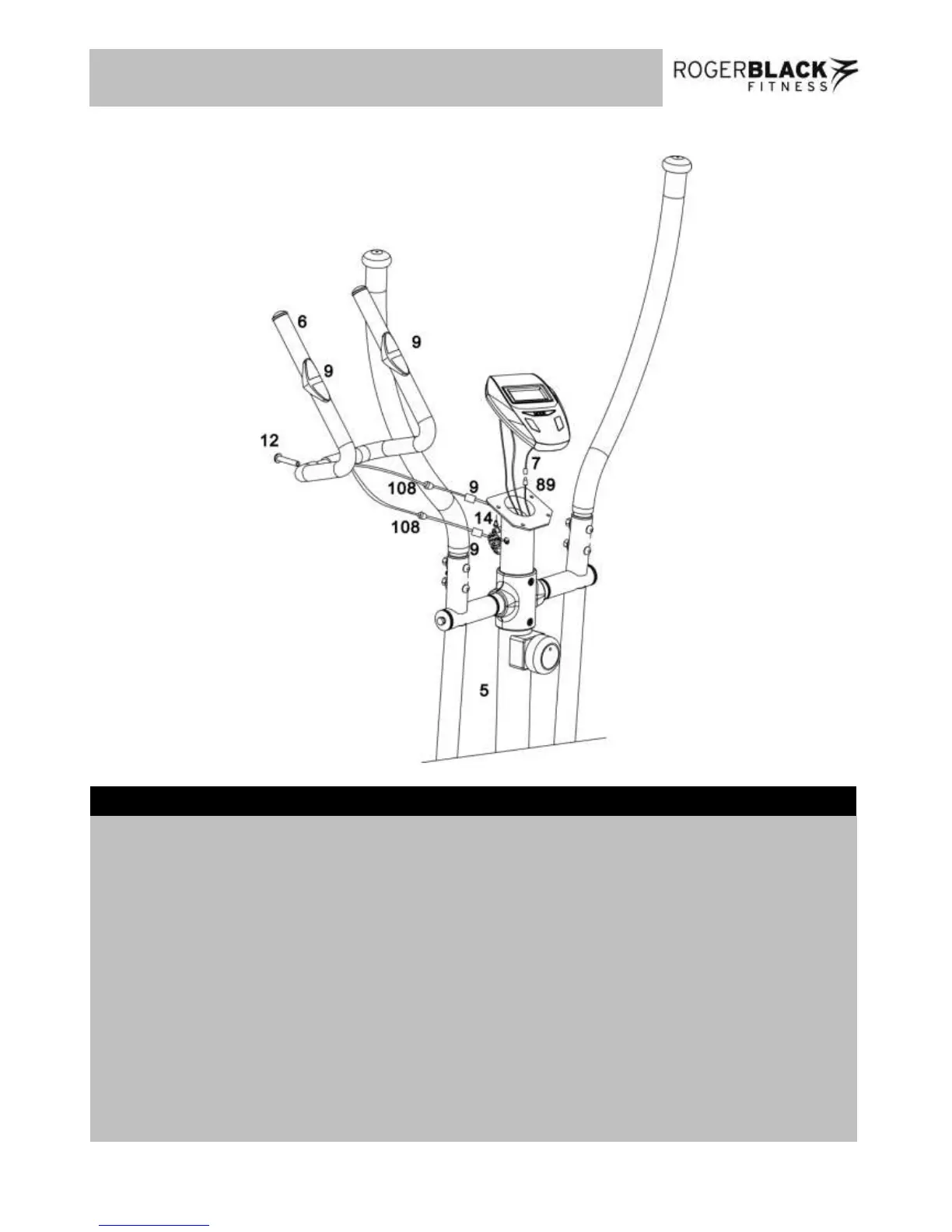
a. Remove the battery cover from the back of the Computer (7) and insert two AA batteries.
b. Connect Sensor WireⅠ(89) to the sensor wire from Computer (7).
c. Loop two pulse sensor wires (7) through the hole on the top of Front Post ( 5), then out from the two
side holes of the Front Post ( 5).
d. Attach the Computer (7) to the bracket on the top of the Front Post (5) using 2 x 10mm Dome Head
Philips Bolts (14). Note:Two bolts (14) were pre-fixed to the back of the Computer (7).
e. Attach the Handle Bar (6) to the bracket on the Front Post (5) using 1 x 40mm Allen Bolt (12).
f. Connect two pulse sensor wires from Computer (7) to pulse sensor wires from two Handle Pulse
Sensor (9), feed the redundant wires into the Front Post (5) from two side holes, then cover the two
holes by using 2 x Wire Holder Rings (108) pre-fitted.


 To Next Page