Roksan Audio ltd K2 Stereo Power Amplifier User Manual
CLASSIFICATION: General Use Version 1.02
All specifications are liable to change without notice. E&OE Page 5 of 11 ENGLISH
CONNECTING MAINS POWER
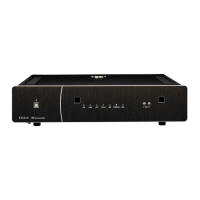
Please refer to the front & rear panel view on Page 4. The moulded IEC connector of the supplied mains
lead should be plugged into the socket (9) on the rear of the unit first and then plugged into the mains supply.
The Mains power switch (2) is on the front underside of the Stereo Power Amplifier. This switch can be left on; if
however the amplifier is likely to be unattended for a long period, switch it off and unplug the mains lead from the
wall.
Signal Input Connections:
There are two types of input on the K2 Stereo Power Amplifier, the ‘TRIMMED’ column
of L & R ‘Trim-able’ Inputs (2) and the ‘STRAIGHT’ column of L & R ‘Straight’ Inputs (1).
Input Selector Switch (5) should be set to ‘Straight’ or ‘Trimmed’ according to the inputs that are intended for use.
All the inputs use Gold plated RCA Phono Connectors and should be connected according to the standard
convention – Right Channel – Red; Left Channel – Black or White.
Also in accordance with standard practice, the Upper row of Phono Sockets carries the Left Channel and the
Lower row carries the Right Channel.
The Input Sockets are labeled with their legends upside down as well as the normal way up to assist you should
you be connecting an input from a position in front of and above the amplifier.
Straight Input Connections:
First set the Input Selector Switch (5) to ‘STRAIGHT’. If you wish to use the amplifier
for multi-amping with the K2 Integrated or purely as a power amplifier, you should connect the pre out of your K2
Integrated , pre-amplifier or surround sound processor to the corresponding Straight Input. The gain of the K2
Stereo Power Amplifier is exactly the same as the power amplifier section of the K2 Integrated Amplifier and
therefore is ideal for Multi-amping (Bi-amping, Tri-amping etc.)
Trimmed Input Connections:
First set the Input Selector Switch (5) to ‘TRIMMED’. If you wish to use the amplifier
for Multi-channel A/V, directly connected to the Kandy DVD 5.1 Dolby Audio output, or as a power amplifier in
an installation requiring its output level to be trimmed down, then the Trimmed Inputs should be used. (e.g. You
should connect the Kandy DVD audio output to the corresponding Trimmed Input of the Kandy Power Amplifier)
These Inputs can then be fully trimmed down by using the Trimmers
(3, 4) on the back panel.
LOUDSPEAKER CONNECTIONS
The Right and Left loudspeakers are connected to the amplifier via the rear panel binding posts (7) and (8)
respectively. There are two basic types of cable –
• Figure 8 cable has two insulated conductors that lie parallel, either side by side, or spaced by insulation.
• Overall sheathed cable has both conductors insulated and enclosed in an overall plastic sheath.
SETUP





 To Next Page