80
Repeatedly playing a portion of the song (A/B Repeat)
You can have a specified section play back repeatedly.
Repeatedly listening to a section of a song is convenient when you’re practicing your
instrument along with the song, or learning the song by ear.
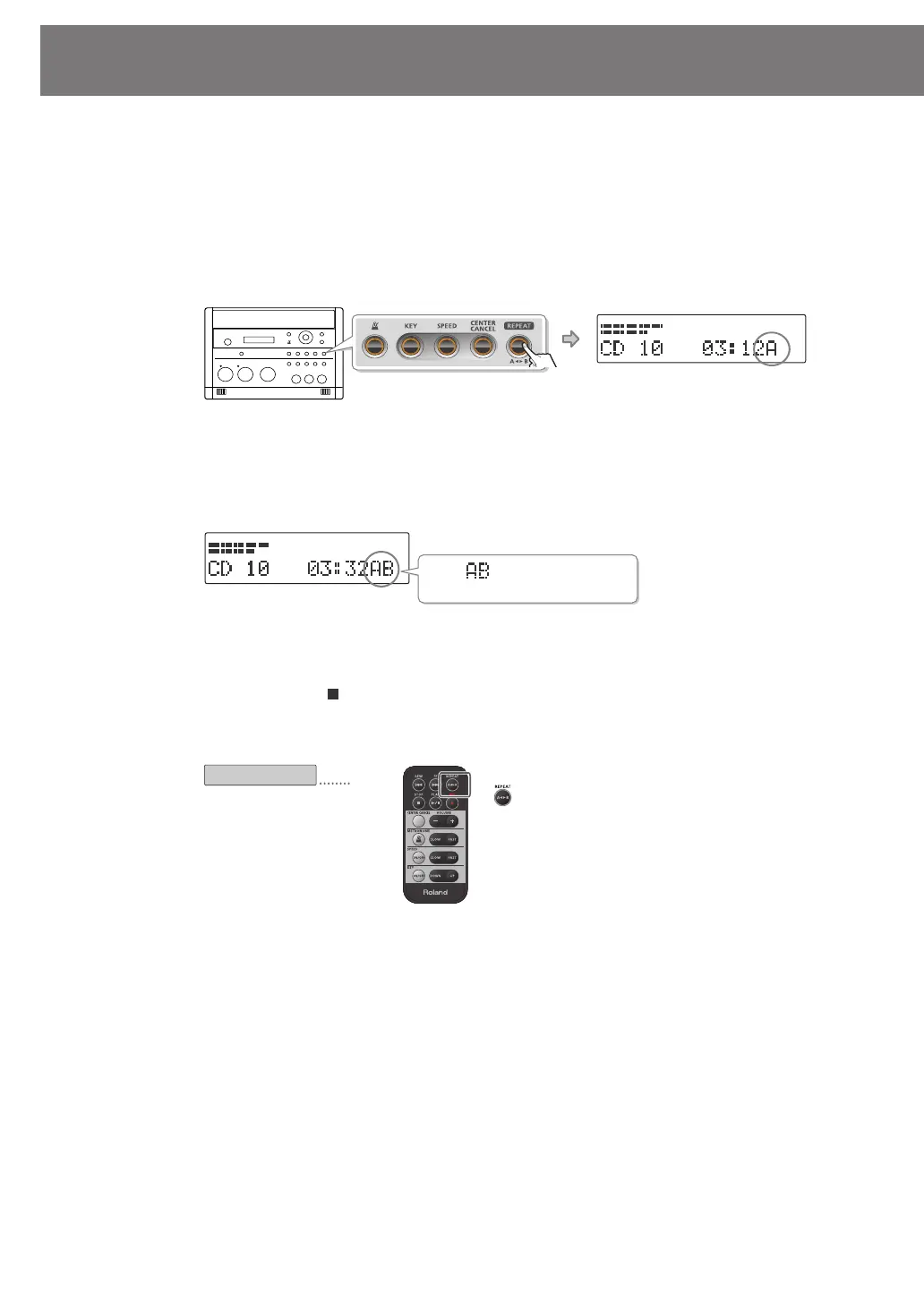
1
During playback, press the [REPEAT] button at the point where you want
Repeat Play to start.
The starting point (A) of A-B Repeat playback is registered, and the Point A icon blinks.
fig.ABrepeat01-e.eps
2
Press the [REPEAT] button once again at the point where you want A-B
Repeat to end.
The end point (B) of A-B Repeat playback is registered, and the A-B region will play back
repeatedly.
fig.ABrepeat02-e.eps
3
To defeat A-B Repeat, press the [REPEAT] button while A-B Repeat
playback is occurring.
If you press the [ ] (Stop) button to stop playback, A-B Repeat playback will also be
cancelled.
fig.ABrepeat-remote-e.eps
Blinking
The “ ” icon is displayed
during A-B Repeat playback.
Register the start/end points for
A-B Repeat.
Remote operations
CD-2u_SD-2u_e.book 80 ページ 2013年1月24日 木曜日 午前11時34分




 To Next Page