Erasing Tracks from a CD-RW Disc
(continued)
93
Advanced UsesRecording Listening Deleting Creating a CD Editing an SD Appendices
Convenient
Functions
Information
/ Display
Checking /
Preparations
Here’s how to erase all tracks from the CD-RW disc.
* In order to perform this operation, you’ll need the included, dedicated AC adaptor.
1
Insert the CD-RW disc that you want to edit.
2
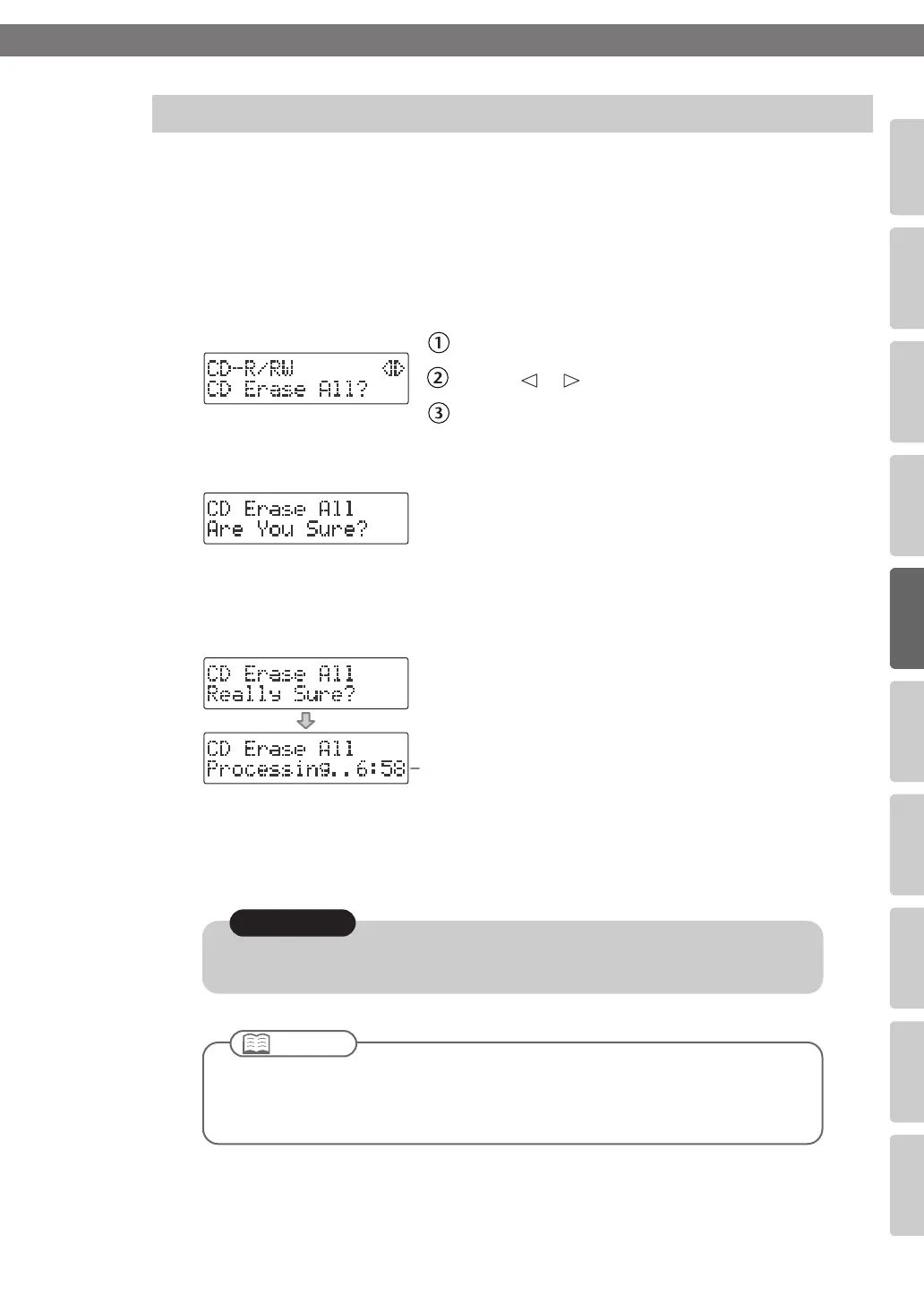
Press the [MENU] button to access the menu screen, and choose “CD
Erase All?”
fig.menu-RWeraseall-e.eps
Press the [MENU] button to access the menu screen.
Use the [ ] [ ] buttons to choose “CD Erase All?”
Press the [ENTER] button to confirm your choice.
3
If you’re sure you want to proceed, press the [ENTER] button.
fig.RWeraseall-mssg01-e.eps
4
If you’re still sure you want to proceed, press the [ENTER] button.
(Note that the process cannot be interrupted once you’ve started it. If you decide that
you don’t want to begin the process, press the [EXIT] button.)
fig.RWeraseall-mssg02-e.eps
The display will show “Processing..,” and all songs will be deleted. During this process,
a timer is displayed, counting down the time until the operation is completed.
When the deletion is completed, you’re returned to the audio source screen.
Erasing All Tracks
Count-down (min:sec)
Once you delete a song, you cannot recover the recorded content. Use this operation with care.
Note
●
You can’t erase tracks from a CD-R disc.
●
If the CD-R/RW disc has been finalized (Page 99), finalization will automatically be
removed when you erase all tracks.
Important
CD-2u_SD-2u_e.book 93 ページ 2013年1月24日 木曜日 午前11時34分




 To Next Page