44
Panel descriptions
1
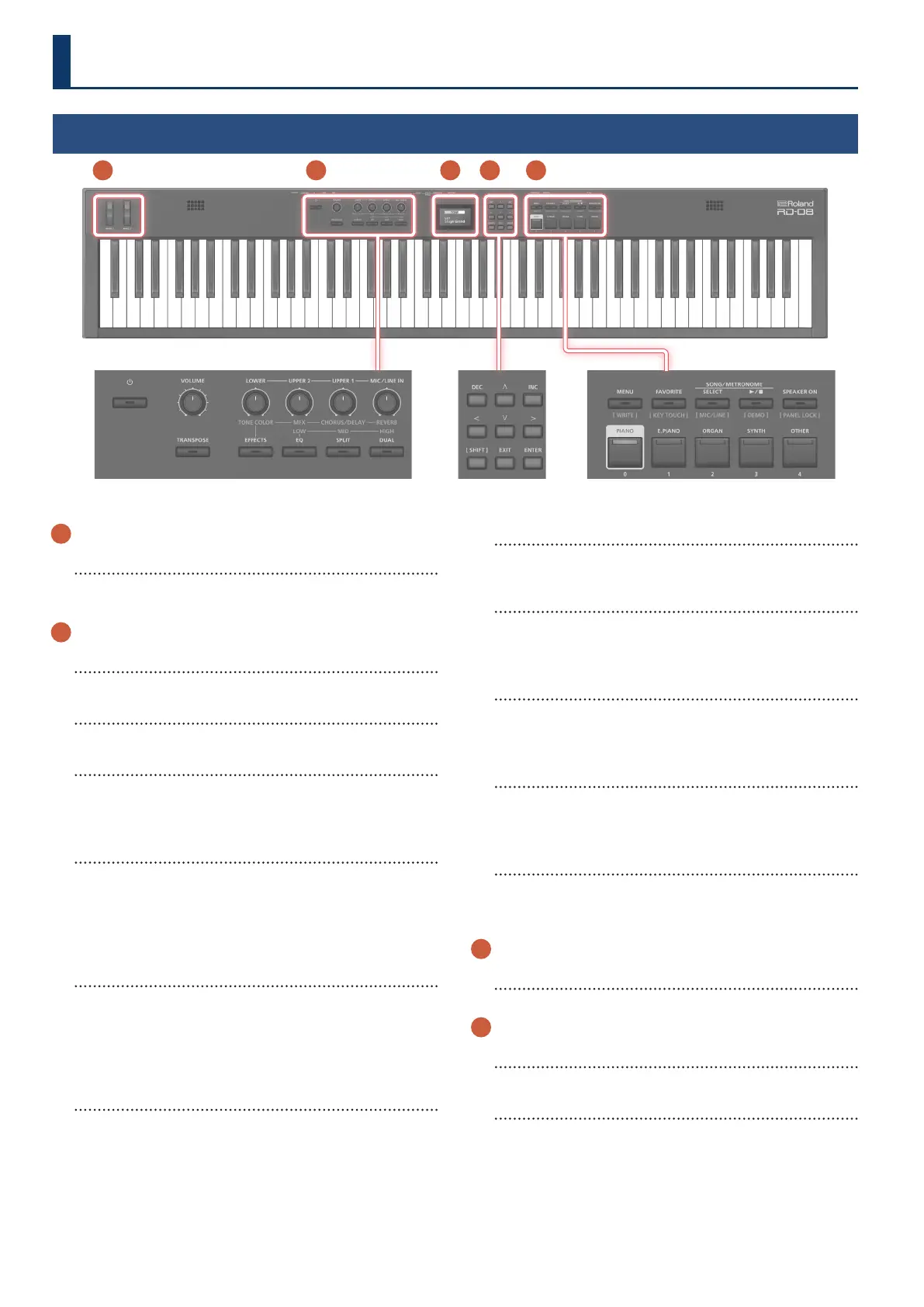
WHEEL 1/2
Turn the wheels to modify the sound.
You can specify the type of change that occurs (p. 15).
2
[Ā] switch
Turns the power on/o.
[VOLUME] knob
Adjust the overall volume of the RD-08.
LEVEL [LOWER] knob
Adjusts the volume of the LOWER zone.
When the [EFFECTS] button is lit, this changes the tonal character
or stereo image.
LEVEL [UPPER2] knob
Adjusts the volume of the UPPER2 zone.
This adjusts how much the eect is applied when the [EFFECTS]
button is lit.
Also, this adjusts the low-band audio volume when the [EQ]
button is lit.
LEVEL [UPPER1] knob
Adjusts the volume of the UPPER1 zone.
This adjusts how much the chorus/delay eects are applied when
the [EFFECTS] button is lit.
Also, this adjusts the midrange-band audio volume when the [EQ]
button is lit.
LEVEL [MIC/LINE IN] knob
Adjusts the MIC/LINE input level.
This adjusts how much reverb is applied when the [EFFECTS]
button is lit.
Also, this adjusts the high-band audio volume when the [EQ]
button is lit.
[TRANSPOSE] button
Press this to shift (transpose) the keyboard to a dierent key
(p. 14).
[EFFECTS] button
Turn this on to adjust the eects.
When the button is on (lit), you can adjust the eects with the four
knobs listed above (p. 15).
[EQ] button
Turn this on to adjust the EQ.
When the button is on (lit), you can adjust the EQ with the three
knobs listed above (p. 16).
[SPLIT] button
Turns the Split Mode on/o (p. 11).
This lets you divide the keyboard into left and right regions and
play a dierent sound in each.
[DUAL] button
Turns the Dual Mode on/o (p. 11).
This layers UPPER 1 and UPPER 2 tones together across the entire
keyboard.
3
Display
Shows the Scene names and the values of various settings, etc.
4
[ç] [æ] [ä] [å] buttons
Press these to switch pages and to move the cursor.
[INC] [DEC] button
Modify values.
If you keep on holding down one button while pressing the other,
the value change accelerates.
Top panel
1 3 4 5 2



 To Next Page