30
Chapter 4. Creating sounds — advanced section
■ Setting the function of the VG-
88’s built-in CTL pedal
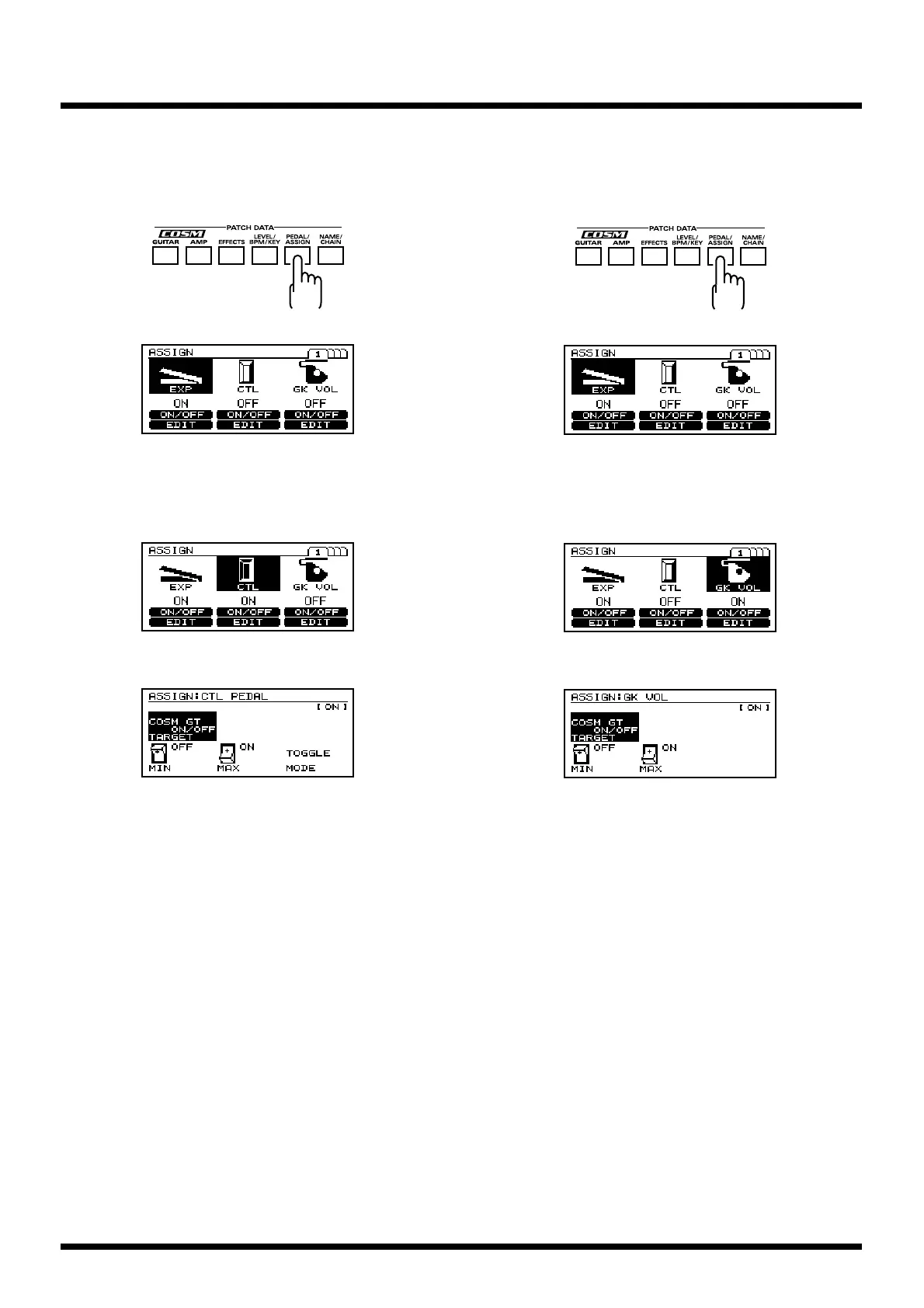
1. Press [PEDAL/ASSIGN].
fig.4-12
fig.4-10
2. Press [F1] (ON/OFF) to switch the CTL pedal function
on or off.
* You can also switch this by turning [VALUE].
fig.4-13
3. Press [F5] (EDIT).
fig.4-14a
4. Press [F1] (TARGET), and turn [VALUE] to select the
target.
5. Press [F4] (MIN), and turn [VALUE] to specify the
minimum value.
6. Press [F5] (MAX), and turn [VALUE] to specify the
maximum value.
7. Press [F6] (MODE), and turn [VALUE] to select the
desired mode.
8. When you have finished making settings, perform the
Write operation (p. 25) if you wish to save them.
* If you do not wish to save the settings, press [EXIT] to return
to Play page.
■ Setting the GK VOL function
* Set SYNTH VOL in GK FUNK to “ASSIGNABLE.”
1. Press [PEDAL/ASSIGN].
fig.4-15
fig.4-10
2. Press [F3] (ON/OFF) to switch the GK VOL function on
or off.
* You can also switch this on or off by turning [VALUE].
fig.4-16
3. Press [F6] (EDIT).
fig.4-17
4. Press [F1] (TARGET), and turn [VALUE] to select the
target.
5. Press [F4] (MIN), and turn [VALUE] to specify the
minimum value.
6. Press [F5] (MAX), and turn [VALUE] to specify the
maximum value.
7. When you have finished making settings, perform the
Write operation (p. 25) if you wish to save them.
* If you do not wish to save the settings, press [EXIT] to return
to Play page.



 To Next Page
 Loading...