EasyManua.ls Logo

rollease acmeda AUTOMATE ARC - User Manual

Default Icon
15 pages
Print Icon
To Next Page IconTo Next Page
Loading...
AUTOMATE
| VT 1.0
ARC
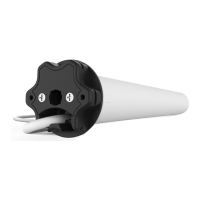
VENETIAN BLIND TILT MOTOR
433 MHZ
BI-DIRECTIONAL
LEVELLING
CONTROL
ELECTRONIC
LIMIT
FAVORITE
POSITION
SELECTABLE
RPM
FEATURES:
• Electronic Limits
• 433 MHz Bi-Directional RF Communication
• Favorite Position
• 3 x Selectable Rpm
• Jog or latch & Run Modes
AUTOMATE
| ARC™ Venetian blind motor enables motorized tilting function of most 2”
venetian blinds. Precisely control the openness of blind vanes or simply recall a favorite
position.
INSTR. MTDCRF-TILT-1 V1.0 APRIL 2017

Questions and Answers

rollease acmeda AUTOMATE ARC Specifications

General IconGeneral
Brandrollease acmeda
ModelAUTOMATE ARC
CategoryEngine
LanguageEnglish

Summary

Assembly

Wiring

Power Options

Details available power supply options, battery wands, and A/C power supplies for motors.

P1 Button Functions

Motor State Test

Explains the function of a short P1 button press/release based on motor configuration.

Motor Configuration Options

Describes using the P1 button for motor configuration, including pairing, sleep mode, and reset.

Initial Set-up

Pair Motor with Controller

Guide to pairing the motor with a controller using P1 button and controller STOP button.

Check Motor Direction

Instructions on checking and reversing motor travel direction during initial setup.

Set Limits

Details on setting the upper and lower travel limits for the motor using the controller.

Adjusting Limits

Adjust Upper Limit

Procedure for adjusting the upper travel limit of the motor using the controller.

Adjust Lower Limit

Procedure for adjusting the lower travel limit of the motor using the controller.

Adding or Removing Controllers and Channels

Using Motor P1 Button

How to add or remove controllers using the motor's P1 button and controller STOP button.

Using a Pre-existing Controller

Method for adding or removing controllers using an existing or new controller's P2 button.

Favorite Positioning

Set Favorite Position

Guide on setting a desired position as a favorite using the controller.

Send Shade to Favorite Position

Instructions for recalling a set favorite position using the controller.

Delete Favorite Position

Steps to remove a previously saved favorite position from the motor.

Sleep Mode

Enter Sleep Mode

Procedure to put the motor into sleep mode for shipping.

Exit Sleep Mode

How to wake the motor from sleep mode after installation.

Troubleshooting

Related product manuals