XPression Connect User Guide (10.5) 3–11
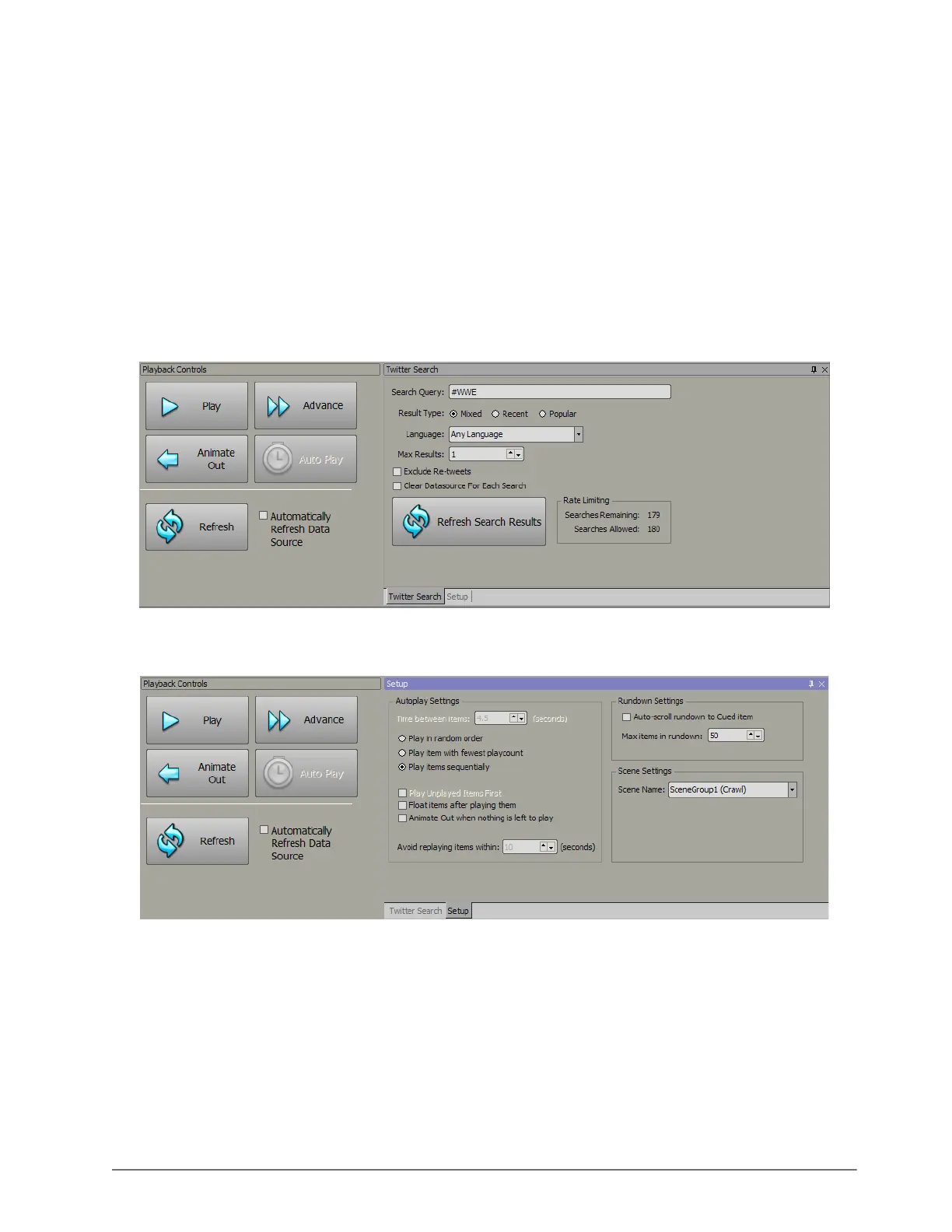
d. Select the Exclude Re-tweets check box to only include original tweets in the rundown and not re-tweets.
e. In the Max Results box, enter or select the amount of search results to return.
f. Select the Clear Datasource For Each Search check box to clear the tweets in the Data Source window
every time a search query is performed.
g. Click the Refresh Search Results button to update the Data Source window with the most recent tweets.
Twitter applies a limit on how many searches can be performed with the search tool within a 15 minute period. If
this limit is exceeded, your Twitter account could become blacklisted. The Rate Limiting section in the Twitter
Search window displays the amount of searches performed and remaining. This limit can change without notice at
the discretion of Twitter.
Twitter only makes tweets made within the last five to ten days available for searching.
4. Click the Enable Playback Controls button in the menu bar.
The Playback Controls and Twitter Search/Setup windows open.
5. Click the Setup tab.
The Setup tab opens.
6. In the Setup window, configure the following options:
a. In the Autoplay Settings section, use the Time between items box to enter or select a time in seconds
between when an item is displayed and when the next item cued in the rundown is displayed.
b. Choose one of the following playout settings:
• Play in random order — display items from the rundown randomly.
• Play item with fewest playcount — automatically display items with the least amount of play counts.
• Play items sequentially — display items according to their order in the rundown.



 To Next Page