RAPID TOASTER VCT-250
10
P/N 1010776 Rev. H 03/04
McDonald’s
RAPID TOASTER VCT-250
11
P/N 1010776 Rev. H 03/04
McDonald’s
Daily Cleaning
NOTE: Also refer to TS 019 Card (P/N 1010732).
1. Turn the Rocker Switch (power ON/OFF) to OFF,
unplug the toaster and allow it to cool down.
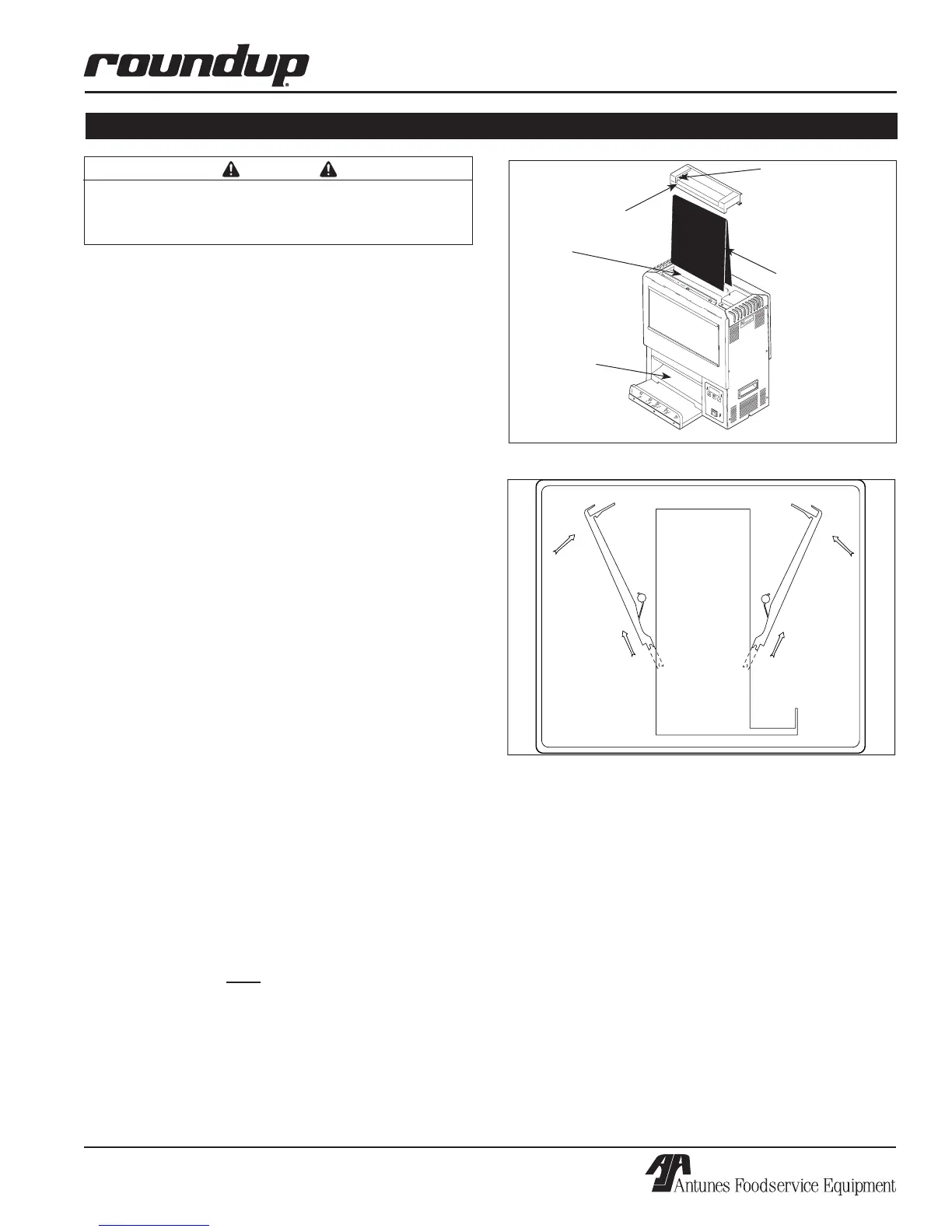
2. Put on Heat Resistant Gloves and remove the Bun
Feeder and Bun Chute (Figure 11). Wash them at
the sink and allow to air dry.
3. Remove the Release Sheet (Figure 9) and lay
it on a clean, flat, dry surface. Spray McD©
All-Purpose Super Concentrate (HCS) on a
clean, dry towel. Wipe the towel firmly across the
Release Sheet lengthwise over its entire surface.
Immediately, repeat this procedure with a clean,
dry towel dampened with KAYQUAT™ Sanitizer
(HCS) solution and allow the Release Sheet to
air dry. Turn the Release Sheet over and repeat
this cleaning procedure on its other side.
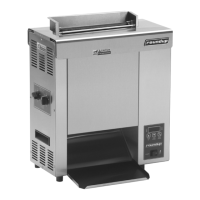
4. Open the Front (Heel/Club side) Conveyor Cover,
spray McD© All-Purpose Super Concentrate
(HCS) on a clean, dry towel and wipe the surface
of the Groovy Belt Wrap firmly from side to side
and then top to bottom. Immediately, repeat the
procedure with a clean, dry towel dampened with
KAYQUAT™ Sanitizer (HCS) solution. Close the
Conveyor Cover and repeat this procedure on the
second, rear (Crown side) Groovy Belt Wrap.
NOTE: Do not remove Groovy Belt Wrap from unit.
5. Plug in the power cord and turn the unit ON,
count seventeen (17) seconds (for Mfg# 9210600
to 9210604 and 9210618 to 9210622) or ten (10)
seconds (for Mfg# 9210609 to 9210612). Then,
turn the unit OFF and unplug the power cord.
Repeat Step 4 again on both Groovy Belt Wraps,
Heat Dampers and the surface of the Inner
Conveyor Covers.
NOTE: Make sure both Conveyor Safety Interlock
Switches are activated when the covers are
installed (Figure 11) or conveyors will not rotate.
6. Plug the power cord in and turn on the unit, fold
the Release Sheet in half and place it over the
Platen. Allow it to be drawn into place and posi-
tioned properly.
MAINTENANCE
WARNING
Turn the unit off, disconnect the power source and
allow the unit to cool down before performing any ser-
vice or maintenance on the unit.
POWER
T
E
M
P
D
O
W
N
T
E
M
P
U
P
T
E
M
P
S
C
A
L
E
˚C
˚F
CAUTION
Figure 9. Removing/Installing Release Sheet
Bun Feeder
Platen
Bun Feeder Clip
Release Sheet
Bun Chute
Figure 10. Conveyor Cover Installation
NOTE: Check the release sheet to make sure it is
not caught in the conveyor.
7. Turn the unit OFF and re-install the Bun Feeder
and Bun Chute.
8.
Wipe the entire exterior surface to the toaster with
a clean, dry towel, dampened with
KAYQUAT™
Sanitizer (HCS)
and allow it to air dry.
9. Verify that the Bun Thickness Compression
Controls are set to “D & 5” (for Mfg# 9210600 to
9210604 and 9210618 to 9210622). For Mfg#
9210609 to 9210612, set the controls to “B & 3”.


 To Next Page