RAPID TOASTER VCT-250
8
P/N 1010776 Rev. H 03/04
McDonald’s
RAPID TOASTER VCT-250
9
P/N 1010776 Rev. H 03/04
McDonald’s
Toaster Operation
The Rapid Toaster uses a Platen Heater and two
Auxiliary Heaters. The Platen Heater consists of a
heating coil built into the platen to toast the cut side of
the bun. The two Auxiliary Heaters assist in providing
additional heat to the buns. The first Auxiliary Heater
is located within the Conveyor Belt Chain in the front
of the toaster. The second Auxiliary Heater is located
within the Conveyor Belt Chain at the rear of the unit.
TEMPERATURE CONTROL
NOTE: Setpoint Temperature refers to the desired
temperature setting.
Pressing the TEMP UP key will display the current
platen temperature provided it is over 420° F (216° C).
Pressing the TEMP DOWN key will display the
current auxiliary heaters temperature when it is
over 250° F (121° C).
Pressing and holding TEMP SCALE key for 3-5 sec-
onds will switch the temperature display between
Fahrenheit (°F) and Celsius (°C).
RECOMMENDED TEMPERATURES
Recommended temperature setting for the Platen
Heater is 560° F (293° C).
Recommended temperature setting for the Auxiliary
Heaters is 400° F (204° C).
NOTE: The toaster is tested and shipped with the
heaters set at the above recommended tempera-
tures.
PLATEN SETPOINT TEMPERATURE ADJUSTMENT
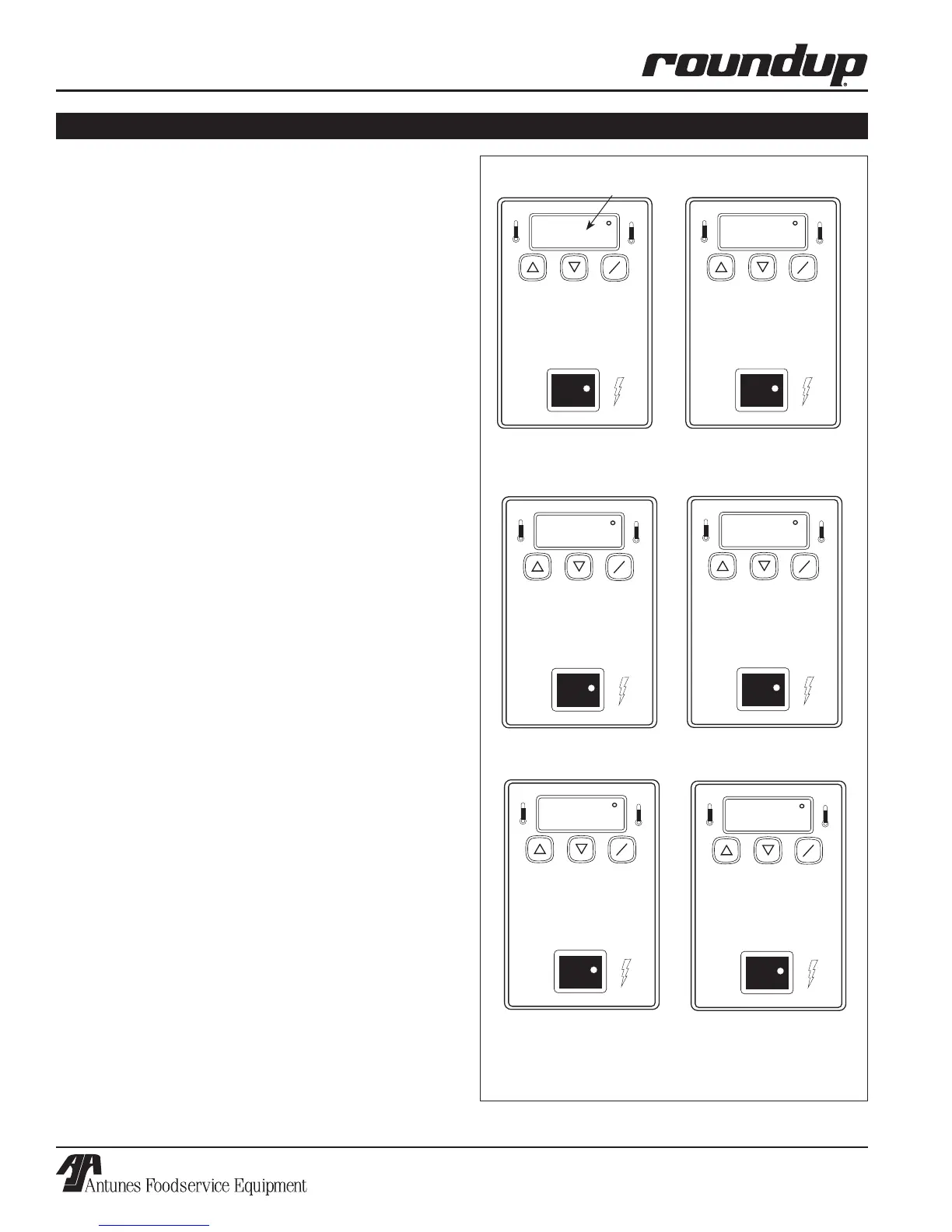
1. Turn the Rocker Switch (Power On/Off) to ON
and wait for the Temperature Display to finish the
power up sequence (Figure 4).
2. Press and hold both TEMP UP and TEMP DOWN
keys until the display flashes the platen setpoint
temperature, then release.
3. Press the TEMP UP or the TEMP DOWN key
to raise or lower the setpoint temperature.
The setpoint temperature will adjust 1° every
0.1 seconds.
4. Release the key when the desired setpoint is
displayed.
NOTE: Maximum adjustable setpoint temperature
for the platen is 600°F (315°C).
TEMP
UP
TEMP
DOWN
TEMP
SCALE
˚F
˚C
POWER
TEMP
UP
TEMP
DOWN
TEMP
SCALE
˚F
˚C
POWER
sp-p
560
TEMP
UP
TEMP
DOWN
TEMP
SCALE
˚F
˚C
POWER
TEMP
UP
TEMP
DOWN
TEMP
SCALE
˚F
˚C
POWER
400
sp-a
Figure 4. Temperature Power Up Sequence
3. SP-A (Setpoint Auxiliary)
is displayed
1. SP-P (Setpoint Platen)
is displayed
“Heat On” LED will blink on/off during warm-up and when either
platen or auxiliary heaters are calling for heat.
2. Current Platen Temperature
setting is shown
4. Current Auxiliary Temperature
setting is shown
5. “LO” is displayed until
platen temperature rises
above 520°F (271°C)
6. “USE” is displayed when
Platen Setpoint Temperature*
is reached
TEMP
UP
TEMP
DOWN
TEMP
SCALE
˚F
˚C
POWER
lo
TEMP
UP
TEMP
DOWN
TEMP
SCALE
˚F
˚C
POWER
use
* Platen setpoint temperature must be between
520°F (271°C) and 590°F (310°) for “USE” to be displayed.
OPERATION (continued)


 To Next Page