USER MANUAL
9
INSTALLING YOUR DASHCAM
The camera comes with the default setting which allows you to start using
your camera right out of the box without changing any settings. Make sure to
Format the memory card before first time use. Then, Simply – Follow the
Steps below:
Important Tips:
•
•
•
Before mounting the dash cam, please clean the windshield using alcohol and wipe it
clean with a dry cloth. Make sure not to touch suction surface of the mount. Finger
grease will prevent the mount from getting strong suction grip. The dash cam is NOT
suitable for Completely Vertical Glass. (Need at-least 20° Angle)
Adjust the lens viewing angle to ensure that it is aligned with the road ahead properly.
Hide the charger cable into the seams around the edge of the dashboard.
Insert the Memory Card
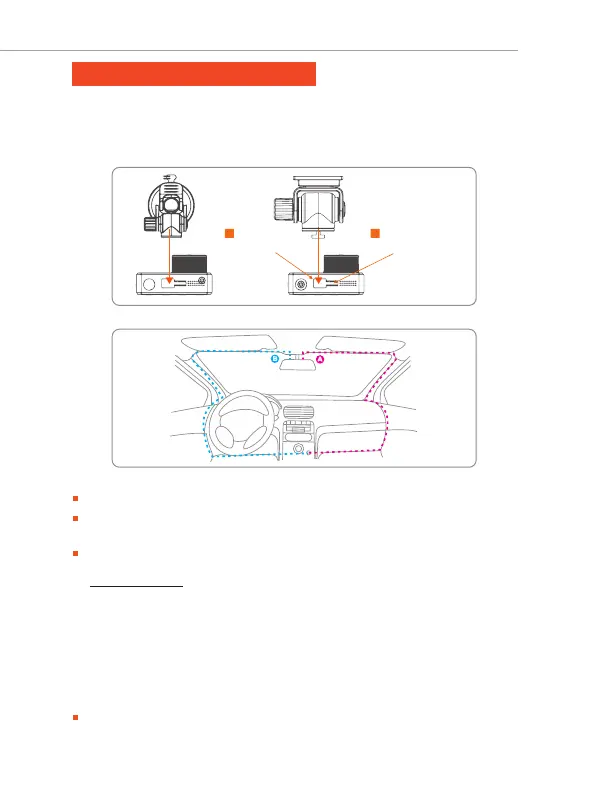
Align the suction mount and the camera into mounting assembly, then slide the mount
towards lock position until it is snug fit. (Image – 1)
Apply the suction mount onto the windshield (Recommended Area: Follow Image – 2)
Image - 1 : Applying Suction Cup
Align the
mount here
Image - 2 : A-B Windshield Area (Rear position of the mirror)
1
Then Slide to
Lock Position
2
Plug in the power cable. Turn ON The Car, SET & GO!



 To Next Page