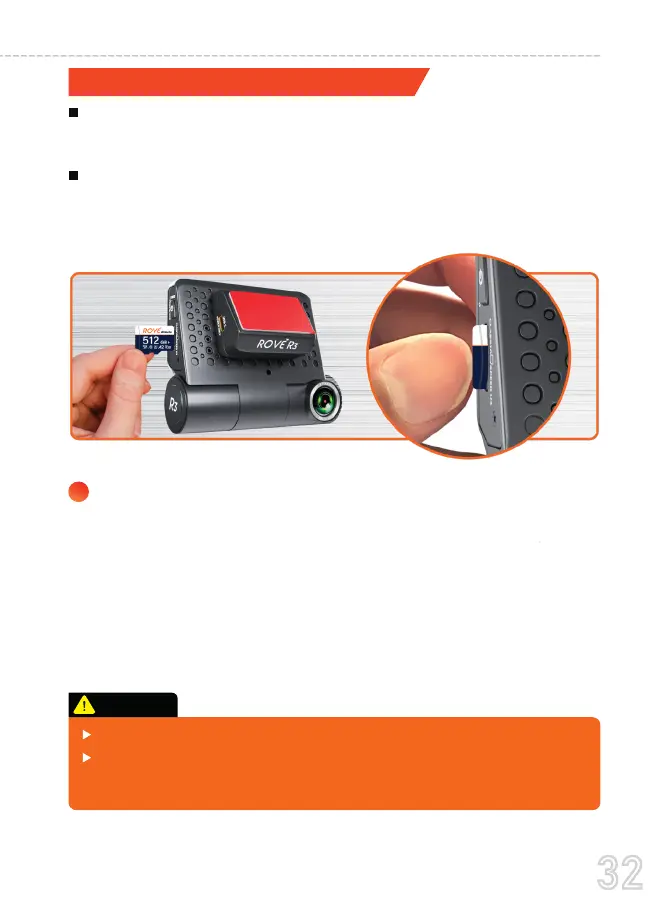
Must use only Brand Name, Class 10, U3 speed or higher speed
Micro-SD card. Max support up to 512GB.
We recommend ROVE Ultimate Class 10, U3 Speed Micro-SD
card. You can purchase it from Amazon.
TO INSTALL
First, make sure the camera is turned OFF. Then align the
memory card's gold contacts facing towards the IPS touch
screen of the camera.
Insert the memory card halfway in, then use your fingernail or
a paper clip to push the card all the way inward until it clicks
and locks in place.
Search for “ROVE Ultimate Micro SD Card”
INSERTING / REMOVING A MICRO SD CARD
1
Do not insert/remove the Micro-SD card while the camera is turned ON.
Otherwise it may cause memory card to be write protected and possible
loss of data or damage your memory card. Always remove/insert
memory card while camera is turned OFF
CAUTION:
32
USER MANUAL



 To Next Page